

You might already be aware that Azure allow us to create VMs as Infrastructure as a Service services out of which VM is one of the components. Below are the articles that explain how to create Virtual Machines for Window 10 Server and Virtual machine with SQL Server.
- Azure Portal - Create Virtual Machine With SQL Server by Praveen Kumar Sreeram
- Configuring Windows 10 Virtual Machine by Prasanna Murali
The above articles explain the step by step process of creating VMs. In this article, we will understand the different components that are associated with the Virtual Machine.
Azure Management portal takes care about creating all the components (that we will be discussing in a moment) on behalf of us. If we are not aware of these components, it will not be easy to troubleshoot in case if there are any issues.
So, Let’s learn about the details of the different Azure Components / objects that are associated and are created by default when you create a Virtual Machine.
Below are the components that are required for a VM to be provisioned in the Azure Cloud.
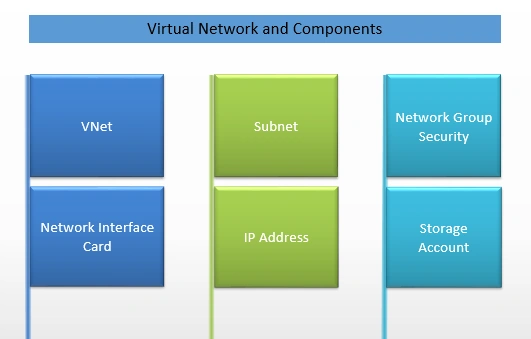
Figure A – Virtual Network and Its Components
Below is a basic Physical Diagram of a Virtual Network that has all the above components. The rest of the article provides basic details of each of the individual components and how to create them using the Azure Management portal.
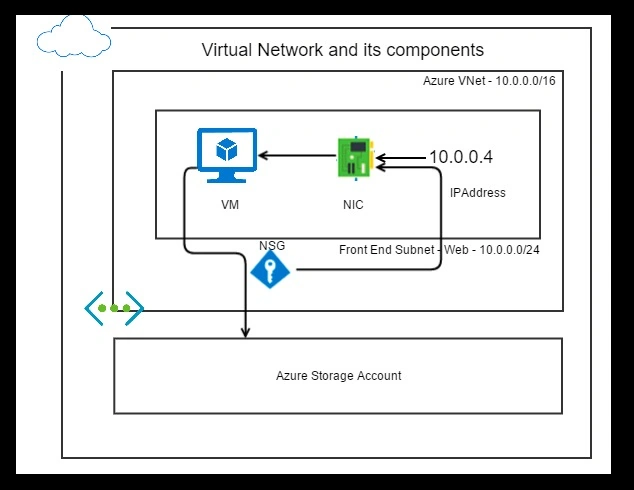
Figure B – Physical Diagram - Virtual Network and Its Components
What is an Azure VNet (Virtual Network)?

Like any other network, you can create a VNet with Azure. We can have our own isolated network within the Azure Cloud. Once you create your VNet, you can also segment the VNet into Subnets and attach IAAS or PAAS Virtual Machines.
In this article, we will just create a VNet. However, in your production scenarios, you might want to create separate VNet for each of your environments like Production, Staging, Development etc.
Please go through the following animated image to create a Virtual Network.
What is a Subnet?
Subnet is a segment within a given VNet. You can create any number of Subnets within a VNet. All the subnets must be fully contained in the virtual network address space and should not overlap with one another. As shown in the figure Figure B above, we named the subnet “web” where we will be creating and attaching a Virtual Machine that we will be using for creating a Web Server.
In production scenarios, you might be creating multiple subnets, one for all your Application / Web Servers and one for hosting all your Database Servers. For simplicity reasons, in this article, we will only work with creating a Web Server and attach the same to the Subnet named “web”.
By default, when you create a VNet, it’s also mandatory that you create a Subnet. You can also create multiple Subnets after you create a VNet.
The smallest subnet that Azure supports is a /29 and the largest is a /8 (using CIDR subnet definitions).
What is a Network Security Group?
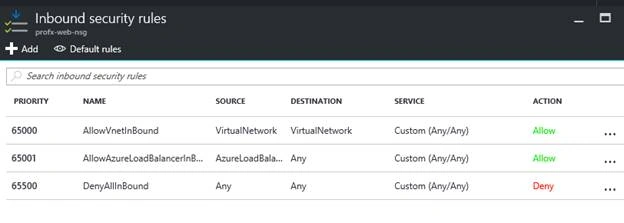
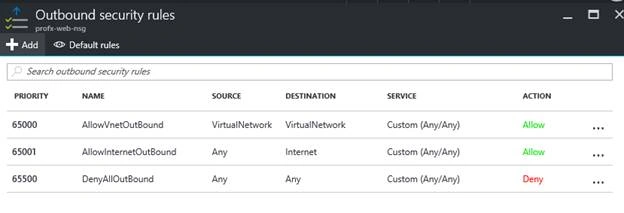

Network security group (NSG) contains a list of Access Control List (ACL) rules that allow or deny network traffic to your VM instances in a Virtual Network. NSGs can be associated with either subnets or individual VM instances within that subnet. When a NSG is associated with a subnet, the ACL rules apply to all the VM instances in that subnet. In addition, traffic to an individual VM can be restricted further by associating a NSG directly to that VM.
Network Security Group Definition Ref: https://azure.microsoft.com/en-in/documentation/articles/virtual-networks-nsg/
NSGs can have two type of rules
Join the conversation! Your thoughts help the community grow.