There are two approaches
1st we can call from another .ps1 file
If we have PowerShellFile1.ps1 and it contains the definition of more than one function then we need to create another File PowerShellFile2.ps1 and we just call the selected function from it.
2nd we can call it from command line
We just have to Find that function and call it from the command line.
1st approach
Here is file FindandReplace.ps1 which contains many definitions of the functions and we just want to call one of the functions.
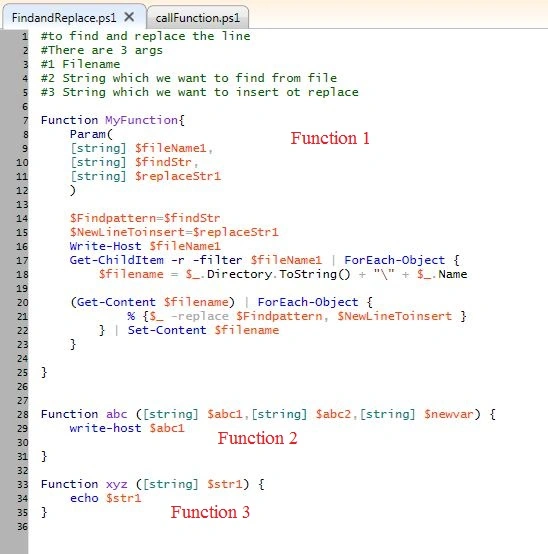
Now we have to create one more file to call the function. I have created a file call Function.ps1.

The code in the callFunctio.ps1 image is not readable so I have inserted the code here:
|
$filepath ='abc.txt';
$findstr = 'StringtoFind';
$replacestr = 'StringtoReplace';
MyFunction -fileName1 $filepath -findStr $findstr -replaceStr1 $replacestr // call the function
|
2nd approach
We need to find our function so for that we can write this command "Dir Function:\m*"

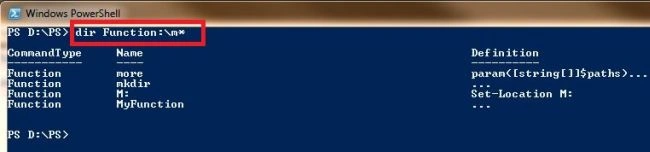
If you are not able to find your function or you want to call the function then you need to load your .ps1 file which contains the definition of the function; try this command: ". Full path\filename.ps1".
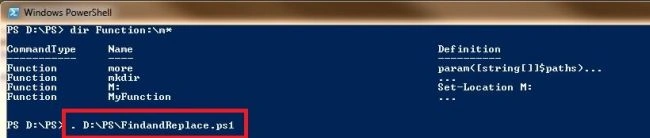
Then search the function again; you will get that function in the results. To load this file we have to put '.' in the beginning of the fullpath and filename; see the above image.
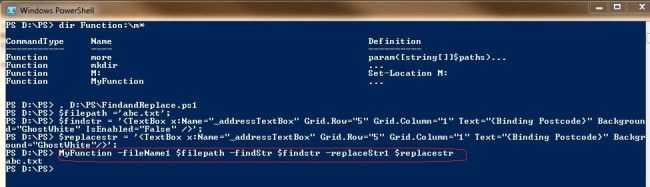
Now you just have to call the function. Try this command, you can declare the variable you want to pass to the function; see the image. In the following image I have created 3 variables to pass to the function:
1st $filepath ='';
2nd $findstr ='';
3rd $replacestr='';
Then I have call the function with the arguments.
To call the function with arguments we need to specify the variable name and then its value.
Syntax to call the function:
FunctionName -args1 $args1value –args2 $args2value
To call the Function "MyFunction -fileName1 $filepath -findStr $findstr -replaceStr1 $replacestr"
Thank you. If you want the both .ps1 files then download the code.


kasi babuPosted Nov 1, 2013, 3:39 AM
Nice article, i need to call this powershall script from installsheild for wsp deployment.--excepting as artilce jay
Jay ParekheditedPosted Oct 18, 2012, 12:33 AMEdited Oct 18, 2012, 12:35 AM
Dear Priya and Isha goel, hi, Power shell is a windows command-line shell designed especially for system administrators.Windows Power Shell gives you access to the file system on the computer. In addition, Windows PowerShell providers enable you to access other data stores, such as the registry and the digital signature certificate stores, as easily as you access the file system. It is also help full for developers ,you can see this link: http://stackoverflow.com/questions/8722/how-do-you-use-power shell And to run file in power shell tool we need file and we have to create that file with extension '.ps1' which contains the commands that will be going to execute in power shell tool and in my article i have called that (*.ps1)file as power shell file. still you have query then let me know or refer to this link: http://msdn.microsoft.com/en-us/library/windows/desktop/aa973757(v=vs.85).aspx thank you so much.
PriyaPosted Oct 18, 2012, 12:10 AM
What is this PowerShell file?
isha goelPosted Oct 17, 2012, 11:24 PM
Could u tell me about PowerShell file means what is the purpose of powershell file