

SSIS (SQL Server Integration Service) is a data migration software which is used to extract, transform, and load the data. Apart from extracting and loading the data, SSIS can also call the API to perform a certain task. Let’s take a scenario where the failure emails are stored in the database, and it has to be initiated in the night. Now, the problem is, that we don’t have any UI screen to initiate these failure emails. So, we usually go with SQL jobs which are configured to run the SSIS packages on a scheduled basis.
While working with SSIS, we can use a script task to write the custom C# code. The Web Service and WCF service can be integrated through script tasks. We can use the WSDL file and consume these services. We can also use the project parameter to configure the Service URL based on the environment such as Dev, Staging, and production etc. The benefit of parameterizing value is: it can be configured through environment variables on SSISDB (the place where we deploy our SSIS packages). So, it will be easy to change the environment for packages whenever is required.
In this article, I have illustrated the purpose of SSIS with Web API. It shows how SSIS can use Web API to do certain operations, like updating the database table based on Service response, processing the data, etc.
Not only Web API, SSIS can consume the following services as well.
- Web Service
- WCF service
- .NET Core API
In my previous article, I explained how to consume web services using SSIS and found that there is not much difference while consuming the WCF as well. It will be the same as Web Service; just add the WCF service reference to your SSIS script task, and consume the way you have consumed Web Service.
Here, I have used the Service URL as a project parameter, so you can use the same in other SSIS packages to consume services as per your requirement.
I just want to highlight ASP.Net core as well, so it will be easy for you to consume it as you will be aware to use of API with SSIS. So I believe this article will help you to understand the way of consuming Web API and Core API using SSIS scrip task.
Let’s say we have one Web API service running in IIS and it exposes the ProcessData() method via the ProcessManager controller. It accepts the amount and transaction ID to be processed further. It does some business functionality internally and sends details to a third-party service to get the PNREF number. It provides the PNREF number to the client through a response object.
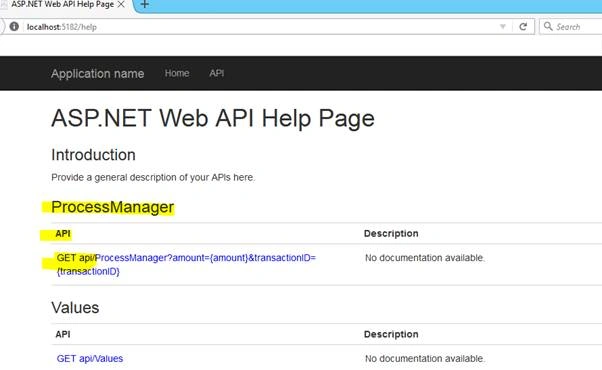
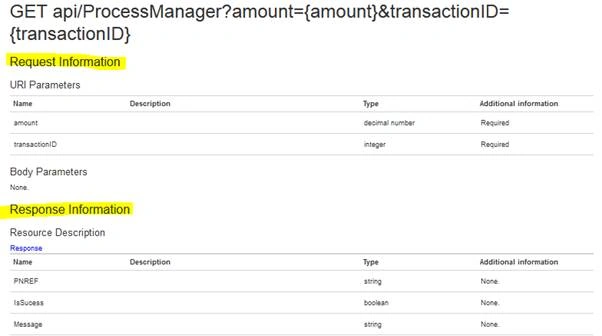
More about Web API
It’s a framework on top of the .NET framework which provides an easy way to build HTTP services, and these services can be consumed by a broad range of clients including browsers and mobiles. It’s a platform to build RESTful services.
Solution
To consume Web API into the SSIS package, first, create the SSIS application. You should have the SSDT tool installed into your system. I have used SSDT 2015 in my sample application.
Perform the following steps.
- Create a package (package.dtsx) inside the SSIS project.
- Go to the solution explorer and double-click on the project. params. It will provide you with the screen to add project-level parameters. (refer to below screen).
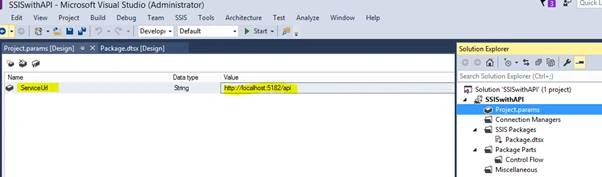
- Drag the script task from the SSIS toolbox on the package design screen. Double-click on the script task. It will open the window where you can configure the ReadOnlyVariables. Set project parameters.
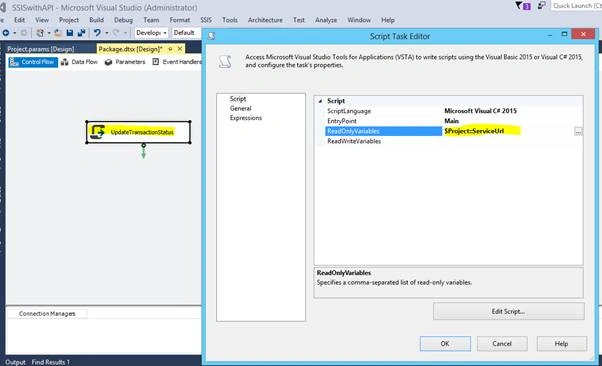
- Click on Edit Script.
- It will open the VSTA project where you can write the C# custom code.
- Go to the Solution Explorer.
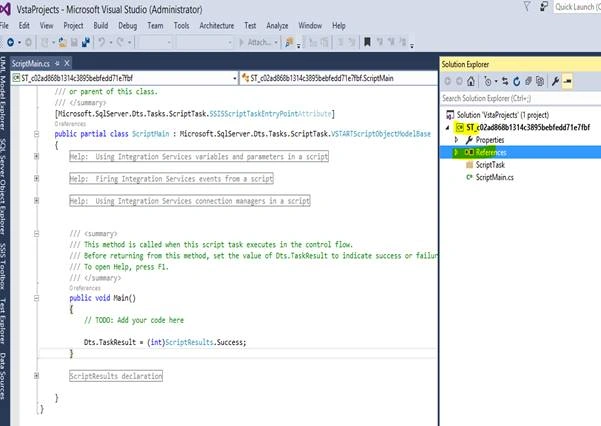
- Right-click on Reference.
- Click on Add the reference and add the Net. Http assembly.
- Add the System.Net.Http.Formatting from the NuGet packages or from the Package Manage Console.
- If you are installing through PMC then write the below code.
Install-Package Microsoft.AspNet.WebApi.Client - It will add the required libraries the project.
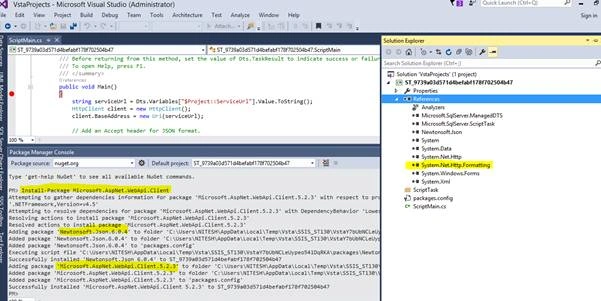
- After adding the library references, you can save the project and come out to verify whether these libraries are referenced properly or not.
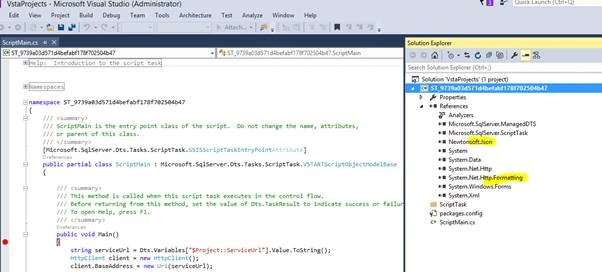
- What happens here, when you go out from the project, is it lost the library references. You can see in the below screen where Newtonsoft.json and System.Net.Http.Formatting DLL are missing the references.
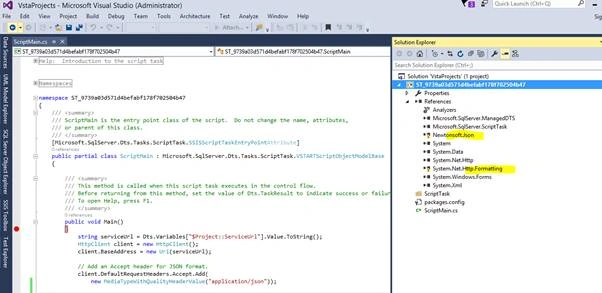
- To avoid this error, we need to register these DLL into GAC, so VSTA project can take reference directly.
- Open the Visual Studio command prompt and register the following DLL.
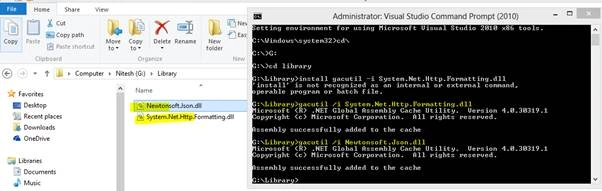
- You can use the PowerShell script also to register the DLLs into the GAC.
- After adding to the GAC, you can again open the SSIS package script task and check whether the references are restored or not.
- Follow the below code. Here, I am passing the transactionID and amount to the ProcessData().
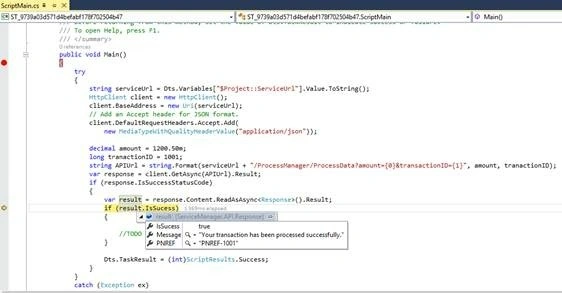
#region Namespaces using System; using System.Data; using Microsoft.SqlServer.Dts.Runtime; using System.Windows.Forms; using System.Net; using System.Net.Http; using System.Net.Http.Headers; using ServiceManager.API; #endregion namespace ST_9739a03d571d4befabf178f702504b47 { /// <summary> /// ScriptMain is the entry point class of the script. Do not change the name, attributes, /// or parent of this class. /// </summary> [Microsoft.SqlServer.Dts.Tasks.ScriptTask.SSISScriptTaskEntryPointAttribute] public partial class ScriptMain : Microsoft.SqlServer.Dts.Tasks.ScriptTask.VSTARTScriptObjectModelBase { /// <summary> /// This method is called when this script task executes in the control flow. /// Before returning from this method, set the value of Dts.TaskResult to indicate success or failure. /// To open Help, press F1. /// </summary> public void Main() { try { string serviceUrl = Dts.Variables["$Project::ServiceUrl"].Value.ToString(); HttpClient client = new HttpClient(); client.BaseAddress = new Uri(serviceUrl); // Add an Accept header for JSON format. client.DefaultRequestHeaders.Accept.Add( new MediaTypeWithQualityHeaderValue("application/json")); decimal amount = 1200.50m; long tranactionID = 1001; string APIUrl = string.Format(serviceUrl + "/ProcessManager/ProcessData?amount={0}&transactionID={1}", amount, tranactionID); var response = client.GetAsync(APIUrl).Result; if (response.IsSuccessStatusCode) { var result = response.Content.ReadAsAsync<Response>().Result; if (result.IsSucess) { //TODO update your database based on the result } Dts.TaskResult = (int)ScriptResults.Success; } } catch (Exception ex) { Dts.TaskResult = (int)ScriptResults.Failure; } } #region ScriptResults declaration /// <summary> /// This enum provides a convenient shorthand within the scope of this class for setting the /// result of the script. /// /// This code was generated automatically. /// </summary> enum ScriptResults { Success = Microsoft.SqlServer.Dts.Runtime.DTSExecResult.Success, Failure = Microsoft.SqlServer.Dts.Runtime.DTSExecResult.Failure }; #endregion } } - When you debug the SSIS package, you get the response from Web API (refer to the below screen).
Conclusion
SSIS provides the features by using a script component to consume the Web API. And, it can be achieved by writing the custom code in SSIS.
Yasin TopcuPosted Dec 11, 2022, 3:52 PM
The <response> code on line 43 is not working
Joseph DorenbosPosted Jun 15, 2022, 5:09 PM
I'm getting "client does not contain definition for Accept..." How to fix?
Joseph DorenbosPosted Jun 15, 2022, 5:07 PM
Client.DefaultRequestHeaders.Accept.Add(
john goodPosted Oct 12, 2021, 7:54 PM
What do you with the assembly references when you deploy the project to SSIS. after i deploy i and run as sql agent job i get the following error --Could not load file or assembly 'System.Net.Http.Formatting, Version=5.2.7.0, Culture=neutral, PublicKeyToken=31bf3856ad364e35' or one of its dependencies.
Shashwat SsPosted Feb 24, 2021, 6:43 PM
Thanks Nitesh for the article. Can you please help me with this run time error.
Martha M.HannaPosted Nov 3, 2020, 4:29 AM
It did not work until I added this "ServicePointManager.SecurityProtocol = SecurityProtocolType.Ssl3 | SecurityProtocolType.Tls | SecurityProtocolType.Tls11 | SecurityProtocolType.Tls12;"
Leszek PiePosted Jul 27, 2020, 5:08 AM
Hi,Can we get a sample, using POST to get a jwt token first, and then make a call with token (in header) to get the data, pelase.
Anu GargPosted Jun 29, 2020, 6:51 AM
This is really good article and helped me a lot. But i have one doubt. When we add WSDL (means refernce.cs file generated) in SSIS script task and suppose that task is called 100 times ; does it mean that reference.cs file will be created 100 times ?
Russ MPosted Dec 17, 2019, 7:38 PM
Hi, I am receiving an error on the following line of code: var result = response.Content.ReadAsAsync<Response>().Result; I am receiving the following error: The type or namespace name 'Response' could not be found. Can you please advise?
Ariel GancPosted Oct 8, 2019, 8:46 AM
HELLO HOW ARE YOU. I NEED HELP I CANNOT MAKE THIS EXAMPLE WORK. WHEN I ADD THE REFERENCES I BUILD WHEN I CLOSE THE EDITOR OF SCRIPT THE REFERENCES System.Net.Http.Formatting, System.Net.Http and System.Net.Http.WebHost are broken and made inaccessible. any ideas? Thank you
Efrain AriasPosted Oct 3, 2019, 10:34 AM
This example is useful to invoque web service with POST method? how to past parameter to invoque web service? thanks
felix leiPosted Jul 8, 2019, 4:09 AM
Hi, First of all thankyou good post. I am getting the following error. "Error: 0x2 on script task: Error when locking the $Project=ServiceUrl variable for read access (error code: 0xC0010001 "The variable was not found. This problem occurs when a variable is retrieved from the Variables collection in a container when the package is run and the variable does not exist. The variable name may have changed or the variable may not be created." Could someone please help?
Tim ShermanPosted Jul 3, 2019, 9:34 PM
I am struggling to get these .dlls registered to the GAC - ildasm/ilasm is producing an error when trying to sign them, and they come without a strong name from the enterprise library. Error is: Failed to strong name sign output file, error code=0x8013141D.
Jeff DarlingPosted Dec 31, 2018, 2:43 PM
Where is Response declared? I see it used on line 44 var result = response.Content.ReadAsAsync<Response>().Result;
Nancy RaiPosted Mar 16, 2018, 9:10 AM
Very nice. Exactly what I wanted.
varada nairPosted Feb 27, 2018, 5:25 PM
How did u add ServiceManager.API reference? I didnt see it under References.
Vinay Kumar GuptaPosted Sep 10, 2017, 8:14 AM
Nice article and very useful.