

Today, I am going to show you how to add CAPTCHA with your ASP.NET application. Firstly, create an ASP.NET application.
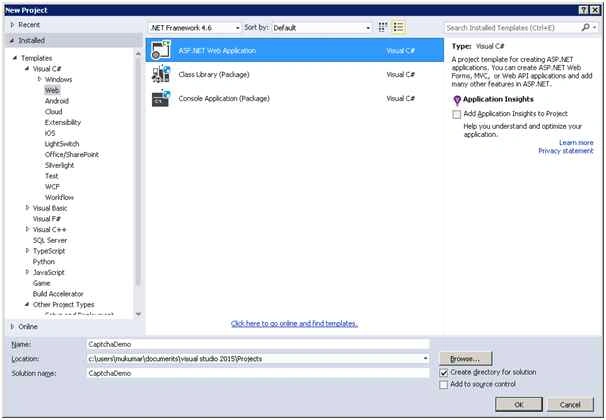
Open Visual Studio 2015, File Menu, New, then Project. It will open a new project window where you can choose the type of the application. So, you need to choose only ASP.NET Web Application. Specify the project name and click OK.
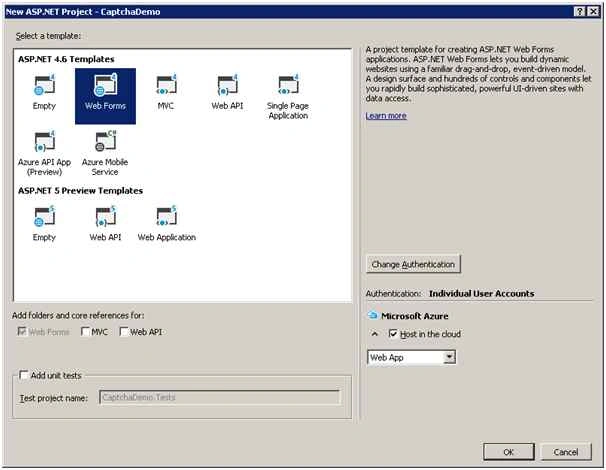
From the next screen of the window, you can choose the Web Forms and choose OK.
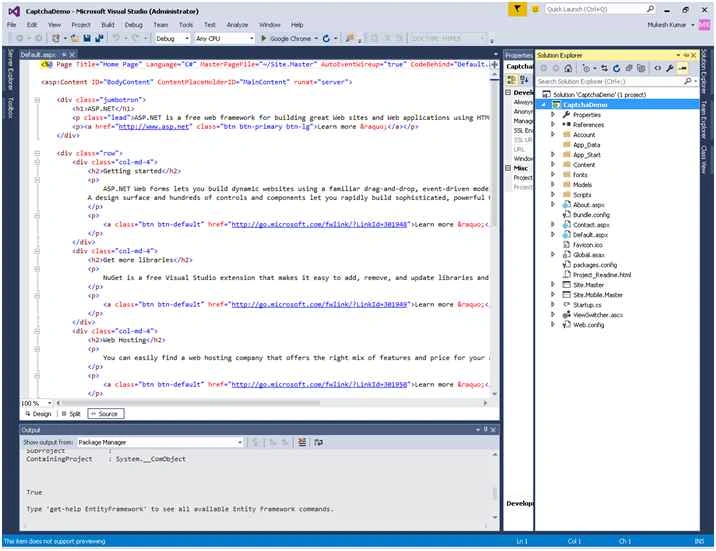
It will create a basic Web Form application for you. See the following screenshot for your demo application.
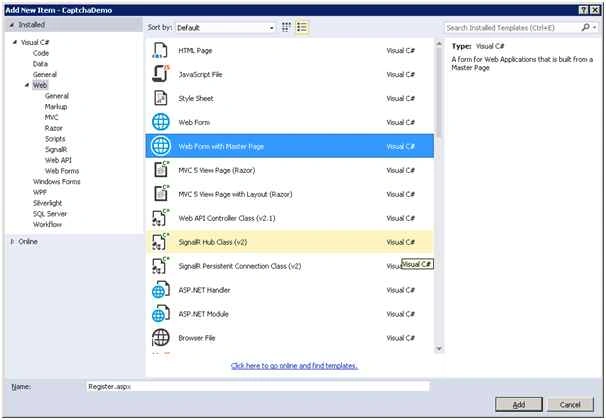
Add a new ASP.NET web form page “Register.aspx”. To add a new page, Right Click on the project and choose Add, then New Item.
From the New Item, choose Web, then Web Form with Master Page and provide the specific name for the page and click OK.
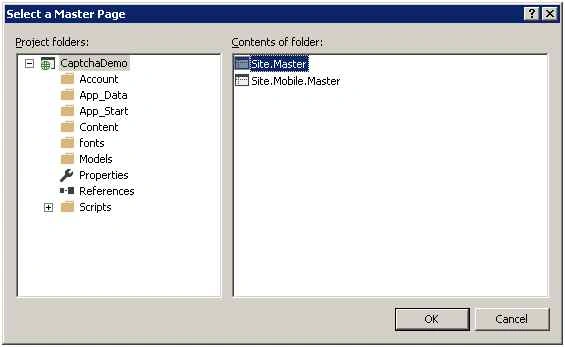
Select your master page for the page and click OK button.
To create captcha, I am using other ASP.NET page where I will create captcha image and use it with Register.aspx page.
So, add new page “Captcha.aspx” and make the code for this page as in the following.
Captcha.aspx.cs
- using System;
- using System.Collections.Generic;
- using System.Drawing;
- using System.Drawing.Drawing2D;
- using System.Drawing.Imaging;
- using System.Linq;
- using System.Web;
- using System.Web.UI;
- using System.Web.UI.WebControls;
- namespace CaptchaDemo
- {
- public partial class Captcha: System.Web.UI.Page
- {
- protected void Page_Load(object sender, EventArgs e)
- {
- Bitmap objBitmap = new Bitmap(130, 80);
- Graphics objGraphics = Graphics.FromImage(objBitmap);
- objGraphics.Clear(Color.White);
- Random objRandom = new Random();
- objGraphics.DrawLine(Pens.Black, objRandom.Next(0, 50), objRandom.Next(10, 30), objRandom.Next(0, 200), objRandom.Next(0, 50));
- objGraphics.DrawRectangle(Pens.Blue, objRandom.Next(0, 20), objRandom.Next(0, 20), objRandom.Next(50, 80), objRandom.Next(0, 20));
- objGraphics.DrawLine(Pens.Blue, objRandom.Next(0, 20), objRandom.Next(10, 50), objRandom.Next(100, 200), objRandom.Next(0, 80));
- Brush objBrush =
- default (Brush);
- //create background style
- HatchStyle[] aHatchStyles = new HatchStyle[]
- {
- HatchStyle.BackwardDiagonal, HatchStyle.Cross, HatchStyle.DashedDownwardDiagonal, HatchStyle.DashedHorizontal, HatchStyle.DashedUpwardDiagonal, HatchStyle.DashedVertical,
- HatchStyle.DiagonalBrick, HatchStyle.DiagonalCross, HatchStyle.Divot, HatchStyle.DottedDiamond, HatchStyle.DottedGrid, HatchStyle.ForwardDiagonal, HatchStyle.Horizontal,
- HatchStyle.HorizontalBrick, HatchStyle.LargeCheckerBoard, HatchStyle.LargeConfetti, HatchStyle.LargeGrid, HatchStyle.LightDownwardDiagonal, HatchStyle.LightHorizontal
- };
- //create rectangular area
- RectangleF oRectangleF = new RectangleF(0, 0, 300, 300);
- objBrush = new HatchBrush(aHatchStyles[objRandom.Next(aHatchStyles.Length - 3)], Color.FromArgb((objRandom.Next(100, 255)), (objRandom.Next(100, 255)), (objRandom.Next(100, 255))), Color.White);
- objGraphics.FillRectangle(objBrush, oRectangleF);
- //Generate the image for captcha
- string captchaText = string.Format("{0:X}", objRandom.Next(1000000, 9999999));
- //add the captcha value in session
- Session["CaptchaVerify"] = captchaText.ToLower();
- Font objFont = new Font("Courier New", 15, FontStyle.Bold);
- //Draw the image for captcha
- objGraphics.DrawString(captchaText, objFont, Brushes.Black, 20, 20);
- objBitmap.Save(Response.OutputStream, ImageFormat.Gif);
- }
- }
- }


SUSHIL TYAGIPosted Sep 23, 2022, 8:55 AM
Not working on ssl secure
Pintukumar ShashmalPosted Mar 1, 2021, 8:09 AM
Thank you for sharing
Jenish PatelPosted Oct 5, 2019, 5:52 AM
Superb, Thank you for sharing...
ShahnawazPosted Aug 17, 2018, 11:16 PM
How refersh this captcha?
ramya mathiPosted Jan 19, 2018, 4:40 AM
Its working in Chrome & Firefox but its not working in IE . let me know is there any settings can be done in webconfig?
Anupam DighePosted Jan 2, 2016, 12:50 PM
nice....
Sibeesh VenuPosted Dec 31, 2015, 3:25 AM
Nice Share
Raja TPosted Dec 30, 2015, 9:57 PM
Nice , thanks for sharing
sreenivasa kPosted Dec 30, 2015, 4:13 PM
excellent
Santhakumar MunuswamyPosted Dec 30, 2015, 3:07 PM
Thanks for nice article
Kiranteja JallepalliPosted Dec 30, 2015, 1:37 PM
simple and easy to understand Mukesh
Ankur MistryPosted Dec 30, 2015, 1:07 PM
Helpful, thank you for sharing Mukesh Kumar
Rupesh KahanePosted Dec 30, 2015, 12:41 PM
nice share...