

My article How to Create Custom Inline Helper Methods in ASP.NET MVC explained what helper methods are and how to create and use inline helper methods in MVC applications. (Note: if you have not read the article regarding custom inline helpers in MVC applications, I recommend reading it first since it is related to this article). Before getting started with how to create custom external helper methods, let`s just explain external helper methods and when we should use them.
External Helper Method
Helper methods are of two types, inline helper methods and external helper methods. Inline helper methods are convenient, since they are declared in the view and the complexity of the code is low. But if the code is becoming complex, then it will be difficult to read and understand the code in our view. The alternative for such a situation is to create an external helper method. External helper methods are expressed as C# extension methods. Now let`s get started with an example.
Getting Started
We will use the same example that we used in my article How to Create Custom Inline Helper Methods in ASP.NET MVC of displaying the list of fruits and flowers (for simplicity purposes I am using the same example). Let`s recall our example. We added the following code to the index action of the home Controller.
- public class HomeController : Controller
- {
- public ActionResult Index()
- {
- ViewBag.Fruits = new string[] {"Apple", "Mango", "Lemon"};
- ViewBag.Flowers = new string[] { "Rose", "Jasmine", "Sunflower" };
- return View();
- }
- public ActionResult About()
- {
- ViewBag.Message = "Your application description page.";
- return View();
- }
- public ActionResult Contact()
- {
- ViewBag.Message = "Your contact page.";
- return View();
- }
- }
- @{
- ViewBag.Title = "Home Page";
- }
- @helper ListItems(string[] items)
- {
- <ul>
- @foreach (var item in items)
- {
- <li>@item</li>
- }
- </ul>
- }
- <div class="row">
- <div class="col-md-6">
- <h2>Fruits</h2>
- @ListItems(ViewBag.Fruits)
- </div>
- <div class="col-md-6">
- <h2>Flowers</h2>
- @ListItems(ViewBag.Flowers)
- </div>
- </div>
- namespace CustomInlineHelper.Helpers
- {
- public static class ExternalHelper
- {
- public static MvcHtmlString ListItems(this HtmlHelper htmlHelper, string[] items)
- {
- var ulElement=new TagBuilder("ul");
- foreach (var item in items)
- {
- var liElement=new TagBuilder("li");
- liElement.SetInnerText(item);
- ulElement.InnerHtml += liElement.ToString();
- }
- return new MvcHtmlString(ulElement.ToString());
- }
- }
- }
In our helper method, we use the TagBuilder class to generate the HTML elements. This class is available in the System.Web.Mvc namespace. To generate the HTML element, we need to create an instance of the TagBuilder class and pass the name of the HTML element that we want to construct as a constructor parameter. For example, we can create the ul element using the TagBuilder class as shown below.
- var ulElement=new TagBuilder("ul");
- AddCssClass(string): Add a CSS class to the HTML Element.
- GenerateId(string): Generates an id for the HTML element. The string parameter specifies the id for the HTML element. This method replaces the periods in the id.
- MergeAttribute(String, String, Boolean): Adds an attribute to the HTML element. The first parameter specifies the name of the attribute and the second parameter specifies the value of the attribute. The third boolean parameter specifies whether it should be replaced if the same attribute already exists.
- SetInnerText(string): Set the text content of the HTML element.
- InnerHtml: This property allows us to nest the HTML elements. (In our example, we have used this property to add the li element under the ul element).
The result of our helper method is the MvcHtmlString object, the content of which are directly written to the response. It takes the HTML markup that we generated using the TagBuilder class as a parameter and encodes that string so that it is safe to display. Now let`s update the index view to use our external helper method. The content of the updated index view is as shown below.
- @using CustomInlineHelper.Helpers
- @{
- ViewBag.Title = "Home Page";
- }
- <!--Custom Inline Helper Method-->
- <div class="row">
- <div class="col-md-6">
- <h2>Fruits</h2>
- @GlobalHelper.ListItems(ViewBag.Fruits)
- </div>
- <div class="col-md-6">
- <h2>Flowers</h2>
- @GlobalHelper.ListItems(ViewBag.Flowers)
- </div>
- </div>
- <!--Custom External Helper Method-->
- <div class="row">
- <div class="col-md-6">
- <h2>Fruits</h2>
- @Html.ListItems((string[])ViewBag.Fruits)
- </div>
- <div class="col-md-6">
- <h2>Flowers</h2>
- @Html.ListItems((string[])ViewBag.Flowers)
- </div>
- </div>
- We need to add the namespace for the class containing our helper method at the top of the view to use the helper method (in our case, the namespace is CustomInlineHelper.Helpers).
- We need to cast the ViewBag dynamic property parameter to the type we have defined in our external helper method. (in our case, the type of parameter is an array of strings).
There is an alternative solution for adding the namespace for our helper method. We can add that namespace to the Views/web.config file. So that our helper method will always be available for use and we don`t need to add the using statement in each and every view. The content of the Views/web.config file after adding the namespace is as shown below (as in Figure 1).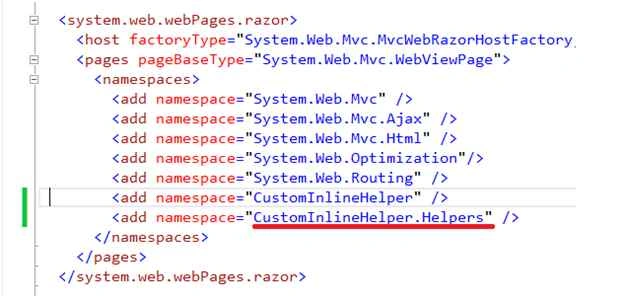
Add the namespace to the Views/web.config file (as in Figure 1).
Conclusion
We can encapsulate the complex code in an external helper method (extension method) and use it in multiple views. This also makes our view simpler and more readable. We can also create a class library project and include these external helper methods in that project. So that next time if we need the same functionality we just need to add the reference to our class library project. I hope this helps you.
I hope you enjoyed reading the article.
Happy Coding!
Lee JonesPosted Oct 31, 2015, 1:45 AM
How did you configure your class library to support MVC? I'm using 5.4.2 with VS 2015. When i created the class library I used NuGet to add the MVC 5 assembly references to the project and immediately had problems. MvcHtmlString for instance, when I hover over it I'm told it requires a reference to version 4.0.0.0 of System.Web.Mvc, obviously I can't have both. I thought about changing the project type GUID to the sane as an MVC app but then I'll have extra content menu items that I'd rather avoid. Thanks, Lee.
Santhakumar MunuswamyPosted Jun 21, 2015, 1:44 AM
Thanks for nice article:)