

In this article I am going to demonstrate how to create Hit counter for
SharePoint site with user details using sandbox solution.
This solution will be very useful when you need detail about the person who
visit this page and also about the number of time page view with page detail. I
created this solution that will make your work easy. It's very simple where you
don't need to do anything except deploying the feature and adding the web part
into you master page or layout page in sharepoint2010.
Below is the screenshot that will display the how it looks like:
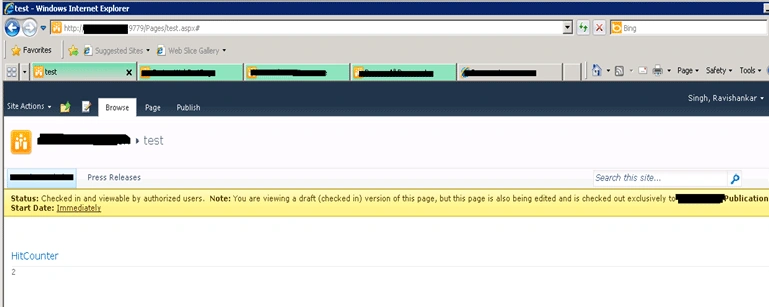
You can further add the name of the users who visit and pages viewed to this web
part.
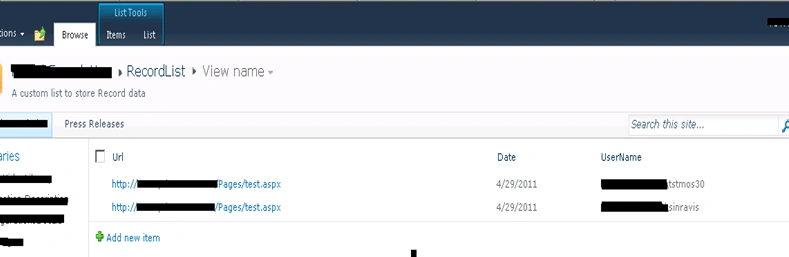
After activating this feature, it will create a list with fields and web part.
List will look like below:
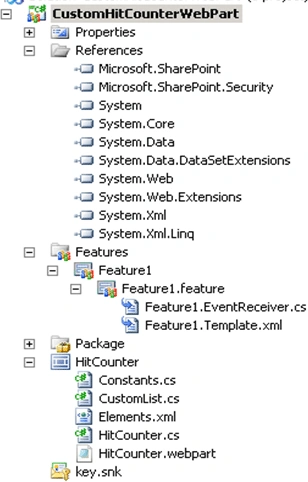
The folder hierarchy for this solution will look like:
Source code you can download with article.
Benefit of this article
You will learn following things:
- How to create sandbox web part
- How to create custom list programmatically
- How to create custom field programmatically
- How to store/get the user detail with page detail
- How to check number of page visit in your site
Hope you enjoy the code and article. Enjoy coding.
md mahmudPosted Aug 14, 2014, 4:43 PM
Great article! i just to need modify code little bit, to display all the users who ever visit this page? What i need to modify to get this please.
deepu risingPosted Sep 23, 2013, 5:41 AM
Hi, I f I want to deploy the solution for subsites it is throwing an error : Unhandled exception was thrown by the sandboxed code wrapper's Executive method in the partial trust appd domain. For root and site level it is working fine but for subsite...how to solve the problem
deepu risingPosted Sep 11, 2013, 6:15 AM
Hi Ravi, I want to display date and time in the record list. trying to add code in hitcounter.cs to display time also but it is not working
AdarshaPosted Jun 18, 2012, 11:14 AM
Hi, For Annonymous user , Hit counter web part throw the error : Web Part Error: Unhandled exception was thrown by the sandboxed code wrapper's Execute method in the partial trust app domain: An unexpected error has occurred....please let me know; how can i solve this. Note : If i login as a administrator solution is working.
Ravishankar SinghPosted May 30, 2012, 3:29 AM
Hi Yanika, This is solution.You open this in Visual studio and set the web application where you want to deploy. Else you can create package(.wsp) and directly upload in Solution Gallery(Site Action->Site Setting->Gallery(tab)-Solution Gallery. Please let me know if you face any issue.
YanikaPosted May 30, 2012, 3:25 AM
Hi, can you please tell me where do I have to deploy the feature (in which folder etc..). I am new to sharepoint so I have no idea.
Ruby YogesPosted Apr 3, 2012, 4:52 AM
hi Ravi, where can i find the article for this post?
Vijai Anand RamalingamPosted May 2, 2011, 3:14 AM
Hi ravi....Nice Article:-):-)