The is the step-by-step procedure for creating dynamic tabs using SQL Server 2008 and above with conditions.

Program output
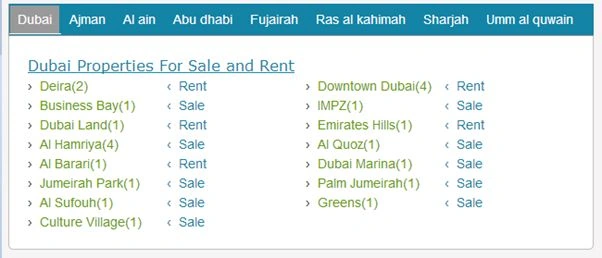
Tab Output

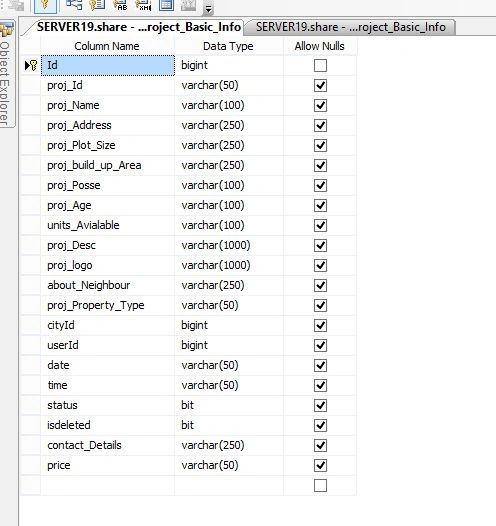
Step 1: Create .dbo (table) and sp (Stored Procedure) that is displayed at the front.

Table City
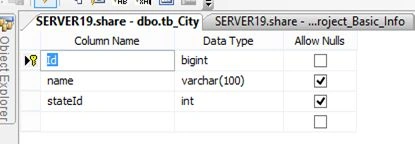
City Table

Table Property

Table Property

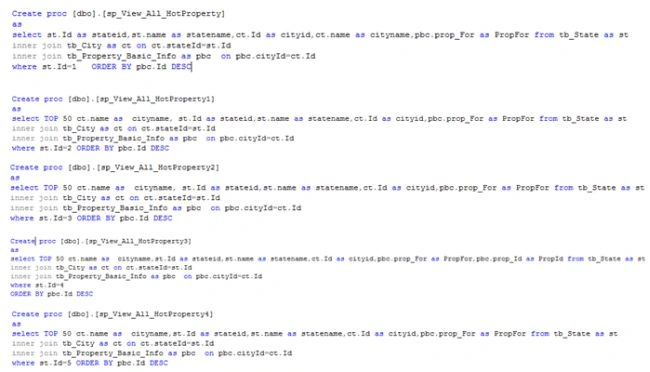
Stored Procedures

Stored Procedure
SQLServer Stored Procedure

Step 2: Write the Business Access Layer (BAL) that is in the App_Code Folder with this code:

  1. public String View_All_HotProperty(String PN, String PS, String PB)
  2. {
  3. try
  4. {
  5. output = String.Empty;
  6. dt = new DataTable();
  7. DataTable dt11 = new DataTable();
  8. DataTable dt1 = new DataTable();
  9. DataTable dt2 = new DataTable();
  10. DataTable dt3 = new DataTable();
  11. DataTable dt4 = new DataTable();
  12. DataTable dt5 = new DataTable();
  13. DataTable dt6 = new DataTable();
  14. DataTable dt7 = new DataTable();
  15. DataTable duplidt = new DataTable();
  16. int c = 0;
  17. int c1 = 0;
  18. int t = 0;
  19. int jump = 0;
  20. string match = string.Empty;
  21. int count=1;
  22. int ii=0;
  23. dt = objDal.GetDataTableHot(ref dt, "sp_View_All_HotProperty3");
  24. dt1 = objDal.GetDataTableHot(ref dt1, "sp_View_All_HotProperty1");
  25. dt2 = objDal.GetDataTableHot(ref dt2, "sp_View_All_HotProperty2");
  26. dt3 = objDal.GetDataTableHot(ref dt3, "sp_View_All_HotProperty");
  27. dt4 = objDal.GetDataTableHot(ref dt4, "sp_View_All_HotProperty4");
  28. dt5 = objDal.GetDataTableHot(ref dt5, "sp_View_All_HotProperty5");
  29. dt6 = objDal.GetDataTableHot(ref dt6, "sp_View_All_HotProperty6");
  30. dt7 = objDal.GetDataTableHot(ref dt7, "sp_View_All_HotProperty7");
  31. //dt1= dt.Select("sateid like '%"+1+"%'");
  32. output = String.Empty;
  33. output += "<div class=\"container\">";
  34. output += "<ul class=\"tabs\">";
  35. output += "<li><a href=\"#tab1\">Dubai</a></li>";
  36. output += "<li><a href=\"#tab2\">Ajman</a></li>";
  37. output += "<li><a href=\"#tab3\">Al ain</a></li>";
  38. output += "<li><a href=\"#tab4\">Abu dhabi</a></li>";
  39. output += "<li><a href=\"#tab5\">Fujairah</a></li>";
  40. output += "<li><a href=\"#tab6\">Ras al kahimah</a></li>";
  41. output += "<li><a href=\"#tab7\">Sharjah</a></li>";
  42. output += "<li><a href=\"#tab8\">Umm al quwain</a></li>";
  43. output += "</ul>";
  44. output += "<div class=\"tab_container\">";
  45. //For Tab1
  46. output += "<div id=tab1 class=\"tab_content\">";
  47. output += "<div class=\"pantool\">";
  48. //For Abudhabi
  49. output += "<div id=propheading><u>Dubai Properties For Sale and Rent</u> </div>";
  50. // output += "<div id=propheading><hr></hr></div>";
  51. output += "<div class=\"pan_tab1\">";
  52. //for (int i = dt.Rows.Count; ; i++)
  53. for (ii = dt.Rows.Count - 1; ii >= 0; ii--)
  54. {
  55. c = int.Parse(dt.Rows[0]["cityid"].ToString());
  56. t = 0;
  57. for (int j = 0; j < dt.Rows.Count; j++)
  58. {
  59. if (c == int.Parse(dt.Rows[j]["cityid"].ToString()))
  60. {
  61. t = t + 1;
  62. jump = int.Parse(dt.Rows[j]["cityid"].ToString());
  63. }
  64. }
  65. output += "<div class=\"pan_tab\">› <a href='SearchwithLocation.aspx?id=" + dt.Rows[0]["cityid"].ToString() + "&for=" + dt.Rows[0]["PropFor"].ToString() + "'>" + dt.Rows[0]["cityname"].ToString() + "(" + t + ")" + "</a></div>";
  66. output += "<div class=\"PropFor\">‹ " + dt.Rows[0]["PropFor"].ToString() + "</div>";

Output

This output string variable provides this result:
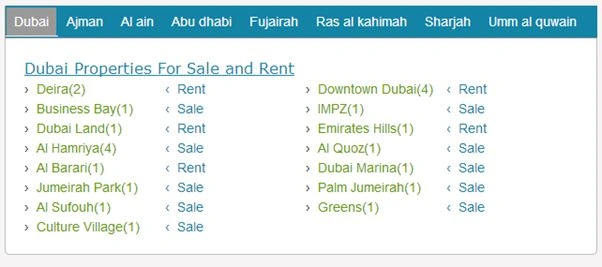
First Tab

  1. match = dt.Rows[0]["cityname"].ToString();
  2. foreach (DataRow dr in dt.Rows)
  3. {
  4. if (dr["cityname"].ToString() == match)
  5. {
  6. dr.Delete();
  7. }
  8. }
  9. dt.AcceptChanges();
  10. count = dt.Rows.Count;
  11. ii = count;
  12. output += "</div>";
  13. //For Abudhabi
  14. output += "</div>";
  15. output += "</div>";
  16. //For Tab2
  17. output += "<div id=tab2 class=\"tab_content\">";
  18. output += "<div class=\"pantool\">";
  19. //For sale start
  20. output += "<div id=propheading><u>Ajman Properties For Sale and Rent</u> </div>";
  21. output += "<div class=\"pan_tab1\">";
  22. for (ii = dt1.Rows.Count - 1; ii >= 0; ii--)
  23. {
  24. c = int.Parse(dt1.Rows[0]["cityid"].ToString());
  25. t = 0;
  26. for (int j = 0; j < dt1.Rows.Count; j++)
  27. {
  28. if (c == int.Parse(dt1.Rows[j]["cityid"].ToString()))
  29. {
  30. t = t + 1;
  31. jump = int.Parse(dt1.Rows[j]["cityid"].ToString());
  32. }
  33. }
  34. output += "<div class=\"pan_tab\">› <a href='SearchwithLocation.aspx?id=" + dt1.Rows[0]["cityid"].ToString() + "'>" + dt1.Rows[0]["cityname"].ToString() + "(" + t + ")" + "</a></div>";
  35. output += "<div class=\"PropFor\">‹ " + dt1.Rows[0]["PropFor"].ToString() + "</div>";

Output

This output string variable provides this result:
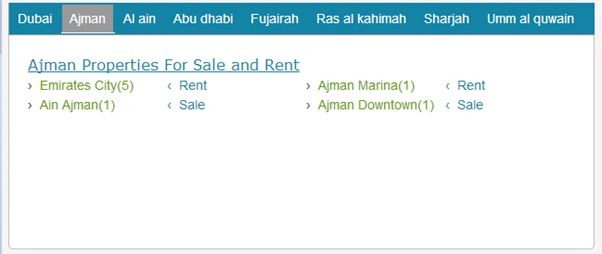
Second Tab

  1. //For matching
  2. match = dt1.Rows[0]["cityname"].ToString();
  3. foreach (DataRow dr in dt1.Rows)
  4. {
  5. if (dr["cityname"].ToString() == match)
  6. {
  7. dr.Delete();
  8. }
  9. }
  10. dt1.AcceptChanges();
  11. count = dt1.Rows.Count;
  12. ii = count;
  13. }
  14. output += "</div>";
  15. //For sale End
  16. output += "</div>";
  17. output += "</div>";
  18. //For Tab3
  19. output += "<div id=tab3 class=\"tab_content\">";
  20. output += "<div class=\"pantool\">";
  21. //For Abudhabi
  22. output += "<div id=propheading><u>Al ain Properties For Sale and Rent</u> </div>";
  23. output += "<div class=\"pan_tab1\">";
  24. for (ii = dt2.Rows.Count - 1; ii >= 0; ii--)
  25. {
  26. c = int.Parse(dt2.Rows[0]["cityid"].ToString());
  27. t = 0;
  28. for (int j = 0;j < dt2.Rows.Count; j++)
  29. {
  30. if (c == int.Parse(dt2.Rows[j]["cityid"].ToString()))
  31. {
  32. t = t + 1;
  33. jump = int.Parse(dt2.Rows[j]["cityid"].ToString());
  34. }
  35. }
  36. output += "<div class=\"pan_tab\">› <a href='SearchwithLocation.aspx?id=" + dt2.Rows[0]["cityid"].ToString() + "'>" + dt2.Rows[0]["cityname"].ToString() + "(" + t + ")" + "</a></div>";
  37. output += "<div class=\"PropFor\">‹ " + dt2.Rows[0]["PropFor"].ToString() + "</div>";

Output

This output string variable provides this result:
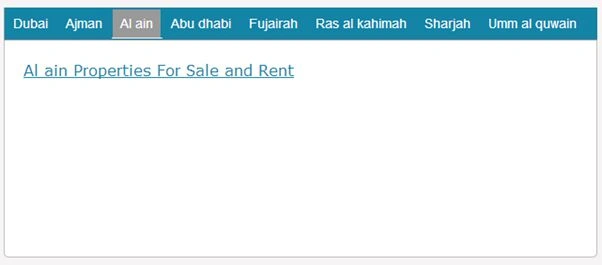
Third Tab

  1. match = dt2.Rows[0]["cityname"].ToString();
  2. foreach (DataRow dr in dt2.Rows)
  3. {
  4. if (dr["cityname"].ToString() == match)
  5. {
  6. dr.Delete();
  7. }
  8. }
  9. dt2.AcceptChanges();
  10. count = dt2.Rows.Count;
  11. ii = count;
  12. }
  13. output += "</div>";
  14. //For Abudhabi
  15. output += "</div>";
  16. output += "</div>";
  17. //For Tab4
  18. output += "<div id=tab4 class=\"tab_content\">";
  19. output += "<div class=\"pantool\">";
  20. //For Abudhabi
  21. output += "<div id=propheading><u>Abu Dhabi Properties For Sale and Rent</u> </div>";
  22. output += "<div class=\"pan_tab1\">";
  23. for (ii = dt3.Rows.Count - 1; ii >= 0; ii--)
  24. {
  25. c = int.Parse(dt3.Rows[0]["cityid"].ToString());
  26. t = 0;
  27. for (int j = 0; j < dt3.Rows.Count; j++)
  28. {
  29. if (c == int.Parse(dt3.Rows[j]["cityid"].ToString()))
  30. {
  31. t = t + 1;
  32. jump = int.Parse(dt3.Rows[j]["cityid"].ToString());
  33. }
  34. }
  35. output += "<div class=\"pan_tab\">› <a href='SearchwithLocation.aspx?id=" + dt3.Rows[0]["cityid"].ToString() + "'>" + dt3.Rows[0]["cityname"].ToString() + "(" + t + ")" + "</a></div>";
  36. output += "<div class=\"PropFor\">‹ " + dt3.Rows[0]["PropFor"].ToString() + "</div>";

Output

This output string variable provides this result:
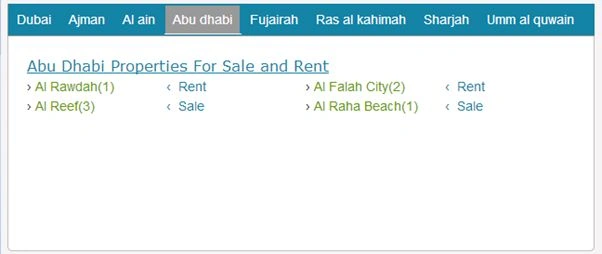
Fourth Tab

  1. match = dt3.Rows[0]["cityname"].ToString();
  2. foreach (DataRow dr in dt3.Rows)
  3. {
  4. if (dr["cityname"].ToString() == match)
  5. {
  6. dr.Delete();
  7. }
  8. }
  9. dt3.AcceptChanges();
  10. count = dt3.Rows.Count;
  11. ii = count;
  12. }
  13. output +="</div>";
  14. //For Abudhabi
  15. output += "</div>";
  16. output += "</div>";
  17. //For Tab5
  18. output += "<div id=tab5 class=\"tab_content\">";
  19. output += "<div class=\"pantool\">";
  20. //For Abudhabi
  21. output += "<div id=propheading><u>Fujairah Properties For Sale and Rent</u> </div>";
  22. output += "<div class=\"pan_tab1\">";
  23. for (ii = dt4.Rows.Count - 1; ii >= 0; ii--)
  24. {
  25. c = int.Parse(dt4.Rows[0]["cityid"].ToString());
  26. t = 0;
  27. for (int j = 0; j < dt4.Rows.Count; j++)
  28. {
  29. if (c == int.Parse(dt4.Rows[j]["cityid"].ToString()))
  30. {
  31. t = t + 1;
  32. jump = int.Parse(dt4.Rows[j]["cityid"].ToString());
  33. }
  34. }
  35. output += "<div class=\"pan_tab\">› <a href='SearchwithLocation.aspx?id=" + dt4.Rows[0]["cityid"].ToString() + "'>" + dt4.Rows[0]["cityname"].ToString() + "(" + t + ")" + "</a></div>";
  36. output += "<div class=\"PropFor\">‹ " + dt4.Rows[0]["PropFor"].ToString() + "</div>";

Output

This output string variable provides this result :
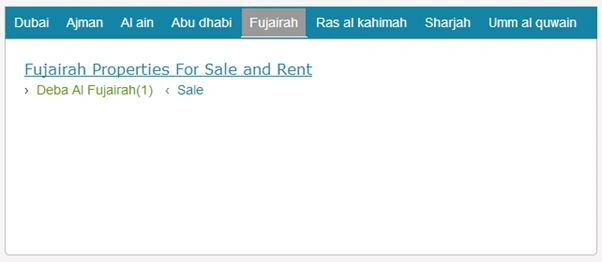
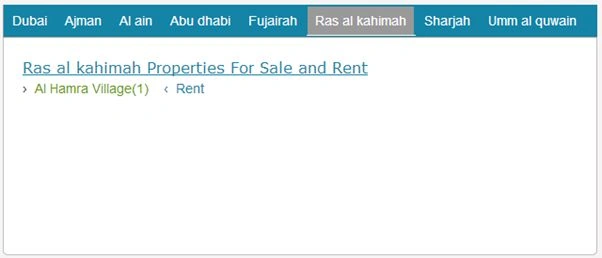
Fifth Tab

  1. match = dt4.Rows[0]["cityname"].ToString();
  2. foreach (DataRow dr in dt4.Rows)
  3. {
  4. if (dr["cityname"].ToString() == match)
  5. {
  6. dr.Delete();
  7. }
  8. }
  9. dt4.AcceptChanges();
  10. count = dt4.Rows.Count;
  11. ii = count;
  12. }
  13. output += "</div>";
  14. //For Abudhabi
  15. output += "</div>";
  16. output += "</div>";
  17. //For Tab6
  18. output += "<div id=tab6 class=\"tab_content\">";
  19. output += "<div class=\"pantool\">";
  20. //For Abudhabi
  21. output += "<div id=propheading><u>Ras al kahimah Properties For Sale and Rent</u> </div>";
  22. output += "<div class=\"pan_tab1\">";
  23. for (ii = dt5.Rows.Count - 1; ii >= 0; ii--)
  24. {
  25. c = int.Parse(dt5.Rows[0]["cityid"].ToString());
  26. t = 0;
  27. for (int j = 0; j < dt5.Rows.Count; j++)
  28. {
  29. if (c == int.Parse(dt5.Rows[j]["cityid"].ToString()))
  30. {
  31. t = t + 1;
  32. jump = int.Parse(dt5.Rows[j]["cityid"].ToString());
  33. }
  34. }
  35. output += "<div class=\"pan_tab\">› <a href='SearchwithLocation.aspx?id=" + dt5.Rows[0]["cityid"].ToString() + "'>" + dt5.Rows[0]["cityname"].ToString() + "(" + t + ")" + "</a></div>";
  36. output += "<div class=\"PropFor\">‹ " + dt5.Rows[0]["PropFor"].ToString() + "</div>";

Output

This output string variable provides this result :
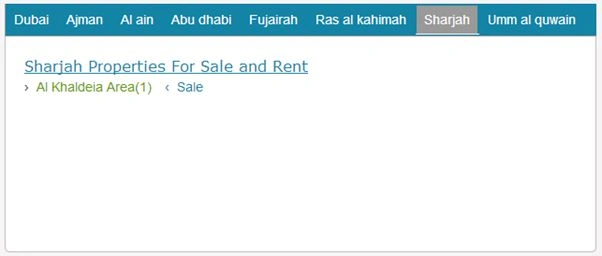
Six Tab

  1. match = dt5.Rows[0]["cityname"].ToString();
  2. foreach (DataRow dr in dt5.Rows)
  3. {
  4. if (dr["cityname"].ToString() == match)
  5. {
  6. dr.Delete();
  7. }
  8. }
  9. dt5.AcceptChanges();
  10. count = dt5.Rows.Count;
  11. ii = count;
  12. }
  13. output += "</div>";
  14. //For Abudhabi
  15. output += "</div>";
  16. output += "</div>";
  17. //For Tab7
  18. output += "<div id=tab7 class=\"tab_content\">";
  19. output += "<div class=\"pantool\">";
  20. //For Abudhabi
  21. output += "<div id=propheading><u>Sharjah Properties For Sale and Rent</u> </div>";
  22. output += "<div class=\"pan_tab1\">";
  23. for (ii = dt6.Rows.Count - 1; ii >= 0; ii--)
  24. {
  25. c = int.Parse(dt6.Rows[0]["cityid"].ToString());
  26. t = 0;
  27. for (int j = 0; j < dt6.Rows.Count; j++)
  28. {
  29. if (c == int.Parse(dt6.Rows[j]["cityid"].ToString()))
  30. {
  31. t = t + 1;
  32. jump = int.Parse(dt6.Rows[j]["cityid"].ToString());
  33. }
  34. }
  35. output += "<div class=\"pan_tab\">› <a href='SearchwithLocation.aspx?id=" + dt6.Rows[0]["cityid"].ToString() + "'>" + dt6.Rows[0]["cityname"].ToString() + "(" + t + ")" + "</a></div>";
  36. output += "<div class=\"PropFor\">‹ " + dt6.Rows[0]["PropFor"].ToString() + "</div>";

Output

This output string variable provides this result:

Seventh Tab

  1. match = dt6.Rows[0]["cityname"].ToString();
  2. foreach (DataRow dr in dt6.Rows)
  3. {
  4. if (dr["cityname"].ToString() == match)
  5. {
  6. dr.Delete();
  7. }
  8. }
  9. dt6.AcceptChanges();
  10. count = dt6.Rows.Count;
  11. ii = count;
  12. }
  13. output += "</div>";
  14. //For Abudhabi
  15. output += "</div>";
  16. output += "</div>";
  17. //For Tab8
  18. output += "<div id=tab8 class=\"tab_content\">";
  19. output += "<div class=\"pantool\">";
  20. //For Abudhabi
  21. output += "<div id=propheading><u>Umm al quwain Properties For Sale and Rent</u> </div>";
  22. output += "<div class=\"pan_tab1\">";
  23. for (ii = dt7.Rows.Count - 1; ii >= 0; ii--)
  24. {
  25. c = int.Parse(dt7.Rows[0]["cityid"].ToString());
  26. t = 0;
  27. for (int j = 0; j < dt7.Rows.Count; j++)
  28. {
  29. if (c == int.Parse(dt7.Rows[j]["cityid"].ToString()))
  30. {
  31. t = t + 1;
  32. jump = int.Parse(dt7.Rows[j]["cityid"].ToString());
  33. }
  34. }
  35. output += "<div class=\"pan_tab\">› <a href='SearchwithLocation.aspx?id=" + dt7.Rows[0]["cityid"].ToString() + "'>" + dt7.Rows[0]["cityname"].ToString() + "(" + t + ")" + "</a></div>";
  36. output += "<div class=\"PropFor\">‹ " + dt7.Rows[0]["PropFor"].ToString() + "</div>";

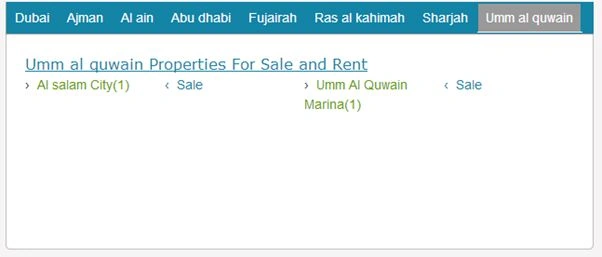
Output

This output string variable provides this result:

Eighth Tab

  1. match = dt7.Rows[0]["cityname"].ToString();
  2. foreach (DataRow dr in dt7.Rows)
  3. {
  4. if (dr["cityname"].ToString() == match)
  5. {
  6. dr.Delete();
  7. }
  8. }
  9. dt7.AcceptChanges();
  10. count = dt7.Rows.Count;
  11. ii = count;
  12. }
  13. output += "</div>";
  14. //For Abudhabi
  15. output += "</div>";
  16. output += "</div>";
  17. //End Any Tab
  18. output += "</div>";
  19. output += "</div>";
  20. return output;
  21. }
  22. catch (Exception ex)
  23. {
  24. }
  25. return output;
  26. }

Note: This code also covers the deletion of duplicate data from a column with a condition.

  1. match = dt7.Rows[0]["cityname"].ToString();
  2. foreach (DataRow dr in dt7.Rows)
  3. {
  4. if (dr["cityname"].ToString() == match)
  5. {
  6. dr.Delete();
  7. }
  8. }
  9. dt7.AcceptChanges();

Match and delete data from a row and update the datatable.

Step 3: Call the above function at the .cs page with the following code:

  1. if (!IsPostBack)
  2. output = objProject.View_All_HotProperty("1", "25", "5");

Step 4: Call the above function at the .cs page with the following code:

Step 5: For Tab decoration use this jQuery and CSS:

  1. <script type="text/javascript">
  2. $(document).ready(function () {
  3. //Default Action
  4. $(".tab_content").hide(); //Hide all content
  5. $("ul.tabs li:first").addClass("active").show(); //Activate first tab
  6. $(".tab_content:first").show(); //Show first tab content
  7. //On Click Event
  8. $("ul.tabs li").click(function () {
  9. $("ul.tabs li").removeClass("active"); //Remove any "active" class
  10. $(this).addClass("active"); //Add "active" class to selected tab
  11. $(".tab_content").hide(); //Hide all tab content
  12. var activeTab = $(this).find("a").attr("href"); //Find the rel attribute value to identify the active tab + content
  13. $(activeTab).fadeIn(); //Fade in the active content
  14. return false;
  15. });
  16. });
  17. </script>
  18. <link href="TABSheet.css" rel="stylesheet" type="text/css" />

TABSheet.css

  1. .container {width:auto; margin: 0px 0px 0px 0px;}
  2. ul.tabs {
  3. margin: 0;
  4. padding: 0;
  5. float: left;
  6. list-style: none;
  7. height: 34px;
  8. border-bottom: 1px solid #999;
  9. border-left: 1px solid #999;
  10. border-right: 1px solid #1383A6;
  11. width:630px;
  12. background-color :#1383A6;
  13. }
  14. ul.tabs li {
  15. float: left;
  16. margin: 0;
  17. padding: 0;
  18. height: 31px;
  19. line-height: 31px;
  20. border: 1px solid #1383A6;
  21. border-left: none;
  22. margin-bottom:5px;
  23. background:#1383A6;
  24. /*background-image:url(images/banner-Head.png);*/
  25. overflow: hidden;
  26. position: relative;
  27. width:auto;
  28. }
  29. ul.tabs li a {
  30. text-decoration: none;
  31. color: #FFFFFF;
  32. display:block;
  33. font-size: 1.2em;
  34. padding: 0 8px;
  35. border: 1px solid #1383A6;
  36. outline: none;
  37. }
  38. ul.tabs li a:hover {
  39. background:white;
  40. color:Black ;
  41. }
  42. html ul.tabs li.active, html ul.tabs li.active a:hover {
  43. background:#999;
  44. color:#000000;
  45. border-bottom:1px solid #fff;
  46. }
  47. .tab_container{
  48. border: 0.1em solid #C0C0C0;
  49. border-top: none;
  50. clear: both;
  51. float: left;
  52. width: 100%;
  53. background:#fff;
  54. -moz-border-radius-bottomright: 5px;
  55. -khtml-border-radius-bottomright: 5px;
  56. -webkit-border-bottom-right-radius: 5px;
  57. -moz-border-radius-bottomleft: 5px;
  58. -khtml-border-radius-bottomleft: 5px;
  59. -webkit-border-bottom-left-radius: 5px;
  60. }
  61. .tab_content {
  62. padding: 20px;
  63. font-size: 1.2em;
  64. }
  65. .tab_content h2 {
  66. font-weight: normal;
  67. padding-bottom: 10px;
  68. border-bottom: 1px dashed #ddd;
  69. font-size: 1.8em;
  70. }
  71. .tab_content h3 a{
  72. color: #254588;
  73. }
  74. .tab_content img {
  75. float: left;
  76. margin: 0 20px 20px 0;
  77. border: 1px solid #ddd;
  78. padding: 5px;
  79. }
  80. .toolbar ul {
  81. display:table-row;
  82. }
  83. .toolbar ul li
  84. {
  85. display: table-cell;
  86. height:auto;
  87. list-style-type: none;
  88. margin: 10px;
  89. vertical-align: middle;
  90. }
  91. .toolbar ul li a {
  92. display:table-cell;
  93. vertical-align: middle;
  94. height:auto;
  95. }
  96. .toolbar ul li.button a {
  97. height:50px;
  98. border: solid 1px black;
  99. }
  100. .pantool
  101. {
  102. width:600px;
  103. float:left;
  104. height:210px;
  105. border:solid 0px black;
  106. }
  107. .tab2_pan
  108. {
  109. width:200px;
  110. height:auto;
  111. float:left;
  112. border:solid 0px black;
  113. }
  114. .pan_tab
  115. {
  116. width:150px;
  117. float:left;
  118. text-align:left;
  119. }
  120. .pan_tab1
  121. {
  122. height:200px;
  123. float:left;
  124. }
  125. #propheading
  126. {
  127. float:none;
  128. color:#1383A6;
  129. font-family:Verdana;font-size:medium;text-decoration:uderline;
  130. text-align :left;
  131. }
  132. .PropFor
  133. {
  134. width:150px;
  135. float :left;
  136. text-align :left;
  137. color:#1383A6;
  138. }

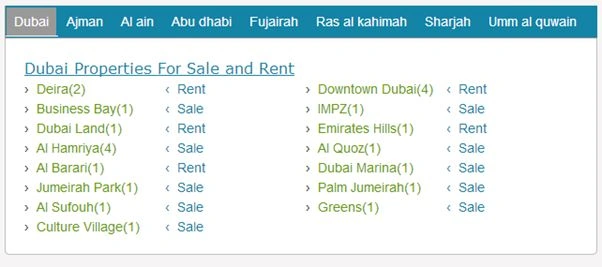
Output

This output string variable provides this final result with select first tab:

Final Result

To see all the tab results, click one tab for the opt specific output by location.

Note: This code will make 8 tabs with conditions that you gave from the SQL Server side.

I hope this article is very valuable and profitable for making attractive dynamic tabs using SQL Server.