

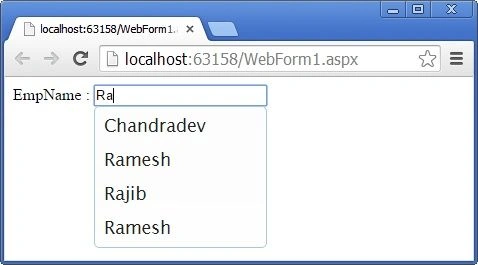
There are so many ways to create an Auto Complete TextBox in ASP.NET like using an Ajax AutoComplete Control with Web Service and WCF. But here we will see how to use jQuery UI autocomplete functionality in ASP.NET.
Pre-requisites
- Create the simple table tblEmp with Id and EmpName Field in SQL Server
- Download the Plugin in the local system or use the online plugin as in the following:
http://ajax.aspnetcdn.com/ajax/jquery/jquery-1.8.0.js
http://ajax.aspnetcdn.com/ajax/jquery.ui/1.8.22/jquery-ui.js
http://ajax.aspnetcdn.com/ajax/jquery.ui/1.8.10/themes/redmond/jquery-ui.css"
You can see here what can you do from the Jquery-ui plugin.
http://jqueryui.com
Now we will see the AutoComplete functionality of the jQuery UI. In this sample I will use the online plugin.
Step 1: Create the aspx page with TextBox control and the jQuery required plugin in the Head portion of the HTML.
Step 2: Write the jQuery UI auto complete jQuery syntax with Ajax web method as given below.
- <%@ Page Language="C#" AutoEventWireup="true" CodeBehind="WebForm1.aspx.cs" Inherits="AjaxTest.WebForm1" %>
- <!DOCTYPE html>
- <html xmlns="http://www.w3.org/1999/xhtml">
- <head runat="server">
- <title></title>
- <script src="http://ajax.aspnetcdn.com/ajax/jquery/jquery-1.8.0.js"></script>
- <script src="http://ajax.aspnetcdn.com/ajax/jquery.ui/1.8.22/jquery-ui.js"></script>
- <link rel="Stylesheet" href="http://ajax.aspnetcdn.com/ajax/jquery.ui/1.8.10/themes/redmond/jquery-ui.css" />
- <script type="text/javascript">
- $(function () {
- $("#txtEmpName").autocomplete({
- source: function (request, response) {
- var param = { empName: $('#txtEmpName').val() };
- $.ajax({
- url: "WebForm1.aspx/GetEmpNames",
- data: JSON.stringify(param),
- dataType: "json",
- type: "POST",
- contentType: "application/json; charset=utf-8",
- dataFilter: function (data) { return data; },
- success: function (data) {
- response($.map(data.d, function (item) {
- return {
- value: item
- }
- }))
- },
- error: function (XMLHttpRequest, textStatus, errorThrown) {
- var err = eval("(" + XMLHttpRequest.responseText + ")");
- alert(err.Message)
- // console.log("Ajax Error!");
- }
- });
- },
- minLength: 2 //This is the Char length of inputTextBox
- });
- });
- </script>
- </head>
- <body>
- <form id="form1" runat="server">
- <div>
- EmpName : <asp:TextBox ID="txtEmpName" runat="server"></asp:TextBox>
- <br />
- <br />
- <br />
- </div>
- </form>
- </body>
- </html>
dailycatchon dailycatchonPosted Jul 16, 2019, 7:44 AM
My rightclick and copy paste has been disabled please tell a solution
Sandipta SahuPosted Jul 2, 2019, 2:42 PM
Wats app no plz, need more help a lot of my projects
Sandipta SahuPosted Jul 2, 2019, 2:42 PM
Thanks bro done my job.
Avinash RaoPosted Jul 29, 2015, 5:24 AM
instead of sql i need to work in mysql db with stored procedures can u plz explain how to do it
sachin patilPosted May 21, 2015, 2:17 AM
Thanks much, nice article
Upendra Pratap ShahiPosted Apr 21, 2015, 6:13 AM
nice
chakradhar juturuPosted Feb 27, 2015, 2:09 AM
chandradev sir,thanksfor ur code.but i want to know after selecting the username its could be split into other textbox.can u tell me ???how ?
Chandradev PrasadPosted Oct 30, 2014, 2:08 PM
Nice to know that. You had fixed your problem.
Dammy SubayrPosted Oct 30, 2014, 9:54 AM
its working now had to comment out this line from RouteConfig.cs settings AutoRedirectMode = RedirectMode.Permanent and used <%=ResolveUrl("webform.aspx/getlist")%> for the ajax url and moved the script to body tag at the bottom
Chandradev PrasadPosted Oct 30, 2014, 7:50 AM
have u given proper URL with exact method Name ?
Dammy SubayrPosted Oct 30, 2014, 7:47 AM
the error is for $.map line in the response{}
Dammy SubayrPosted Oct 30, 2014, 5:57 AM
tried it but I keep getting this error in the jquery file "Unable to get property 'lenght' of undefined or null references", and it points to the response line, how can I resolve this thanks
Chandradev PrasadPosted Oct 24, 2014, 1:49 AM
Thank you.
Saineshwar BageriPosted Oct 24, 2014, 12:54 AM
nice article
Kel KelPosted Oct 23, 2014, 2:52 PM
Hi, I'm having an error message "Instance failure"