

In this article, you will get the following questions answered.
- What is JSON?
- What is serialization and deserialization of JSON data?
- How many preferred types of JSON data are there?
- Step by step JSON creation.
What is JSON?
JSON's full form is JavaScript Object Notation.
JavaScript Object Notation (JSON) is a lightweight data-interchange format. JSON creation and read of JSON string is very easy. In Web technology, nowadays people transfer and receive the data in this format. Even MONGO DB stores the data in JSON format.
What is Serialization and Deserialization of JSON data?
The creation of JSON data from an object is serialization, and deserialization is its inverse operation.
How many preferred types of JSON data are there?
Preferred types of JSON Data are as follows,
Object
In this, the data is stored in KEY/VALUE pattern. Object starts with { and end with }. It is very easy to read and understand the object.
As you see in the example section, Key “friendid” and value “1”, which is separated by : colon sign.
{"friendid":"1","friendname":"Ashish Kalla","friendplace":"Malad","friendmobile":"777777777"}
Array
Array starts with “[“ and end with “]”and the rest of the operation is similar to the object pattern. JSON array is mostly the same as a general list kind of array, which we use in .NET. In addition to it in Javascript, you can plugin function to process something.
Var friendlist=[{"friendlist":{"friendid":"2","friendname":"Ashish Kalla","friendplace":"Malad","friendmobile":"777777777"}},

{"friendlist":{"friendid":"3","friendname":"Suhana Kalla","friendplace":"Phalodi","friendmobile":"666666666"}}]
Step by step JSON creation
JSON is used primarily to transmit the data between a Server and Web Application. Basically in .NET, we can send and receive JSON data. In my major projects, I transfer/give JSON. We give/ send/ transfer JSON data through Web Service, AJAX jQuery calls and other ways.
Here, we generate JSON data in C# code at the back-end and return the string. You can return JSON in object mode (single record) or an array mode (list of records).
In this walk through, we create JSON data and write on the Browser screen, using Response.Write().
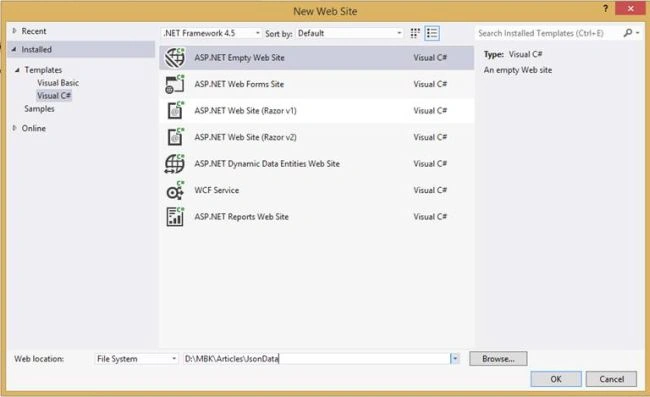
Step 1
Create ASP.NET Empty Web Site project named “JsonData”.
Step 2
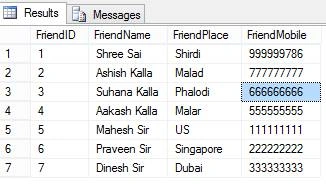
Create a table and code the sample data.
Table structure
USE [MBKTest]
GO

SET ANSI_NULLS ON
GO

SET QUOTED_IDENTIFIER ON
GO

CREATE TABLE [dbo].[tblMyFriends](
    [FriendID] [int] IDENTITY(1,1) NOT NULL,
    [FriendName] [nvarchar](50) NULL,
    [FriendPlace] [nvarchar](50) NULL,
    [FriendMobile] [nvarchar](10) NULL
) ON [PRIMARY]

GO
Sample data
Step 3
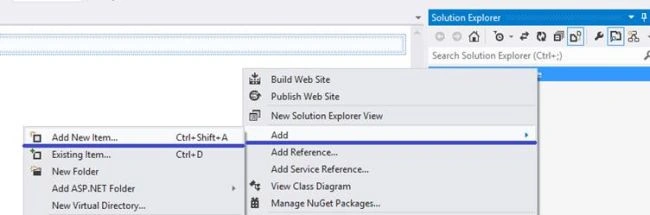
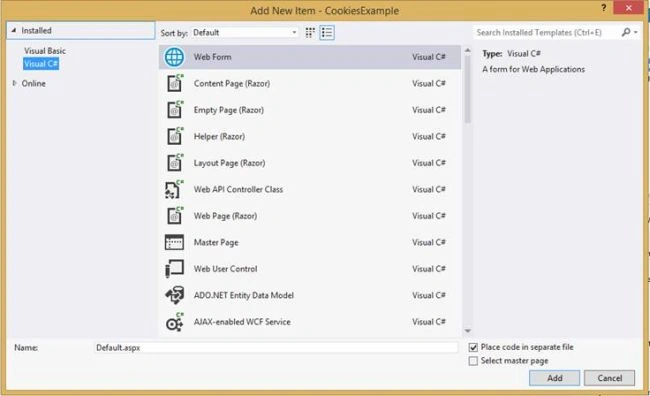
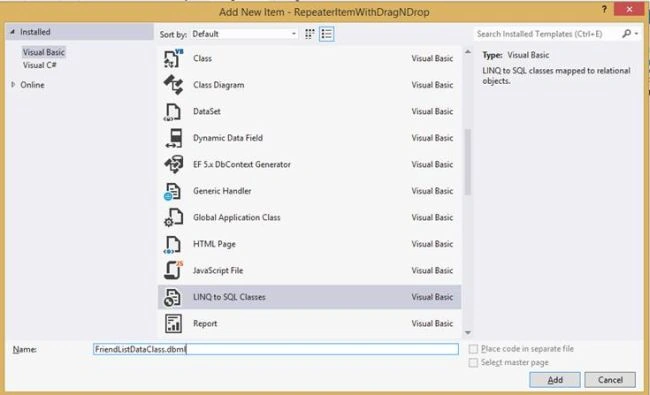
Right click on the project and select Add-->Add New Item and select WebForm

Dharmendra Kumar PanditPosted Sep 1, 2019, 10:19 PM
Now I have to use JsonStr in javascript. What will be the next steps to achieve this.
Dharmendra Kumar PanditPosted Sep 1, 2019, 10:13 PM
Thank you sir. Very helpful article. I'm happy with with this article.
Viknaraj ManogararajahPosted May 23, 2019, 6:43 AM
nice Article 👍
deepak hirePosted Mar 7, 2017, 11:54 PM
Valuable Article Sir, Thank you
Roshan MulePosted Feb 26, 2017, 10:17 PM
Thank you Manoj sir for sharing ...... very nice article. Your every article is very valuable for me.
Vignesh ManiPosted Feb 24, 2017, 5:26 PM
Simple and nice article.
Vishal PrajapatiPosted Feb 23, 2017, 10:15 PM
Thanks for sharing..Worth Reading..
Nilesh ShahPosted Feb 23, 2017, 2:50 PM
Using Newtonsoft.Json nuget package is much more easier, I think
Manav PandyaPosted Feb 23, 2017, 12:26 PM
Need some demo with MVC if possible
Manav PandyaPosted Feb 23, 2017, 12:26 PM
Thanks for sharing sir
RakeshPosted Feb 23, 2017, 11:30 AM
Good share Manoj sir