

Menu and SubMenu
Menus and submenus are an important part of any application. There are many ways to create them in applications. Also we are using a navigation path to easily access any page by menu and submenu.
Menus and submenus are created normally with any hyperlink, link button and so on. However, we are showing in this article menus and submenus created with SQL Table.
First create a table in your SQL database as in the following procedure.
Step 1: Database Side
Create Table a Menu and Sub Menu Level as in the following:
- create table MenuSubmenu
- (
- Menu_id int identity(1,1) primary key,
- Submenu_id int,
- Menu varchar(30),
- MenuUrl nvarchar(500)
- )
- Create procedure sp_Menu
- @Submenu_id int
- as
- begin
- select Menu_id,Submenu_id,Menu,MenuUrl from MenuSubmenu where Submenu_id=@Submenu_id
- End
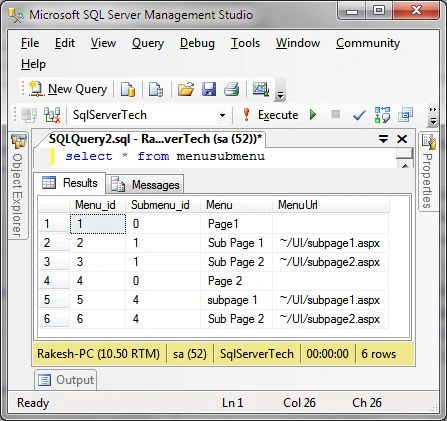
Figure 1: Database table
You will see in this table Menu_id, submenu_id, Menu name and Menu URL. Under this Page1 and Page2 is a parent menu and Sub Page1 and Sub Page2 is a child page. In this table the parent menu id is also provided in a sub menu id.
Step 2: Application Side
Now we will go to our web application and add a webpage to the application or project.
Step 3: Page Design Side
Now add a Menu control on a web page as in the following code snippet.
- <%@ Page Title="" Language="C#" MasterPageFile="~/MasterPage.Master" AutoEventWireup="true"
- CodeBehind="Menu.aspx.cs" Inherits="Test_WebApplication.UI.Menu" %>
- <asp:Content ID="Content1" ContentPlaceHolderID="head" runat="server"></asp:Content>
- <asp:Content ID="Content2" ContentPlaceHolderID="ContentPlaceHolder1" runat="server">
- <h1>Menu And SubMenu Example </h1>
- <asp:Menu ID="HMenu" runat="server" Orientation="Horizontal" >
- <StaticSelectedStyle />
- <LevelMenuItemStyles>
- <asp:MenuItemStyle />
- </LevelMenuItemStyles>
- </asp:Menu>
- </asp:Content>
Now go to the page code and write the following code for menu and submenu. Get the values from the datatable and display it in menu style on your current page.
Code:
- using System;
- using System.Collections.Generic;
- using System.Linq;
- using System.Web;
- using System.Web.UI;
- using System.Web.UI.WebControls;
- using System.Data;
- using System.Data.SqlClient;
- using System.Configuration;
- using System.IO;
- namespace Test_WebApplication.UI
- {
- public partial class Menu: System.Web.UI.Page
- {
- string constr = ConfigurationManager.ConnectionStrings["connstr"].ConnectionString;
- protected void Page_Load(object sender, EventArgs e)
- {
- if (!IsPostBack)
- {
- DataTable dt = GetMenu(0);
- FillMenu(dt, 0, null);
- }
- }
- private DataTable GetMenu(int Submenu_id)
- {
- using(SqlConnection con = new SqlConnection(constr))
- {
- using(SqlCommand cmd = new SqlCommand("sp_Menu", con))
- {
- SqlDataAdapter sd = new SqlDataAdapter();
- DataTable dtMenu = new DataTable();
- cmd.Parameters.AddWithValue("@Submenu_id", Submenu_id);
- cmd.CommandType = CommandType.StoredProcedure;
- cmd.Connection = con;
- sd.SelectCommand = cmd;
- sd.Fill(dtMenu);
- return dtMenu;
- }
- }
- }
- private void FillMenu(DataTable dt, int Submenu_id, MenuItem MenuItem) {
- string Page = Path.GetFileName(Request.Url.AbsolutePath);
- foreach(DataRow row in dt.Rows)
- {
- MenuItem Menu = new MenuItem
- {
- Value = row["Menu_id"].ToString(),
- Text = row["Menu"].ToString(),
- NavigateUrl = row["MenuUrl"].ToString(),
- Selected = row["MenuUrl"].ToString().EndsWith(Page, StringComparison.CurrentCultureIgnoreCase)
- };
- if (Submenu_id == 0)
- {
- HMenu.Items.Add(Menu);
- DataTable dtSubmenu = this.GetMenu(int.Parse(Menu.Value));
- FillMenu(dtSubmenu, int.Parse(Menu.Value), Menu);
- } else {
- MenuItem.ChildItems.Add(Menu);
- }
- }
- }
- }
- }
Now we will run the page and display the menu and submenu items on a page.
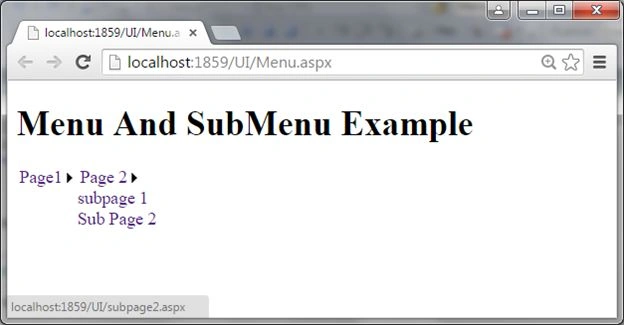
Figure 2: output
Click on the sub menu items and access other pages of the application.
thanhd ducPosted Sep 29, 2020, 9:23 AM
Menu - Sub - Sub Child ?? How ?? ( please help me )
kalai romiPosted Sep 24, 2019, 2:09 AM
Good article sir..
SubashPosted Mar 27, 2017, 8:41 PM
Good Article this will also helpful to give rights based on different type of users
Khan Abrar AhmedPosted Jun 28, 2015, 6:02 AM
Nice Artical
Santhakumar MunuswamyPosted Jun 27, 2015, 10:57 AM
Thanks for good article:)
Sibeesh VenuPosted Jun 27, 2015, 12:33 AM
Good one.
Debendra DashPosted Jun 26, 2015, 1:41 PM
great.........
Pankaj Kumar ChoudharyPosted Jun 26, 2015, 10:16 AM
Nice explain Sir........
Jaipal ReddyPosted Jun 26, 2015, 8:26 AM
Nice one
Narasimha Reddy ChennupalliPosted Jun 26, 2015, 7:04 AM
Good one..