

Introduction
In this article, we are going to explore how to deploy a React app to GitHub pages.
What are GitHub pages?
- GitHub Pages is a static website hosting service and it is free of charge.
- It takes resources like HTML, CSS, and JavaScript files directly from the GitHub repository.
- We can host our website on GitHub's with github.io domain or our own custom domain name.
Types of GitHub Pages
- There are three types of GitHub Pages sites which are,
- User site
- Project site
- Organization site.
- Project sites are connected to a specific project hosted on GitHub, such as a JavaScript library.
- User and organization sites are connected to a specific GitHub account.
User Site
- The user site is connected to a specific GitHub account.
- You should have a user account on GitHub.
- To publish a user site, you must create a GitHub repo owned by your user account and repo name should be username.github.io. For Example, If your user name is TestName your repo name should be testname.github.io.
- If you are not using any custom domain, then your website will be available at https://username.github.io.
Organization Site
- The organization site is connected to a specific GitHub account.
- To publish an organization site, you must create a repo owned by an organization and the repo name should be organization.github.io.
- If you are not using any custom domain, then your website will be available at https://organization.github.io.
- You can create only one user or organization site for each user account on GitHub. But we can create unlimited Project sites which can be owned by an organization or a user account.
How to Publish the React application on GitHub Pages
To publish the user site, follow the below steps.
- Create an Account in GitHub.
- Create Repo in GitHub where the repo name should be username.github.io
- Create React Application.
- Deploy the React Application using GitHub Pages.
- Commit and Push the codebase (React Application) into GitHub repo.
Step 1 - Create an Account in GitHub
- Open the GitHub link
- Create an account using your personal email
- To secure your GitHub account, you can enable MFA (multi-factor authentication) login for your account.
Step 2 - Create Repo in GitHub
- Login to your GitHub account.
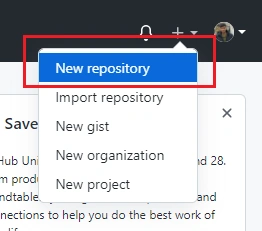
- Create the new repo by clicking the "+" icon at the right top of the page.
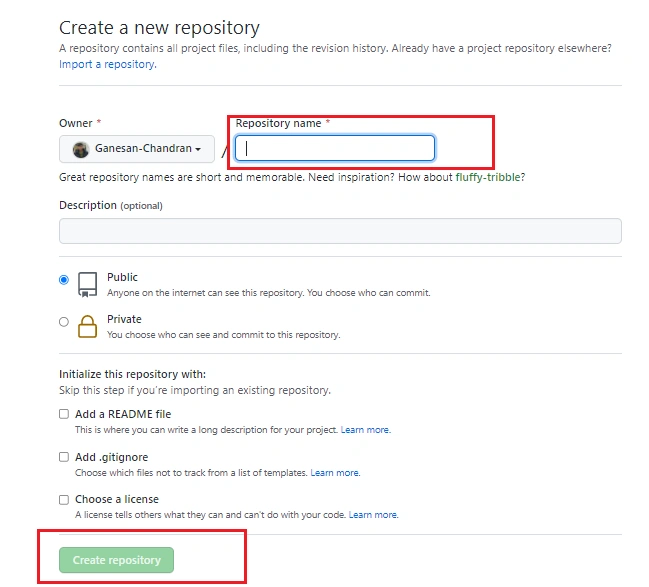
- Enter the repo name as yourusername.github.io and choose whether the repo should be public or private.

Vaibhav ParasharPosted Aug 10, 2023, 5:43 AM
Branch is showing only main and none but not gh-pages. What to do?
Nadine Amanda OrtegaPosted Apr 17, 2022, 4:39 AM
I think this is kinda out dated. it should be npm install gh-pages --save-dev
Jay AyersonPosted Feb 16, 2022, 6:12 AM
I have an existing react repo, and I want to deploy it as a project. This list of steps doesn't work. Tips please?
Luis CastellonPosted Jan 17, 2022, 4:21 PM
Once I ran the npm run deploy commands the page that is getting showed in github pages is the readme. How can I fix that?
Ramakrishnan RPosted Oct 13, 2021, 10:54 AM
Good article!