

What is Local Cache?
Local cache is a new feature of Azure app Service, as by using it, the site content is read, written from the local virtual machine instance to improve the performance and instead of retrieving it from Azure storage, Azure storage is used to store app Service content.
When to use local cache feature?
When the Applications in app Service has the static data as read data, not the writable data and the Application has the demand of high performance, then the local cache is the suitable option.
Below are some points related to local cache,
- Site and the site extension folder’s content of Application in Azure app Service are locally cached in local cache.
- The local cache content is stored on the local virtual machine instance; i.e., D drive.
- The local cache is created on the virtual machine's start and restart.
- The default size of the local cache is 300 mb and maximum size is 1 GB. If Web Application content is more than 1 GB, this option will not work.
- The Web Application reads and writes the data from the local cache. However, any changes done to the local cache data will be discarded, when the Web app moves the virtual machines or gets restarted.
Note: The local cache should not be used for apps which store the mission-critical data in the content store (Azure storage). - Local cache is one directional sync, and syncs only from the content store (Azure storage) content to the local disk content and not vice versa.
To complete this tutorial, you'll need the following,
- An active Azure account. (If you don't have an account, you can create a free trial account in just a couple of minutes. For details, see Azure Free Trial.)
How to enable local cache in app Service, using Azure portal:
- Login to Azure Portal.
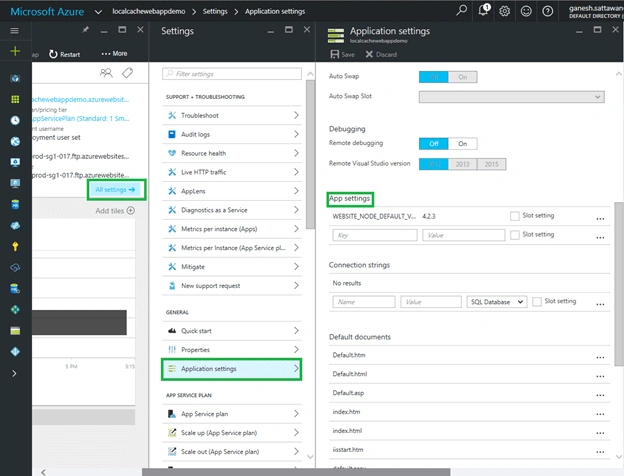
- Got to the Web app for which the Local Cache has to enable. In the Web app blade, go to All Settings. In the settings blade, select Application settings, which opens the Application settings blade, as shown in the image, given below:
- In the highlighted App settings section, enter the WEBSITE_LOCAL_CACHE_OPTION in key. In Value text box, save the changes as shown in the image, given below. Select Slot setting checkbox, if we have to keep this setting as slot specific, otherwise this setting will swap when we have the deployment slots other than production, and we perform swapping.
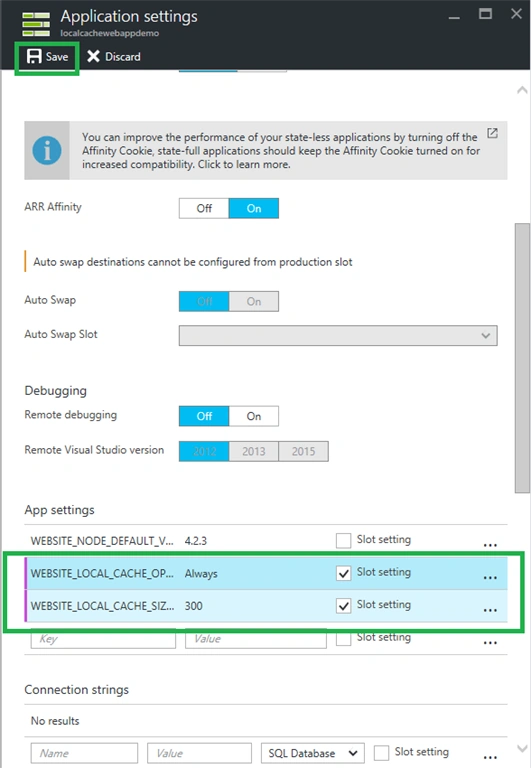
I have added both the settings WEBSITE_LOCAL_CACHE_OPTION and WEBSITE_LOCAL_CACHE_SIZEINMB. If we don’t provide WEBSITE_LOCAL_CACHE_SIZEINMB, the default value for it will be 300 MB. If we need more size, up to 1GB, we need to provide this setting. Finally click Save to save App setting changes that we made to enable the local cache.
Anu VPosted Aug 21, 2016, 11:59 PM
Nice..
Prasanna MuraliPosted Jul 29, 2016, 11:36 AM
Nice one..
Vignesh ManiPosted Jul 29, 2016, 8:43 AM
Nice