

In this article we will be seeing how to enforce unique value for a list or
library column in SharePoint 2010 using C# and powershell.
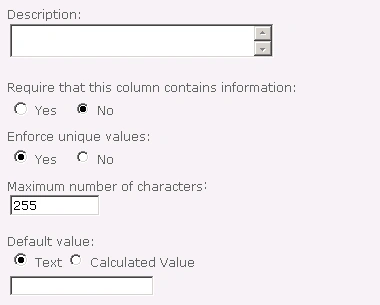
In SharePoint 2010 we can enforce uniqueness on values in a list or library
column, effectively creating a primary key. When you create a column in the list
or library you could see an option "Enforce Unique Values" where you can enforce
uniqueness. When you enforce uniqueness on a Lookup column, the list item in the
target list can have only one list item looking up to it from the child list.
Using C#:
- Open Visual Studio 2010.
- Create Console application.
- Replace the code with the following.
using System;
using System.Collections.Generic;
using System.Linq;
using System.Text;
using Microsoft.SharePoint;namespace EnforceUniqueValue
{
class Program
{
static void Main(string[] args)
{
using (SPSite site = new SPSite("http://serverName:1111/"))
{
using (SPWeb web = site.RootWeb)
{
SPList list = web.Lists.TryGetList("cl");
SPField field = list.Fields["TestCol"];
field.Indexed = true;
field.EnforceUniqueValues = true;
field.Update();
}
}
}
}
}
- Hit F5.
Using PowerShell:
$siteURL="http://serverName:1111/"
$listName="cl"
$fieldName="TestCol"
$site=Get-SPSite $siteURL
$web=$site.RootWeb
$list=$web.Lists.TryGetList($listName)
$field=$list.Fields[$fieldName]
$field.Indexed=$true
$field.EnforceUniqueValues=$true
$field.Update()
Join the conversation! Your thoughts help the community grow.