

Introduction
In this article, we will see How to export an HTML table in Excel using jquery with web applications; the ability to export HTML tables to Excel can be helpful since it makes it simple for users to download and analyze data. A quick and effective method for exporting HTML tables to Excel can be made with jQuery.
Using the jQuery-Table2Excel third-party plugin is one way to accomplish this. By simply invoking a function on a button click event, this plugin enables you to convert HTML tables to Excel. Using this plugin, let's look at how to export an HTML table to Excel. Create an HTML grid table you want to export and include a button that triggers the export function using the button's ID.
<h3 class="table-header font-weight-bold"> <u> User Management </u> </h3>
<div class="Row" style="display: flex; justify-content: space-between;">
<div class="col-sm-6 ">
<button class="btn btn-secondary btn-lg" type="button" aria-pressed="true"> <a class="text-white" href="Add_User"> Add User </a></button>
</div>
<div class="col-sm-6 ">
<button type="button" class="btn btn-primary" id="btnExport" data-kt-menu-trigger="click" data-kt-menu-placement="bottom-end" style="padding: 9px; margin-left: 78%;">Export Report
</button>
</div>
</div>
<section class="content">
<div class="row">
<div class="col-xs-12">
<div class="box">
<div class="box-body table-responsive table mt-2" id="dataTable" role="grid" aria-describedby="dataTable_info">
<table class="table table-sm table-hover my-0 mydatatable" id="mydatatable" style=" text-align:center">
<thead class="text-center">
<tr>
<th>S.No</th>
<th>Name</th>
<th>Email</th>
<th>Phone</th>
<th>Type</th>
<th>Created Date</th>
</tr>
</thead>
<tbody>
@{
int x = 1;
@foreach (var item in Model)
{
if ([email protected])
{
<tr>
<td>@x</td>
<td>@item.Name</td>
<td>@item.Email</td>
<td>@item.Phone</td>
<td>@item.Type</td>
<td>@item.CreatedDate.ToShortDateString()</td>
</tr>
x++;
}
}
}
</tbody>
</table>
</div>
</div>
</div>
</div>
</section>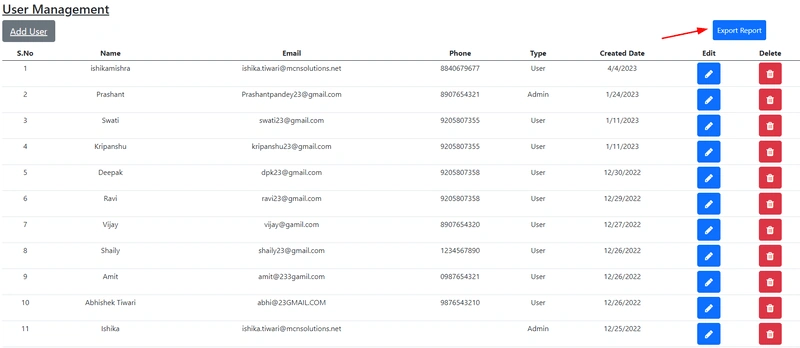
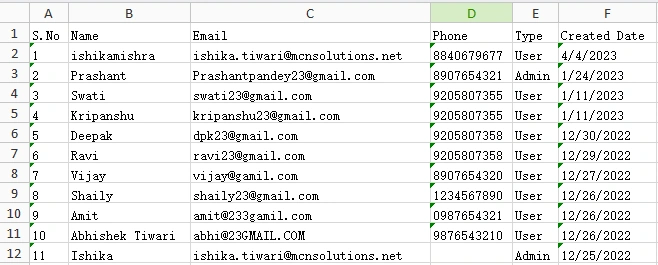
dwf austinPosted Oct 19, 2023, 1:22 AM
Hi Ishika. I was able to use your code for exports but the problem is that I have pagination setup and it only exports the current page. I've searched and applied different scripts to export the tables in entirety but none are working. Do you have a modified script where it exports all of the tables in a pagination environment?