

This article shows how to export multiple data tables to multiple worksheets inside a single excel file in ASP.Net C#.
The following are the two data tables that I will export.
Employee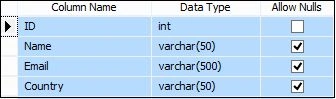
Script of Employee Table
- CREATE TABLE [dbo].[Employee]
- (
- [ID] [int] IDENTITY(1, 1) NOT NULL,
- [Name] [varchar](50) NULL,
- [Email] [varchar](500) NULL,
- [Country] [varchar](50) NULL
- ) ON [PRIMARY] GO
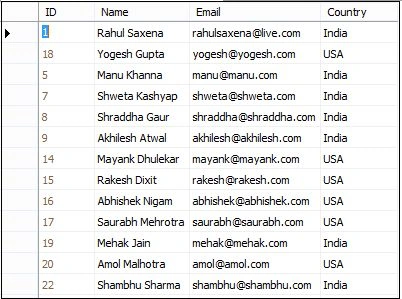
OrderDetails
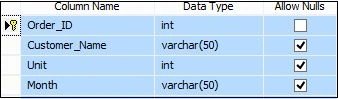
Script of OrderDetails Table
- CREATE TABLE [dbo].[OrderDetails](
- [Order_ID] [int] IDENTITY(1,1) NOT NULL,
- [Customer_Name] [varchar](50) NULL,
- [Unit] [int] NULL,
- [Month] [varchar](50) NULL,
- CONSTRAINT [PK_OrderDetails] PRIMARY KEY CLUSTERED
- (
- [Order_ID] ASC
- )WITH (PAD_INDEX = OFF,
- STATISTICS_NORECOMPUTE = OFF, IGNORE_DUP_KEY = OFF,
- ALLOW_ROW_LOCKS = ON, ALLOW_PAGE_LOCKS = ON) ON [PRIMARY]
- ) ON [PRIMARY]
- GO
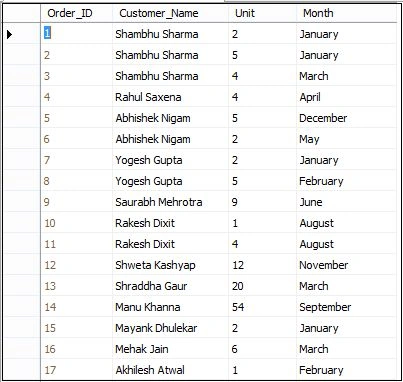
Now, I will add a closedXML reference to my application.
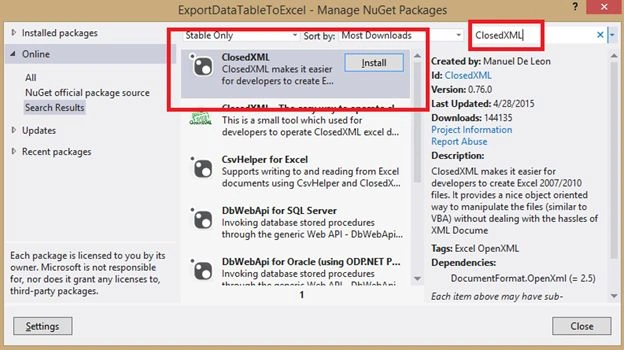
.aspx code
- <%@ Page Language="C#" AutoEventWireup="true" CodeBehind="Default.aspx.cs" Inherits="ExportDataTableToExcel.Default" %>
- <!DOCTYPE html>
- <html
- xmlns="http://www.w3.org/1999/xhtml">
- <head runat="server">
- <title>Export Multiple Data Tables to Multiple worksheets inside a single Excel File</title>
- </head>
- <body>
- <form id="form1" runat="server">
- <div>
- <table border="0" cellpadding="5" cellspacing="5" style="border: solid 2px Red; background-color: skyblue; width: 100%;">
- <tr>
- <td colspan="2" style="background-color: #f00; color: white; font-weight: bold; font-size: 12pt; text-align: center; font-family: Verdana;">Export multiple Data Tables to Multiple worksheets inside a single Excel File</td>
- </tr>
- <tr>
- <td style="text-align: center;">
- <asp:Button ID="Button1" runat="server" Text="Click To Export Data " OnClick="btn_Export_Click" />
- </td>
- </tr>
- </table>
- </div>
- </form>
- </body>
- </html>
.aspx.cs code
- using ClosedXML.Excel;
- using System;
- using System.Collections.Generic;
- using System.Configuration;
- using System.Data;
- using System.Data.SqlClient;
- using System.IO;
- using System.Linq;
- using System.Web;
- using System.Web.UI;
- using System.Web.UI.WebControls;
- namespace ExportDataTableToExcel {
- public partial class Default: System.Web.UI.Page {
- protected void Page_Load(object sender, EventArgs e) {
- }
- private DataTable getAllEmployeesList() {
- string constr = ConfigurationManager.ConnectionStrings["RConnection"].ConnectionString;
- using(SqlConnection con = new SqlConnection(constr)) {
- using(SqlCommand cmd = new SqlCommand("SELECT * FROM Employee ORDER BY ID")) {
- using(SqlDataAdapter da = new SqlDataAdapter()) {
- DataTable dt = new DataTable();
- cmd.CommandType = CommandType.Text;
- cmd.Connection = con;
- da.SelectCommand = cmd;
- da.Fill(dt);
- return dt;
- }
- }
- }
- }
- private DataTable getAllEmployeesOrderList() {
- string constr = ConfigurationManager.ConnectionStrings["RConnection"].ConnectionString;
- using(SqlConnection con = new SqlConnection(constr)) {
- using(SqlCommand cmd = new SqlCommand("SELECT * FROM OrderDetails ORDER BY Order_ID")) {
- using(SqlDataAdapter da = new SqlDataAdapter()) {
- DataTable dt = new DataTable();
- cmd.CommandType = CommandType.Text;
- cmd.Connection = con;
- da.SelectCommand = cmd;
- da.Fill(dt);
- return dt;
- }
- }
- }
- }
- public DataSet getDataSetExportToExcel() {
- DataSet ds = new DataSet();
- DataTable dtEmp = new DataTable("Employee");
- dtEmp = getAllEmployeesList();
- DataTable dtEmpOrder = new DataTable("Order List");
- dtEmpOrder = getAllEmployeesOrderList();
- ds.Tables.Add(dtEmp);
- ds.Tables.Add(dtEmpOrder);
- return ds;
- }
- protected void btn_Export_Click(object sender, EventArgs e) {
- DataSet ds = getDataSetExportToExcel();
- using(XLWorkbook wb = new XLWorkbook()) {
- wb.Worksheets.Add(ds);
- wb.Style.Alignment.Horizontal = XLAlignmentHorizontalValues.Center;
- wb.Style.Font.Bold = true;
- Response.Clear();
- Response.Buffer = true;
- Response.Charset = "";
- Response.ContentType = "application/vnd.openxmlformats-officedocument.spreadsheetml.sheet";
- Response.AddHeader("content-disposition", "attachment;filename= EmployeeAndOrderReport.xlsx");
- using(MemoryStream MyMemoryStream = new MemoryStream()) {
- wb.SaveAs(MyMemoryStream);
- MyMemoryStream.WriteTo(Response.OutputStream);
- Response.Flush();
- Response.End();
- }
- }
- }
- }
- }
- <?xml version="1.0"?>
- <!--
- For more information on how to configure your ASP.NET application, please visit
- http://go.microsoft.com/fwlink/?LinkId=169433
- -->
- <configuration>
- <system.web>
- <compilation debug="true" targetFramework="4.5" />
- <httpRuntime targetFramework="4.5" />
- </system.web>
- <connectionStrings>
- <add name="RConnection" connectionString="Server=INDIA\MSSQLServer2k8;database=TestDB;UID=sa; pwd=india;"/>
- </connectionStrings>
- </configuration>
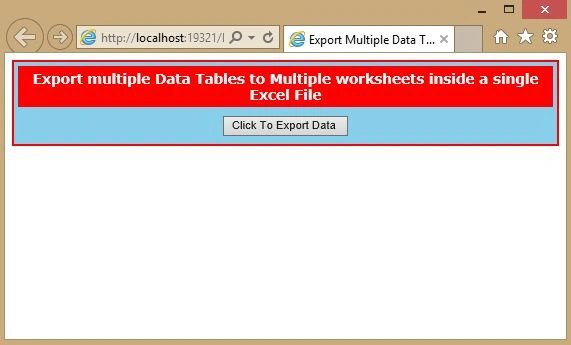
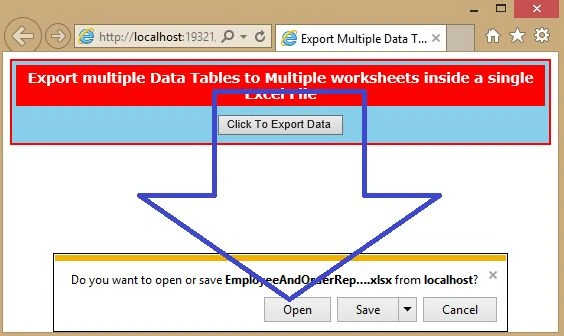
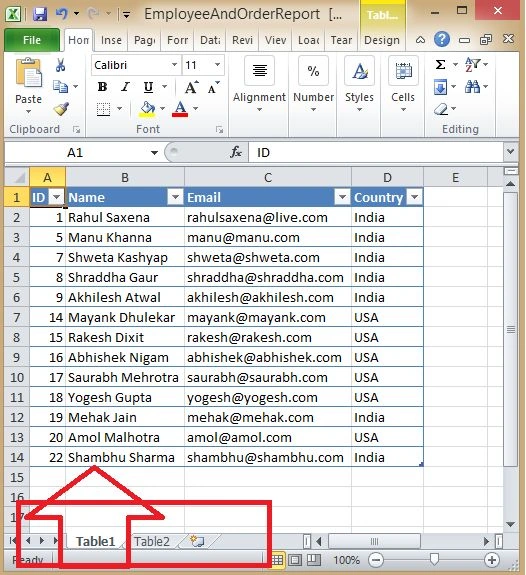
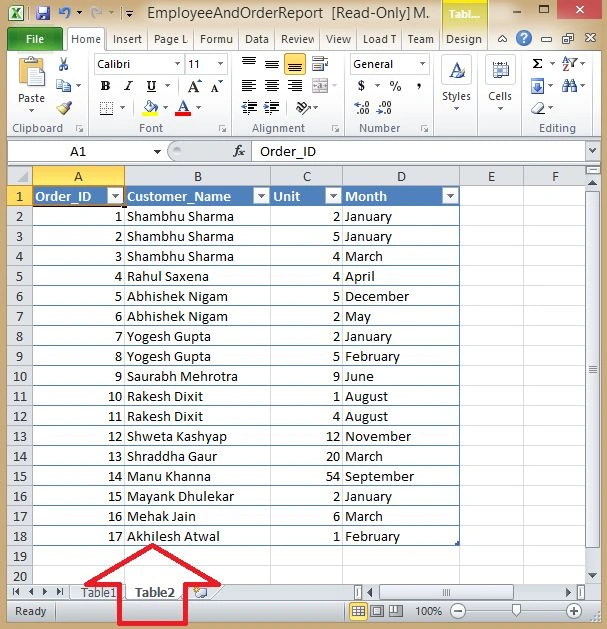
Now you can see both tables in separate worksheets in a single Excel sheet.
Usman AzamPosted Dec 25, 2019, 5:24 AM
Can i export multiple table with two dates in single excel file?
Sean McGriffPosted Dec 1, 2017, 7:44 PM
Thanks, this is great. Can you add a way to remove the Auto Filter and Theme from the data sets? I can do it with the following code, but it only works if there is only one data set. ws.table("Table1").ShowAutoFilter = False & ws.table("Table1").Theme = XLTableTheme.None - Thanks
PARIMAL MAHANTPosted Jul 5, 2017, 1:25 AM
It is not work for more then 5000 data
Nivas KhatalPosted Nov 15, 2016, 5:35 AM
How to set Header name for sheets plese and ho download it on particular floader/directory
Nivas KhatalPosted Nov 15, 2016, 5:33 AM
How to set Header Name for particulae Sheets
Salman BegPosted Nov 15, 2016, 4:13 AM
Nice article.Thanks for sharing @ Rahul Saxena
Salman BegPosted Nov 15, 2016, 2:02 AM
@gopal Surya:- It's so simple. if your DataTable dtEmp = new DataTable("Employee"); dtEmp = getAllEmployeesList(); and after that add your code like this dtEmp.TableName="Employee" then your tab name will be changed to Employee. thanks.
Ankita YadavPosted Mar 30, 2016, 7:22 AM
but how to add both the table data into single worksheet please give me reply
gopal SuryaPosted Feb 1, 2016, 1:33 AM
plese give reply sir
gopal SuryaPosted Feb 1, 2016, 1:10 AM
how to change that tab name from table1 and table2 to required tab name using c#
sushil kumarPosted Aug 24, 2015, 2:23 AM
this is nice but ..if i want more than 2 cell tab then how its possible ..Please give briefly
Swapnil DhamalPosted Aug 4, 2015, 2:02 AM
Hi Rahul..Grete article but its not working my MVC Project+Angularjs
Paras Mal MaliPosted Jun 25, 2015, 8:34 AM
hello dear , If i want to put up header in all work sheet like some text then. what should we do...
Paras Mal MaliPosted Jun 25, 2015, 8:33 AM
hello dear,
Rahul Kumar SaxenaPosted May 25, 2015, 6:31 AM
Thank u Nitin Tyagi
NitinPosted May 23, 2015, 8:57 AM
good show
Rahul Kumar SaxenaPosted May 22, 2015, 2:42 AM
Thanks Santhakumar Munuswamy
Santhakumar MunuswamyPosted May 21, 2015, 3:02 PM
Thanks for nice one
Rahul Kumar SaxenaPosted May 21, 2015, 2:10 PM
Thanks.Abhishek Jaiswal
Abhishek JaiswalPosted May 21, 2015, 9:22 AM
Informative article! :)