Introduction
SQL Server is one of the most powerful database management systems that store and retrieve data. At times, the DBAs are stuck with the "Recovery Pending" status of the database, which does not let them access it. The purpose of this article is to describe why it occurs and also how the issue can be fixed with steps.

An SQL database is said to be damaged if one or more of its core files become corrupted. Depending on the severity of the issue, the database will be marked with different states. Some of these states are:
- Online: While executing a query, if one of the database data files is damaged, it will remain online.
- Suspect: If during the startup of an SQL Server, a database cannot be recovered, it will be placed as a"suspect"
- Recovery Pending: In case the SQL Server is aware that database recovery is to be performed but cannot start because of some problem, the Server puts the DB into a 'Recovery Pending' state.
What Does SQL Server Recovery Pending State Mean?
The Recovery Pending state in MS SQL Server indicates that the database cannot start the recovery process due to missing files, resource constraints, or corruption issues. This is different from the Suspect state, which clearly shows there is corruption. Recovery Pending just means the recovery can't continue due to incomplete or inconsistent files.
Common Causes of SQL Server Recovery Pending State
- Insufficient Disk Space: The database recovery process may halt due to a lack of space on the server.
- Corrupted Log Files: Damaged or missing transaction log files can disrupt recovery.
- Power Failure or Crash: Unexpected shutdowns can lead to database inconsistency.
- Hardware Malfunctions: Disk errors or faulty storage devices can corrupt database files.
- Improper Shutdowns: Forceful termination of SQL Server processes can result in uncommitted transactions.
When a database is in this state, it becomes inaccessible, and immediate action is required to restore normal operations.
How Does SQL Server Recovery Work?
When an SQL Server starts or a database is restarted, it goes through a recovery process with three phases:
- Analysis: SQL Server reads the transaction log to determine which transactions need to be rolled forward or rolled back.
- Redo (Roll Forward): All committed transactions from the log are reapplied to the database to ensure consistency.
- Undo (Roll Back): Uncommitted transactions are rolled back to maintain a clean state.
Characteristics of a Database in the "Recovery Pending" State
- Database Inaccessible: The database is not available for use by applications or users.
- No Automatic Recovery: SQL Server is unable to initiate the automatic recovery process.
- Error Messages: Common error messages related to this state include:
- Error 9003: The log file is corrupt or missing.
- Error 1813: SQL Server cannot attach the database because some files are missing.
- Error 5123: The operating system returned an error while trying to access the database files.
How to Check if a Database is in Recovery Pending State?
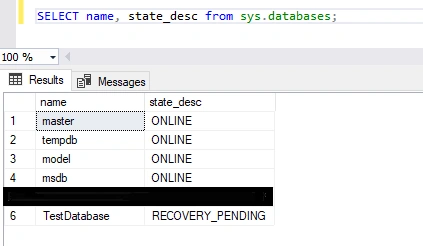
To verify the state of your SQL Server database, execute the below query:
SELECT name, state_desc FROM sys.databases;
This query lists all databases and their current states. If the database is marked as "RECOVERY_PENDING" you need to fix the issue.
Methods to Fix SQL Server Recovery Pending State
1. Ensure Sufficient Disk Space: First, check if the drive with the database files has enough free space. If not, free up some space or move the files to a drive with more storage.
2. Check SQL Server Permissions: Make sure the SQL Server service account has the right permissions to access the database files. Wrong permissions can block the recovery process.
3. Manually Bring the Database Online: You can attempt to resolve the issue by setting the database to Emergency mode and performing repairs. Follow these steps:
- Set the Database to Emergency Mode:
ALTER DATABASE [TestDatabase] SET EMERGENCY;
- Perform Consistency Check: Run DBCC CHECKDB to check for corruption:
DBCC CHECKDB([TestDatabase]);
- Repair the Database: If corruption is detected, use the REPAIR_ALLOW_DATA_LOSS option to repair the database:
ALTER DATABASE [TestDatabase] SET SINGLE_USER;
DBCC CHECKDB([TestDatabase], REPAIR_ALLOW_DATA_LOSS);
ALTER DATABASE [TestDatabase] SET MULTI_USER;
Note: The REPAIR_ALLOW_DATA_LOSS option may result in some data loss. Always back up your database before using this option.
4. Restore from a Backup: If you have a recent backup of the database, restoring it can be the safest way to resolve the issue:
RESTORE DATABASE [TestDatabase] FROM DISK = 'BackupFilePath.bak';
5. Use third-party recovery tool: When there are problems with SQL Server, like database corruption or the "Recovery Pending" state, manual troubleshooting methods, such as restoring from backups, running DBCC CHECKDB, or detaching and reattaching database files, may not always help. In these situations, special tools like Stellar Repair for MS SQL can be very important for recovering essential data accurately and quickly. In situations where data is accidentally deleted, specialized recovery techniques can help retrieve the deleted records during the database repair process, ensuring that important information is not permanently lost.
How SQL Database Repair Tools Can Assist in Recovery
- Repair tools help fix corrupted MDF and NDF files and restore the database without changing its original structure..
- The tool can bypass the issues and recover the data even if SQL Server cannot bring it online.
- Unlike manual methods that may risk losing data, the recovery process ensures no data loss..
- Whether you are using an old or the latest version, the tool supports all versions and ensures smooth recovery.
- In situations where data is accidentally deleted, specialized recovery techniques can help retrieve the deleted records during the database repair process, ensuring that important information is not permanently lost.
Preventive Measures
- Regularly back up your database to avoid data loss during unforeseen issues.
- Monitor disk usage and ensure sufficient free space.
- Use reliable storage devices to minimize hardware-related corruption.
- Always shut down SQL Server gracefully to prevent uncommitted transactions.
Conclusion
To fix a SQL Server database in a 'Recovery Pending' state, you need to find the root cause and take the right steps. Manual fixes like repairing the database or restoring from backups can help, but may not work for heavily corrupted databases. Always keep regular backups and check disk space to avoid these problems.


Tuhin PaulPosted Jan 26, 2025, 6:12 PM
Thank you for this detailed and informative article on SQL Server Recovery Pending State. Your explanation of the causes, characteristics, and methods to fix this issue is extremely helpful in understanding how to resolve database corruption and recovery problems.
Emmmanuel FIADUFEPosted Jan 24, 2025, 1:07 PM
That's great article, thank you Mr Mohanty