

Introduction
This article shows how to generate a barcode in Windows Forms using C# using an IDAutomationCode39 file to generate the barcode.
Initial Chamber
Open Visual Studio 2010, go to File, New, then Projects. Under Visual C#, click Windows. Select Windows Forms Application.
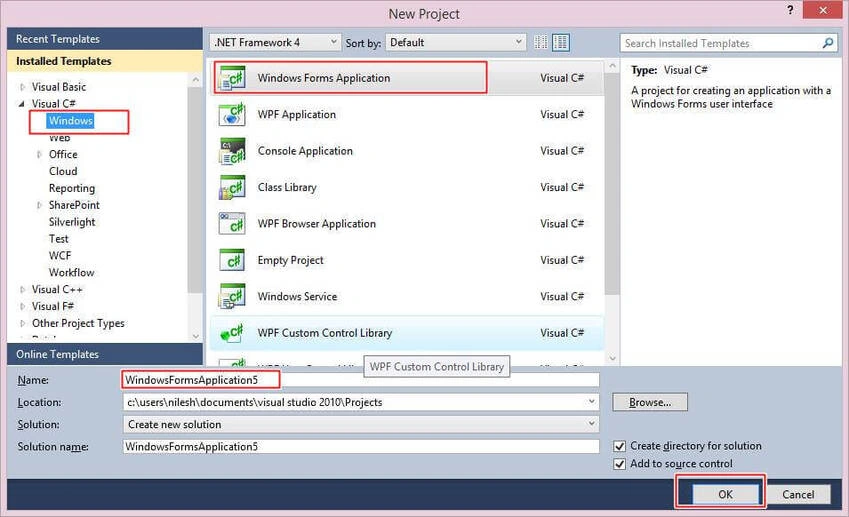
You can change the name of the project and put your project in a different location too. And then press OK.
Design Chamber
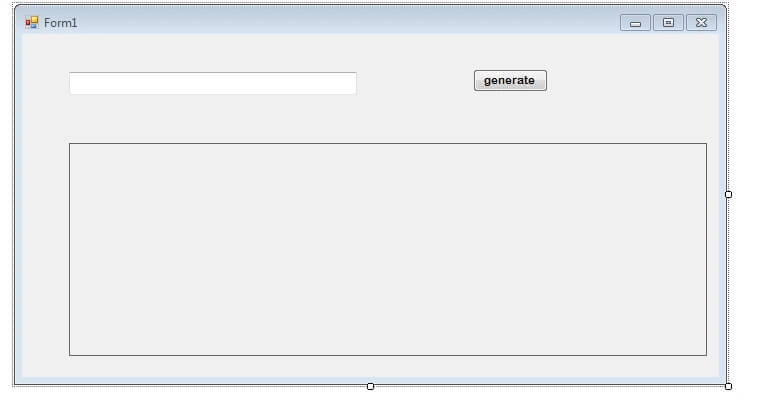
In this chamber you need to drag and drop some controls from the toolbox, drag one TextBox, a button and a picture box.
Once you make it out with this control, set the control in the form so that it looks good. Your design will look as in the following screenshot.
Code Chamber
In the code chamber, you need to write the code, like whatever the TextBox contains is printed in the form of the bardcode on a button click. To make this application you first need to install the IDAutomationCode39.exe file. You can get this file from this article as I am attaching that .exe with my source code or you can get this file from the link IDAutomationCode.
Open your code section and start writing the following code so that you can get to the solution.
using System;
using System.Collections.Generic;
using System.ComponentModel;
using System.Data;
using System.Drawing;
using System.Linq;
using System.Text;
using System.Windows.Forms;
using System.IO;
using System.Drawing.Imaging;

namespace Barcode_demo {
    public partial class Form1: Form {
        public Form1() {
            InitializeComponent();
        }

        private void button1_Click(object sender, EventArgs e) {
            string barcode = textBox1.Text;

            Bitmap bitm = new Bitmap(barcode.Length * 45, 160);
            using(Graphics graphic = Graphics.FromImage(bitm)) {


                Font newfont = new Font("IDAutomationHC39M", 20);
                PointF point = new PointF(2f, 2f);
                SolidBrush black = new SolidBrush(Color.Black);
                SolidBrush white = new SolidBrush(Color.White);
                graphic.FillRectangle(white, 0, 0, bitm.Width, bitm.Height);
                graphic.DrawString("*" + barcode + "*", newfont, black, point);


            }

            using(MemoryStream Mmst = new MemoryStream()) {


                bitm.Save("ms", ImageFormat.Jpeg);
                pictureBox1.Image = bitm;
                pictureBox1.Width = bitm.Width;
                pictureBox1.Height = bitm.Height;


            }

        }
    }
}
Once you install the IDAutomationCode39 file, just ensure you restart your system, otherwise Visual Studio will throw an error message. You may get stuck with the following error message.
“Only TrueType fonts are supported and this is not a TrueType font”
Resolve the error by the following two methods
- After Installing restart your system or Visual Studio.
- Or you need to embed this code.
private void Form1_Load(object sender, System.EventArgs e)
{

    label1.Font = new Font("IDAutomationHC39M", 12, FontStyle.Regular);

}
OUTPUT

I hope you like this. Have a good day. Thank you for reading.
faaizan ahmadPosted Jan 10, 2020, 12:30 PM
Only text is displaying
faaizan ahmadPosted Jan 10, 2020, 12:30 PM
Only text displaying
Laxmidhar SahooPosted Dec 23, 2019, 10:52 PM
Thanks for a good article
charan cherryPosted Oct 18, 2019, 4:35 AM
How can I display a list of barcodes?
prabhu gPosted Jan 8, 2019, 3:10 AM
Nice its wonderfully working
shyam kumarPosted Mar 3, 2018, 4:10 AM
HOW TO CREATE BARCODE IN PURCHASE FORM PLZ HELM ME
Sagar Pandurang KapPosted Dec 15, 2017, 3:38 AM
Working fine and thanks a lott
Ponlawoot DueanjamPosted Aug 1, 2017, 11:45 PM
Just only text showing not barcode , please advise me.
Abdul Amin KhanPosted Mar 18, 2017, 1:17 AM
Only Written Text Showing not Barcode
Arul RPosted Oct 28, 2015, 5:34 AM
Good one !!!
Shakti SaxenaPosted Sep 16, 2015, 9:31 AM
awesome
Santhakumar MunuswamyPosted Aug 16, 2015, 2:36 AM
Nice Article. Thanks for sharing
Yashwanth MuthineniPosted Aug 14, 2015, 12:47 AM
useful one...thanks for sharing
Humayun Kabir MamunPosted Aug 14, 2015, 12:42 AM
Nice...
RakeshPosted Aug 14, 2015, 12:00 AM
Good one
Karthikeyan KPosted Aug 13, 2015, 7:53 AM
Thanks for sharing...
Ankit BansalPosted Aug 13, 2015, 7:41 AM
good one..
Vaikesh K PPosted Aug 13, 2015, 6:42 AM
Nice one
Rajeesh MenothPosted Aug 13, 2015, 6:18 AM
Cool..good one
Pankaj Kumar ChoudharyPosted Aug 13, 2015, 6:07 AM
Nice Explain Sir..........