

In this article we will see how to programmatically get a specific user's profile property for a user using CSOM in SharePoint 2013.
Introduction
In SharePoint 2010 using the client-side object model we are unable to retrieve the user profile properties whereas in SharePoint 2013 they have added a new assembly for the user profile service. Using "Microsoft.SharePoint.Client.UserProfiles.dll" located in hive 15 of the ISAPI folder we are able to retrieve the user profile properties using CSOM.
(Client-Side Object Model). In this article we will see how to programmatically get a specific user's profile property for a user using CSOM in SharePoint 2013.
Prerequisites
The following are the prerequisites:
- SharePoint 2013.
- Visual Studio 2012.
- User Profile Service application provisioned.
- User profiles should be created.
I have created a user profile whose account name is "Pai". In this article we will see how to retrieve a specific user's profile property (Account Name) for the user "Pai" using the Client-Side Object Model.
Create a console application in Visual Studio 2012 using the following:
- Open Visual Studio 2012 (Run as administrator).
- Go to File=> New => Project.
- Select Console Application in the Visual C# node from the installed templates.
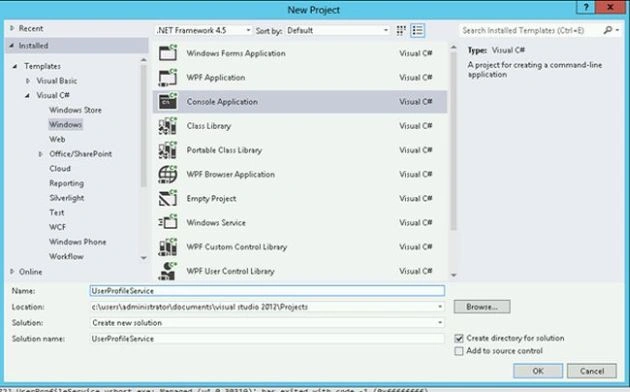
- Enter the Name and click on Ok.
- In the Solution Explorer, right-click on the References folder and then click on Add Reference.
- Add the following assemblies from hive 15 (C:\Program Files\Common Files\microsoft shared\Web Server Extensions\15\ISAPI).
a. Microsoft.SharePoint.Client.dll
b. Microsoft.SharePoint.Client.Runtime.dll
c. Microsoft.SharePoint.Client.UserProfiles.dll - Open Program.cs file and replace the code with the following:
using System;
using System.Collections.Generic;
using System.Linq;
using System.Text;
using System.Threading.Tasks;
using Microsoft.SharePoint.Client;
using Microsoft.SharePoint.Client.UserProfiles;
namespace UserProfileService
{
class Program
{
static void Main(string[] args)
{
//// String Variable to store the siteURL

Kuppurasu NagarajPosted May 26, 2016, 12:42 PM
Nice Sharing..
Gowtham RajamanickamPosted Apr 8, 2016, 9:20 AM
Good one..
Chris GhysbrechtPosted Sep 28, 2015, 6:08 AM
Hi, I tried this solution, adapted it to our environment, but I seem to get an error: "(403) Forbidden". Do you know where this comes from? or how I can get around it?