

What is fault Contract?
A Fault Contract is a way to handle an error/exception in WCF. In C# we can handle the error using try and catch blocks at the client-side. The purpose of a Fault Contract is to handle an error by the service class and display in the client-side. Whenever the client makes a call to a service class and an unexpected exception comes such as, SQL Server is not responding, or Divide by zero; in this case, the service class throws an exception to the client using the Fault Contract.
By default when we throw an exception from a service, it will not reach the client. WCF provides the option to handle and convey the error message to the client from a service using a SOAP Fault Contract.
To support SOAP Faults, WCF provides the FaultException class. This class has two forms:
- FaultException: to send an untyped fault back to the caller
- FaultException<T>: to send a typed fault data to the client. It is basically a Generic Type.
Syntax
- [OperationContract]
- [FaultContract(typeof(MyException))]
- string getDetails(int value);
The Fault Contract sample demonstrates how to communicate error information from a service to a client. The sample is based on the, with some additional code added to the service to convert an internal exception to a fault.
What is the use of FaultContract?
In ASP.Net, C#, and VB.Net it's very simple to handle an exception just by adding the simple Try & Catch blocks. But when you talk about the WCF Service if an unexpected error occurs (like Server not responding properly and divide by zero) in a WCF Service then the exception details can be passed to the client using a Fault Contract.
FaultContract inherits from the FaultContractAttribute Class.
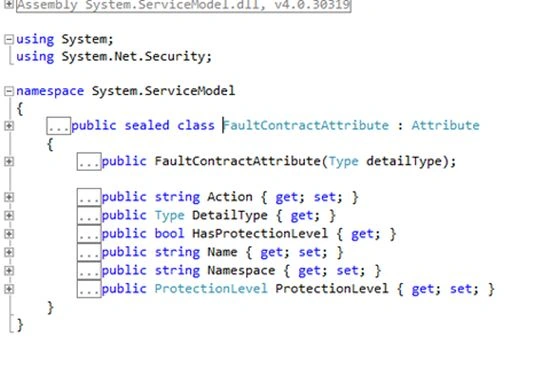
Now we are going to implement the Fault Contract with database connectivity
Step 1: Database Setup
Create a table named EMPLOYEE with column names EMP_ID and EMP_NAME. We will create a service to input the user id and get the name of the employee.
- SET ANSI_NULLS ON
- GO
- SET QUOTED_IDENTIFIER ON
- GO
- SET ANSI_PADDING ON
- GO
- CREATE TABLE [DBO].[EMPLOYEE](
- [EMP_ID] [INT] NULL,
- [EMP_NAME] [VARCHAR](50) NULL
- ) ON [PRIMARY]
- GO
- SET ANSI_PADDING OFF
- GO
- INSERT INTO EMPLOYEE(EMP_ID,EMP_NAME) VALUES(1,'AMIT')
- INSERT INTO EMPLOYEE(EMP_ID,EMP_NAME) VALUES(2,'KIRTI')
Devesh PandeyPosted Dec 28, 2017, 9:34 AM
Awsum sir!!!!!!!!!!!
Amit TiwariPosted May 31, 2016, 7:58 AM
Thanks Shubham
shubham pathakPosted Mar 3, 2016, 7:32 AM
Nice Explanation :)
Ramesh GaurPosted Apr 30, 2013, 12:09 PM
Nice Article.
Jagdish SaxenaPosted Apr 30, 2013, 7:25 AM
Good Job Amit.