

In this article, I have described a few things, like inline edit, cloning row items, and updating them to SharePoint lists, using AngularJS. After going through AngularJS dynamic table with add/remove action, we have created the table but with the dynamic content fetched from SharePoint list. To connect with SharePoint from AngularJS, we have used the scripts in this article. Without stopping there, we continued to implement in-line edit/ update, followed by trying to clone a row. Finally, everything can be updated to SharePoint List.
Steps to follow
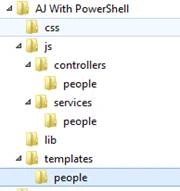
- Create MVC project structure, using the article- AngularJS in Content Editor Web Part.
- Create a SharePoint List as mentioned in Step 1.

- To deploy the files to SharePoint, I got some from PowerShell and modified to copy AngularJS files to SharePoint Style Library (Attached).
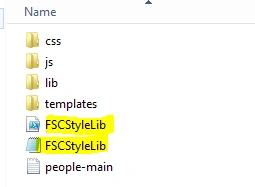
- Source code is attached that includes scripts for PDF Creation and Upload PDF to SharePoint.
- AngularJS view is created, as shown below.
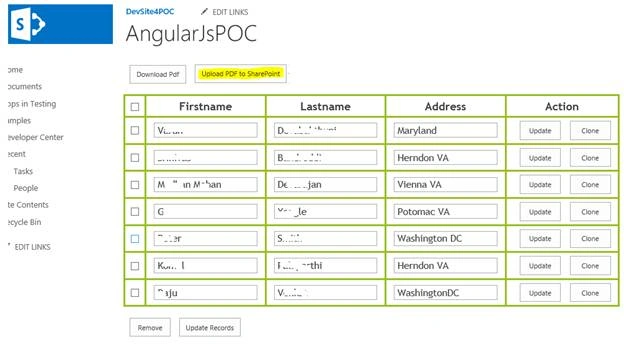
Creation of the AngularJS view
People-main.txt
- <link href="http//w-3427994040/sites/DevSite4POC/Style%20Library/AJProject/css/style.css" rel="stylesheet" type="text/css">
- <script src="http//w-3427994040/sites/DevSite4POC/Style%20Library/AJProject/lib/angular.min.js" type="text/javascript"></script>
- <script src="http//w-3427994040/sites/DevSite4POC/Style%20Library/AJProject/lib/angular-route.min.js" type="text/javascript"></script>
- <script src="http//w-3427994040/sites/DevSite4POC/Style%20Library/AJProject/lib/angular-uuid.js" type="text/javascript"></script>
- <script type="text/javascript" src="http//w-3427994040/sites/DevSite4POC/Style%20Library/AJProject/lib/pdfmake.js"></script>
- <script type="text/javascript" src="http//w-3427994040/sites/DevSite4POC/Style%20Library/AJProject/lib/vfs_fonts.js"></script>
- <script src="http//w-3427994040/sites/DevSite4POC/Style%20Library/AJProject/js/app.js" type="text/javascript"></script>
- <script src="http//w-3427994040/sites/DevSite4POC/Style%20Library/AJProject/js/services/baseSvc.js" type="text/javascript"></script>
- <script src="http//w-3427994040/sites/DevSite4POC/Style%20Library/AJProject/js/services/people/people.js" type="text/javascript"></script>
- <script src="http//w-3427994040/sites/DevSite4POC/Style%20Library/AJProject/js/controllers/people/allinone.js" type="text/javascript"></script> // modified by Madhan Mohan Devarajan
- <div data-ng-app="peopleApp" ng-controller='allPeopleCtrl'> <button ng-click="downloadPdf()">Download Pdf</button> <button ng-click="uploadPdf()">Send PDF as Email Attachment</button>
- <div data-ng-view class="people-app"></div> <br/> </div>
- // modified by Madhan Mohan Devarajan
- < divclass = "all-people" > < divclass = "container" > < divclass = "row" > < divclass = "col-md-12" > < divclass = "panel panel-default" > < divclass = "panel-body" > < tableclass = "table table-striped table-bordered" > < thead > < tr > < th > < inputtype = "checkbox"
- data - ng - model = "selectedAll"
- ng - click = "checkAll()" / > < /th> < th > Firstname < /th> < th > Lastname < /th> < th > Address < /th> < th > Action < /th> < /tr> < /thead> < tbody > < trdata - ng - repeat = "personalDetail in personalDetails" > < td > < inputtype = "checkbox"
- data - ng - model = "personalDetail.selected" / > < /td> < td > < inputtype = "text"
- class = "form-control"
- data - ng - model = "personalDetail.FirstName"
- required / > < /td> < td > < inputtype = "text"
- class = "form-control"
- data - ng - model = "personalDetail.LastName"
- required / > < /td> < td > < inputtype = "text"
- class = "form-control"
- data - ng - model = "personalDetail.Address"
- required / > < /td> < td > < inputtype = "button"
- class = "btnbtn-danger pull-right"
- data - ng - click = "updateRecord(personalDetail)"
- value = "Update" / > < inputtype = "button"
- class = "btnbtn-danger pull-right"
- data - ng - click = "addNew(personalDetail)"
- value = "Clone" / > < /td> < /tr> < /tbody> < /table> < br / > < divclass = "form-group" > < inputng - hide = "!personalDetails.length"
- type = "button"
- class = "btnbtn-danger pull-right"
- ng - click = "remove()"
- value = "Remove" / > < inputng - hide = "!personalDetails.length"
- type = "button"
- class = "btnbtn-danger pull-right"
- ng - click = "bulkupdate()"
- value = "Update Records" / > < /div> < /div> < /div> < /div> < /div> < /div> < /div>
Join the conversation! Your thoughts help the community grow.