

Introduction
In this article, we will perform authentication using Web API, Entity Framework, and Angular 7 web applications. We are using the SQL database as the back-end with Entity Framework. In the middle layer, we will use Web API for data connectivity between the database and the front-end application. On the UI side, we will use an Angular 7 application.
We are using SQL Server for the database, Visual Studio for the Web API, and Visual Studio Code for creating the Angular application.
Step 1 Create a Database Table and Stored Procedure
Open SQL Server and create a database table as in the below code. After the table is created successfully, insert some user data for authentication and create one stored procedure. If you have already had this type of table, you can skip this step.
- -- create table
- CREATE TABLE [dbo].[UserLogin](
- [Id] [int] IDENTITY(1,1) NOT NULL,
- [UserName] [varchar](50) NULL,
- [UserPassword] [varchar](50) NULL,
- [UserEmail] [varchar](50) NULL,
- [UserRole] [varchar](50) NULL,
- CONSTRAINT [PK_UserLogin] PRIMARY KEY CLUSTERED
- (
- [Id] ASC
- )WITH (PAD_INDEX = OFF, STATISTICS_NORECOMPUTE = OFF, IGNORE_DUP_KEY = OFF, ALLOW_ROW_LOCKS = ON, ALLOW_PAGE_LOCKS = ON) ON [PRIMARY]
- ) ON [PRIMARY]
- GO
- -- insert data in table
- insert into UserLogin(UserName,UserPassword,UserEmail,UserRole)
- values ('admin','123456','[email protected]','admin')
- -- create store procedure
- Create PROCEDURE [dbo].[EF_UserLogin]
- @UserName varchar(50)=null,
- @UserPassword varchar(50)=null
- AS
- BEGIN
- SET NOCOUNT ON;
- SELECT UserName,UserPassword,UserEmail,UserRole from UserLogin where UserName=@UserName and UserPassword=@UserPassword
- END
Step 2 - Create a New Web API Project
Now, open Visual Studio, create a Web API project as you see in the below image. Here, select the "No Authentication" option because we don't want to use a membership database.
Open Visual Studio >> File >> New >> Poject >> Select Web API.
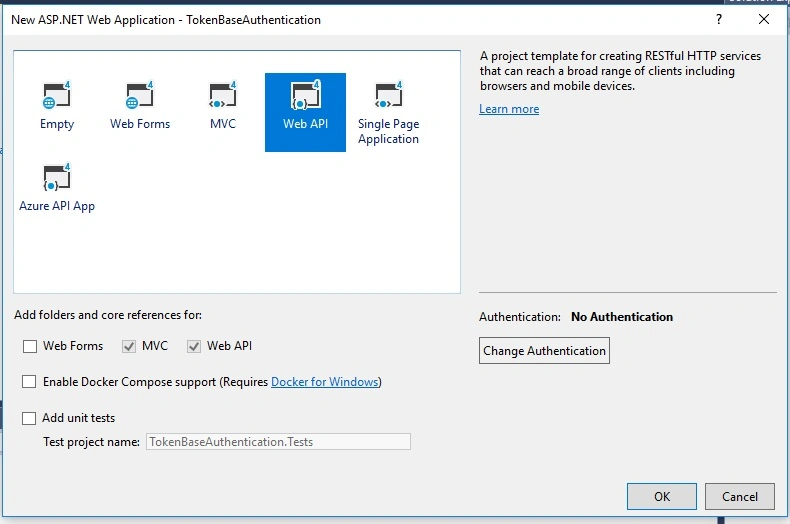
Click OK.
Step 3 - Install Required Packages
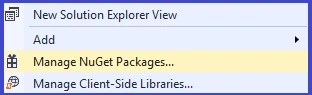
Now, find NuGet Package Manager, click on "Install". You can also use the Package Manager Console. In the Package Manager Console window, type the following command. After installation, these packages will be available in references.
Install-Package name of the package
- Microsoft.Owin.Host.SystemWeb
- Microsoft.Owin.Security.OAuth
- Microsoft.Owin.Cors
Here, we also need to install a package for enabling CORS. This dependency is used for allowing our origin (domain) of the front-end on the Web API.
Microsoft.AspNet.WebApi.Cors
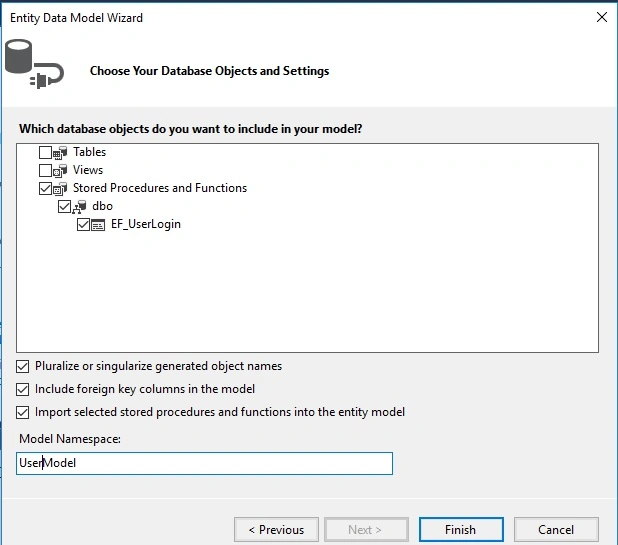
Step 4 - Now, Add ASO.NET Entity Data Model
Now, we are creating a new ADO.NET Entity Data Model. Select the stored procedure for checking the user login credentials, as you see in the given image.
Step 5 - Create a Startup.cs Class File
Here, we need to create a new class file to implement the code configuration provider and create an instance of class MyAuthProvider.
- using Microsoft.Owin;
- using Microsoft.Owin.Security.OAuth;
- using Owin;
- using System;
- using System.Web;
- using System.Web.Http;
- [assembly: OwinStartup(typeof(TokenBaseAuthentication.Startup))]
- namespace TokenBaseAuthentication
- {
- public class Startup
- {
- public void Configuration(IAppBuilder app)
- {
- app.UseCors(Microsoft.Owin.Cors.CorsOptions.AllowAll);
- var myProvider = new MyAuthProvider();
- OAuthAuthorizationServerOptions options = new OAuthAuthorizationServerOptions
- {
- AllowInsecureHttp = true,
- TokenEndpointPath = new PathString("/token"),
- AccessTokenExpireTimeSpan = TimeSpan.FromMinutes(30),
- Provider = myProvider
- };
- app.UseOAuthAuthorizationServer(options);
- app.UseOAuthBearerAuthentication(new OAuthBearerAuthenticationOptions());
- HttpConfiguration config = new HttpConfiguration();
- WebApiConfig.Register(config);
- }
- }
- }
Step 6 - Create MyAuthProvider.cs Class File
Now, let us create one more class to implement OAuthAuthorizationServerProvider and call our ADO.NET Entity Model. This model validates the user from a database.
- using Microsoft.Owin.Security.OAuth;
- using System.Linq;
- using System.Security.Claims;
- using System.Threading.Tasks;
- using System.Web;
- namespace TokenBaseAuthentication
- {
- public class MyAuthProvider : OAuthAuthorizationServerProvider
- {
- public override async Task ValidateClientAuthentication(OAuthValidateClientAuthenticationContext context)
- {
- context.Validated();
- }
- public override async Task GrantResourceOwnerCredentials(OAuthGrantResourceOwnerCredentialsContext context)
- {
- var identity = new ClaimsIdentity(context.Options.AuthenticationType);
- UserEntities obj = new UserEntities();
- var userdata = obj.EF_UserLogin(context.UserName, context.Password).FirstOrDefault();
- if (userdata != null)
- {
- identity.AddClaim(new Claim(ClaimTypes.Role, userdata.UserRole));
- identity.AddClaim(new Claim(ClaimTypes.Name, userdata.UserName));
- context.Validated(identity);
- }
- else
- {
- context.SetError("invalid_grant", "Provided username and password is incorrect");
- context.Rejected();
- }
- }
- }
- }
Open the Web API config file and add this code.
- config.EnableCors();
Now, we are done with almost all the required code for Web API application.
Step 7 - Create New Angular Project
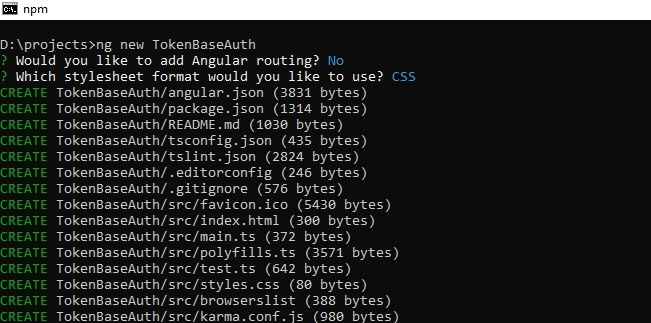
Now, we are creating a new Angular application for UI. Here, I am using VS Code IDE for front-end; you can use any IDE for creating the Angular application. Given below is the command for Angular application creation. One thing to keep in mind before Angular installation is that you have already installed Node and AngularCLI in your system.
ng new TokenBaseAuth
Step 8 - Create New Service in Angular
Now, we are creating a new service for calling the Web API. As you can see, here, we are defining the API URL for sending a request to the server.
ng generate service myservice
Jerald Jayaraj DPosted Jul 24, 2021, 8:18 PM
Puneet Kankar nice article can you tell how to pass the token in the header request and validate with Authorize attribute. (syntax)
Lawrence LokePosted Jun 5, 2020, 3:06 AM
Hi Puneet Kankar, I faced error on step 6, on ` var userdata = PCE.GL_UserLogin(context.UserName, context.Password).FirstOrDefault();` It said 'int does not contain a definition for FirstOrDefault and no extension method FirstOfDefault' but so far I following your steps
Bidyasagar MishraPosted Apr 2, 2020, 9:32 AM
Hi @Puneet, where the token value stores in the server side?
Raja AvulaPosted Mar 16, 2020, 8:20 AM
It very useful, thank you, if possible after login, can you make another request to web API, how can we validate existing token.
Cesar GuevaraPosted Nov 28, 2019, 3:21 PM
Clean and clear, I found it very useful, thank you brother.
donlot ganolPosted Jul 25, 2019, 3:54 AM
I found error like "'can't find module @angular/core/testing'"
donlot ganolPosted Jul 25, 2019, 3:52 AM
Hi, can you explain how to run the part of frontend?
sanjay guptaPosted Mar 11, 2019, 7:52 AM
Nicely Explain. looking for more updates.