

Introduction
This article is an extension of the previous article Integrate Stratis Blockchain APIs In Your Custom Application. The article describes how to integrate Stratis blockchain transaction APIs in your custom application with an example of the e-commerce site. I will explain the steps and necessary API endpoints to integrate payment methods into an e-commerce website. This article will demonstrate and provide clear insight into how to integrate Stratis blockchain in e-commerce websites when the user checkout from the cart.
As this article is an extension of the previous article, here we will use the previous project and add necessary models, services, and components. We need one component here so I will use the home component. You can get the previous source code from here. We will extend this previous project in this article.
The source code of this article is available here.
Prerequisites
- IDE for Angular (Visual Studio or Visual Studio Code) as per your convenience.
- Stratis FullNode
We need Stratis FullNode. If you don’t have you can download it from here. Open the FullNode project and run the Stratis.CirrusMinerD project in devmode. You can use the below command to run FullNode.
cd StratisFullNode\src\Stratis.CirrusMinerD
dotnet run -devmode=miner
Cart Design
We will design the cart first and then pass the cart total amount to pay from the Stratis Wallet. We have made the WalletComponent as the default page from the routing in the previous part. So go to app-routing.module.ts and change
//{ path: '', component: HomeComponent, pathMatch: 'full' },
{ path: '', component: WalletComponent, pathMatch: 'full' },
to,
{ path: '', component: HomeComponent, pathMatch: 'full' },
{ path: 'wallet', component: WalletComponent },
Then, go to the home.component.html page and write the below HTML to design a simple Cart item.
<!-- Cart Items -->
<div class="card-body">
  <div class="row">
    <div class="col-sm-6">
      <table id="appsettingtable" class="table table-striped table- table-bordered">
        <thead>
          <tr>
            <th>Item </th>
            <th>Price</th>
          </tr>
        </thead>
        <tbody>
          <!--<tr *ngFor="let balance of walletbalances">-->
          <tr>
            <td>Item1</td>
            <td>400</td>
          </tr>
          <tr>
            <td>Item 2</td>
            <td>600</td>
          </tr>
          <tr>
            <td>Total</td>
            <td>1000</td>
          </tr>
        </tbody>
      </table>
    </div>
  </div>
  <div class="row">
    <div class="col-sm-2">
      <button (click)="CheckoutToPay()" class="btn btn-primary">
        <i class="fa fa-lock"></i> CheckOut </button>
    </div>
  </div>
</div>
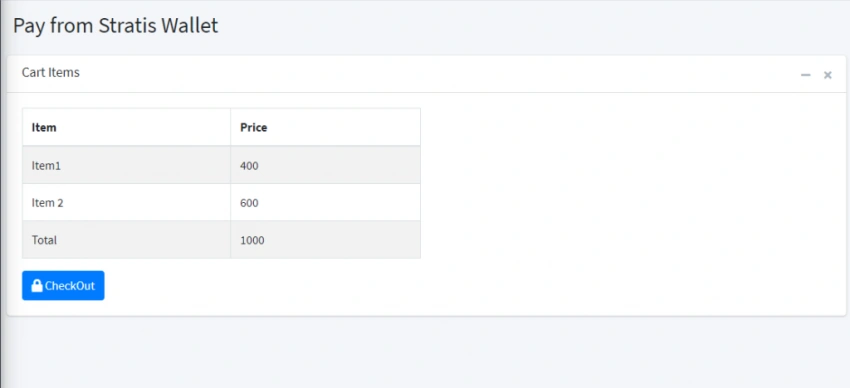
Here, we have designed the cart in simple table form with items, and price with hardcoded value. You can design a cart based on your requirement and own design as well as can get the price of each item.
UI of Cart with Items.
API Integration
To integrate the payment method in our site we need two API endpoints from Stratis Full Node.
Build Transaction(/api/Wallet/build-transaction)
Firstly, we have to build the transaction. Once the transaction is built successfully, this API endpoint gives a response as the Hex code that we need to pass to send the transaction. We have to pass some parameters to build the transaction. You can explore and see what are the parameters you need for each API endpoint from the Full Node Swagger page as well or can visit Stratis Academy to get more details of APIs. You will get details of parameters for transaction APIs later in the article.
Send Transaction(/api/Wallet/send-transaction)
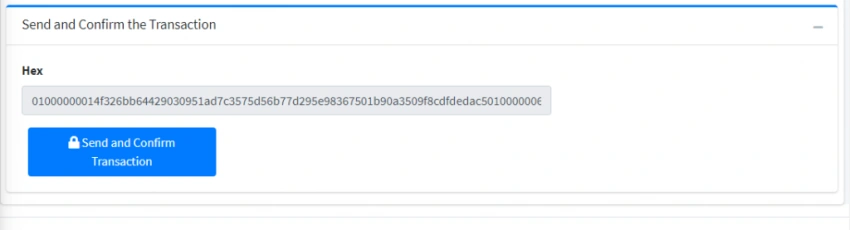
This API endpoint uses to send the transaction that is already built. Once we build the transaction, we can now use this endpoint to send and confirm the transaction in the network. This returns the transaction details. If you want, once the transaction is sent you can save the response details in your custom application as well for further processing and reference.
So first let’s create a Model class for those parameters.
We will create two models Recipient.ts and WalletBuildTransaction.ts
First, create the recipient.ts model with the following parameters under the _model folder.
export class Recipient {
  destinationAddress: string = "";
  amount: number = 0;
}
Then we will add the walletbuildtransaction.ts class as a model with the below parameters and here we will import the recipient model as well.
Code of walletbuildtransaction.ts is given below.
import { Recipient } from "./recipient";

export class WalletBuildTransaction {
  walletName: string = "";
  password: string = "";
  accountName: string = "";
  feeType: string = "Low";//you can set the feeType as Low, Medium and High
  allowUnconfirmed: boolean = true;
  shuffleOutputs: boolean = true;
  changeAddress: string = "";
  recipients: Array<Recipient> = [];
}
Similarly, add the model to confirm and send the Transaction. Below is walletsendtransaction.ts class. Here, we need only one parameter hex.
export class WalletSendTransaction {
  hex: string = "";
}
So, all necessary model for payment is done, now we will move for Service. We have already created wallet.service.ts in the previous part of the article so we will use the same service class and will add new methods for Transaction Build and send transaction.
Below is the code for these two API endpoint integrations.
WalletBuildTransaction(walletBuildTransaction: any) {
    return this.http.post(ROOT_URL + '/api/Wallet/build-transaction', walletBuildTransaction);
}

WalletSendTransaction(walletSendTransaction: any) {
    return this.http.post(ROOT_URL + '/api/Wallet/send-transaction', walletSendTransaction);
}
Here Root_URL is the value we can get from config.ts. This contains the base URL of the fullnode that is http://localhost:38223
Complete code of wallet.service.ts class.
import { Injectable } from '@angular/core';
import { HttpClient } from '@angular/common/http';
import { ROOT_URL } from '../../_model/config';
@Injectable({
  providedIn: 'root'
})
export class WalletService {

  constructor(private http: HttpClient) { }

  LoadWallet(login:any) {
    return this.http.post(ROOT_URL + '/api/Wallet/load', login, { observe: 'response' });
  }
  WalletBalance(params:any) {
    return this.http.get(ROOT_URL + '/api/Wallet/balance', { params: params });
  }

  WalletSplitCoins(walletSplitCoin: any) {
    return this.http.post(ROOT_URL + '/api/Wallet/splitcoins', walletSplitCoin);
  }
  WalletBuildTransaction(walletBuildTransaction: any) {
    return this.http.post(ROOT_URL + '/api/Wallet/build-transaction', walletBuildTransaction);
  }

  WalletSendTransaction(walletSendTransaction: any) {
    return this.http.post(ROOT_URL + '/api/Wallet/send-transaction', walletSendTransaction);
  }
}
In an e-commerce site, the recipient wallet address is the address of the store that owns the site, so it is always the same value for all transactions. Thus, we can save this recipient value in the confit.ts file and use it whenever it is needed. Below is the code of config.ts.
export const ROOT_URL: string = "http://localhost:38223";
export const StoreWalletAddress: string = "PNfUkyKi7FuepV8Y1MMfCJytMuVjW33TNX"; /*receipent address is the address of the ecommerce store*/
Then, let’s go to home.component.ts. Here we will import the Service, Models, and Config file. We need three-click events one for Cart Check-Out, the second for Build Transaction and the last one is for Send Transaction. You can see the complete code of the home.component.ts class.
import { Component, OnInit } from '@angular/core';
import Swal from 'sweetalert2';
import { WalletBuildTransaction } from '../_model/walletbuildtransaction';
import { WalletSendTransaction } from '../_model/walletsendtransaction';
import { Recipient } from '../_model/recipient';
import { WalletService } from '../_service/stratisfullnode/wallet.service';
import { StoreWalletAddress } from '../_model/config';
@Component({
  selector: 'app-home',
  templateUrl: './home.component.html',
  styles: [
  ]
})
export class HomeComponent implements OnInit {
  public walletBuildTransaction: WalletBuildTransaction = new WalletBuildTransaction();
  public recipient: Recipient = new Recipient();
  public walletSendTransaction: WalletSendTransaction = new WalletSendTransaction();
  constructor(private walletService: WalletService ) { }
  builTransactionResponse: any;
  sendtransaction: any;
  payByWallet: boolean = false;
  totalCartAmount: any;

  ngOnInit(): void {
  }

  CheckoutToPay() {
    this.payByWallet = true;
    this.totalCartAmount = 1000;
    this.recipient.amount = this.totalCartAmount;
    this.recipient.destinationAddress = StoreWalletAddress; //gets the store wallet address from config;
  }
  BuildTransaction() {
    this.walletBuildTransaction.recipients = [];
    this.walletBuildTransaction.recipients[0] = this.recipient;
    this.walletService.WalletBuildTransaction(this.walletBuildTransaction).subscribe((response: any) => {
      console.log(response);
      if (response) {
        this.builTransactionResponse = response;
        console.log(this.builTransactionResponse);
        Swal.fire('Successful', 'Transaction Build Successfully', 'info');
        this.walletSendTransaction.hex = this.builTransactionResponse.hex
      } else {
         Swal.fire('Oops...', 'Something went wrong!, Please contact your administrator', 'error');
        (error: any) => {
          console.log(error);
        }
      }
    });
  };

  SendTransaction() {
    this.walletService.WalletSendTransaction(this.walletSendTransaction).subscribe((response: any) => {
      console.log(response);
      if (response) {
        this.sendtransaction = response;
        console.log(this.sendtransaction);
        Swal.fire('Successful', 'Transaction Send  Successfully', 'info');
      } else {
         Swal.fire('Oops...', 'Something went wrong!, Please contact your administrator', 'error');
        (error: any) => {
          console.log(error);
        }
      }
    });
  };
}
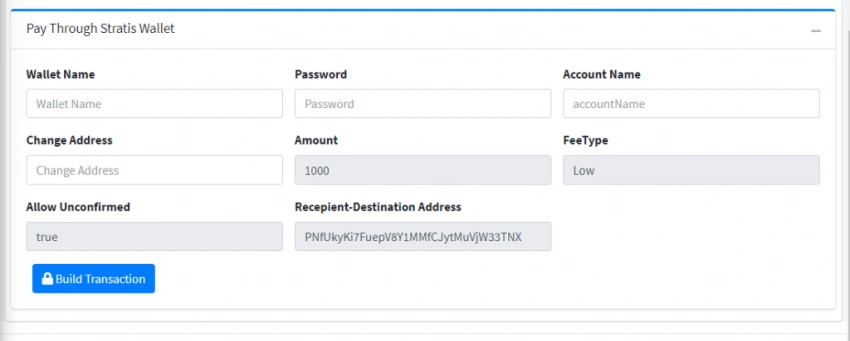
Here I have set up the total cart amount by default 1000 and all cart items price hardcoded in Html. However, you can design your cart according to your own requirement and can just pass the total cart amount to the model recipient.amount when the user clicks on the Checkout button.
Code of CheckoutToPay click event.
CheckoutToPay() {
    this.payByWallet = true; //this is used just to show the Payment division when click on Checkout
    this.totalCartAmount = 1000;
    this.recipient.amount = this.totalCartAmount;
    this.recipient.destinationAddress = StoreWalletAddress; //gets the store wallet address from config;
  }
The complete code of the home.component.html page is provided below.
Rijwan AnsariPosted Oct 8, 2021, 7:16 AM
Very insightful Satya Karki. This opens the implementation of blockchain technology in payment system.