

Introduction
In this article, we will learn how to integrate theme or HTML-bootstrap template in a React.js project.
Prerequisites
Create React.js Project
To create a new React.js project, open the command prompt and enter the following command.
- npx create-react-app reacttemplatedemo
Open the newly created project in Visual Studio Code and install Bootstrap in this project by using the following command.
- npm install --save bootstrap
Now, open the index.js file and add import Bootstrap.
- import 'bootstrap/dist/css/bootstrap.min.css';
Now copy css, js and img folder from the template
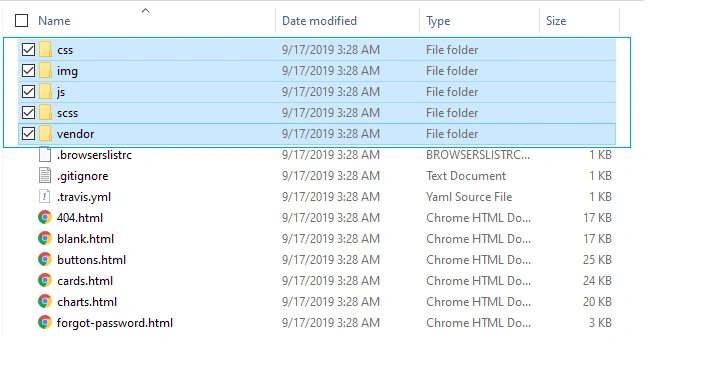
Now, in Visual Studio code, go to the Public folder, create a new folder named 'assets' and inside this folder, add the css, js and img file that you copied from the bootstrap template.
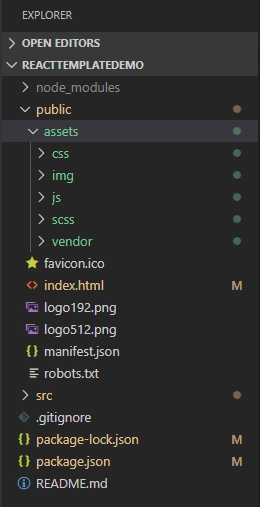
Now open index.html file and add reference of css and js. Add the following code in index.html.
- <!DOCTYPE html>
- <html lang="en">
- <head>
- <meta charset="utf-8" />
- <link rel="icon" href="%PUBLIC_URL%/favicon.ico" />
- <meta name="viewport" content="width=device-width, initial-scale=1" />
- <meta name="theme-color" content="#000000" />
- <meta
- name="description"
- content="Web site created using create-react-app"
- />
- <link rel="apple-touch-icon" href="%PUBLIC_URL%/logo192.png" />
- <link href="./assets/vendor/fontawesome-free/css/all.min.css" rel="stylesheet" type="text/css">
- <link href="https://fonts.googleapis.com/css?family=Nunito:200,200i,300,300i,400,400i,600,600i,700,700i,800,800i,900,900i" rel="stylesheet">
- <link href="./assets/css/sb-admin-2.min.css" rel="stylesheet">
- <link rel="manifest" href="%PUBLIC_URL%/manifest.json" />
- <title>React App</title>
- </head>
- <body>
- <noscript>You need to enable JavaScript to run this app.</noscript>
- <div id="root"></div>
- <script src="./assets//vendor/jquery/jquery.min.js"></script>
- <script src="./assets/vendor/bootstrap/js/bootstrap.bundle.min.js"></script>
- <script src="./assets/vendor/jquery-easing/jquery.easing.min.js"></script>
- <script src="./assets/js/sb-admin-2.min.js"></script>
- <script src="./assets/vendor/chart.js/Chart.min.js"></script>
- <script src="./assets/js/demo/chart-area-demo.js"></script>
- <script src="./assets/js/demo/chart-pie-demo.js"></script>
- </body>
- </html>
Now, go to the src folder, create a new folder named 'Layout 'and inside this folder, add 4 new components,
- Footer.js
- Header.js
- Layout.js
- Leftside.js
Now open Header.js component and add the following code.
- import React, { Component } from 'react'
- export class Header extends Component {
- render() {
- return (
- <div>
- <nav class="navbar navbar-expand navbar-light bg-white topbar mb-4 static-top shadow">
- <button id="sidebarToggleTop" class="btn btn-link d-md-none rounded-circle mr-3">
- <i class="fa fa-bars"></i>
- </button>
- <form class="d-none d-sm-inline-block form-inline mr-auto ml-md-3 my-2 my-md-0 mw-100 navbar-search">
- <div class="input-group">
- <input type="text" class="form-control bg-light border-0 small" placeholder="Search for..." aria-label="Search" aria-describedby="basic-addon2"/>
- <div class="input-group-append">
- <button class="btn btn-primary" type="button">
- <i class="fas fa-search fa-sm"></i>
- </button>
- </div>
- </div>
- </form>
- <ul class="navbar-nav ml-auto">
- <li class="nav-item dropdown no-arrow d-sm-none">
- <a class="nav-link dropdown-toggle" href="#" id="searchDropdown" role="button" data-toggle="dropdown" aria-haspopup="true" aria-expanded="false">
- <i class="fas fa-search fa-fw"></i>
- </a>
- <div class="dropdown-menu dropdown-menu-right p-3 shadow animated--grow-in" aria-labelledby="searchDropdown">
- <form class="form-inline mr-auto w-100 navbar-search">
- <div class="input-group">
- <input type="text" class="form-control bg-light border-0 small" placeholder="Search for..." aria-label="Search" aria-describedby="basic-addon2"/>
- <div class="input-group-append">
- <button class="btn btn-primary" type="button">
- <i class="fas fa-search fa-sm"></i>
- </button>
- </div>
- </div>
- </form>
- </div>
- </li>
- <li class="nav-item dropdown no-arrow mx-1">
- <a class="nav-link dropdown-toggle" href="#" id="alertsDropdown" role="button" data-toggle="dropdown" aria-haspopup="true" aria-expanded="false">
- <i class="fas fa-bell fa-fw"></i>
- <span class="badge badge-danger badge-counter">3+</span>
- </a>
- <div class="dropdown-list dropdown-menu dropdown-menu-right shadow animated--grow-in" aria-labelledby="alertsDropdown">
- <h6 class="dropdown-header">
- Alerts Center
- </h6>
- <a class="dropdown-item d-flex align-items-center" href="#">
- <div class="mr-3">
- <div class="icon-circle bg-primary">
- <i class="fas fa-file-alt text-white"></i>
- </div>
- </div>
- <div>
- <div class="small text-gray-500">December 12, 2019</div>
- <span class="font-weight-bold">A new monthly report is ready to download!</span>
- </div>
- </a>
- <a class="dropdown-item d-flex align-items-center" href="#">
- <div class="mr-3">
- <div class="icon-circle bg-success">
- <i class="fas fa-donate text-white"></i>
- </div>
- </div>
- <div>
- <div class="small text-gray-500">December 7, 2019</div>
- $290.29 has been deposited into your account!
- </div>
- </a>
- <a class="dropdown-item d-flex align-items-center" href="#">
- <div class="mr-3">
- <div class="icon-circle bg-warning">
- <i class="fas fa-exclamation-triangle text-white"></i>
- </div>
- </div>
- <div>
- <div class="small text-gray-500">December 2, 2019</div>
- Spending Alert: We've noticed unusually high spending for your account.
- </div>
- </a>
- <a class="dropdown-item text-center small text-gray-500" href="#">Show All Alerts</a>
- </div>
- </li>
- <li class="nav-item dropdown no-arrow mx-1">
- <a class="nav-link dropdown-toggle" href="#" id="messagesDropdown" role="button" data-toggle="dropdown" aria-haspopup="true" aria-expanded="false">
- <i class="fas fa-envelope fa-fw"></i>
- <span class="badge badge-danger badge-counter">7</span>
- </a>
- <div class="dropdown-list dropdown-menu dropdown-menu-right shadow animated--grow-in" aria-labelledby="messagesDropdown">
- <h6 class="dropdown-header">
- Message Center
- </h6>
- <a class="dropdown-item d-flex align-items-center" href="#">
- <div class="dropdown-list-image mr-3">
- <img class="rounded-circle" src="https://source.unsplash.com/fn_BT9fwg_E/60x60" alt=""/>
- <div class="status-indicator bg-success"></div>
- </div>
- <div class="font-weight-bold">
- <div class="text-truncate">Hi there! I am wondering if you can help me with a problem I've been having.</div>
- <div class="small text-gray-500">Emily Fowler · 58m</div>
- </div>
- </a>
- <a class="dropdown-item d-flex align-items-center" href="#">
- <div class="dropdown-list-image mr-3">
- <img class="rounded-circle" src="https://source.unsplash.com/AU4VPcFN4LE/60x60" alt=""/>
- <div class="status-indicator"></div>
- </div>
- <div>
- <div class="text-truncate">I have the photos that you ordered last month, how would you like them sent to you?</div>
- <div class="small text-gray-500">Jae Chun · 1d</div>
- </div>
- </a>
- <a class="dropdown-item d-flex align-items-center" href="#">
- <div class="dropdown-list-image mr-3">
- <img class="rounded-circle" src="https://source.unsplash.com/CS2uCrpNzJY/60x60" alt=""/>
- <div class="status-indicator bg-warning"></div>
- </div>
- <div>
- <div class="text-truncate">Last month's report looks great, I am very happy with the progress so far, keep up the good work!</div>
- <div class="small text-gray-500">Morgan Alvarez · 2d</div>
- </div>
- </a>
- <a class="dropdown-item d-flex align-items-center" href="#">
- <div class="dropdown-list-image mr-3">
- <img class="rounded-circle" src="https://source.unsplash.com/Mv9hjnEUHR4/60x60" alt=""/>
- <div class="status-indicator bg-success"></div>
- </div>
- <div>
- <div class="text-truncate">Am I a good boy? The reason I ask is because someone told me that people say this to all dogs, even if they aren't good...</div>
- <div class="small text-gray-500">Chicken the Dog · 2w</div>
- </div>
- </a>
- <a class="dropdown-item text-center small text-gray-500" href="#">Read More Messages</a>
- </div>
- </li>
- <div class="topbar-divider d-none d-sm-block"></div>
- <li class="nav-item dropdown no-arrow">
- <a class="nav-link dropdown-toggle" href="#" id="userDropdown" role="button" data-toggle="dropdown" aria-haspopup="true" aria-expanded="false">
- <span class="mr-2 d-none d-lg-inline text-gray-600 small">Valerie Luna</span>
- <img class="img-profile rounded-circle" src="https://source.unsplash.com/QAB-WJcbgJk/60x60"/>
- </a>
- <div class="dropdown-menu dropdown-menu-right shadow animated--grow-in" aria-labelledby="userDropdown">
- <a class="dropdown-item" href="#">
- <i class="fas fa-user fa-sm fa-fw mr-2 text-gray-400"></i>
- Profile
- </a>
- <a class="dropdown-item" href="#">
- <i class="fas fa-cogs fa-sm fa-fw mr-2 text-gray-400"></i>
- Settings
- </a>
- <a class="dropdown-item" href="#">
- <i class="fas fa-list fa-sm fa-fw mr-2 text-gray-400"></i>
- Activity Log
- </a>
- <div class="dropdown-divider"></div>
- <a class="dropdown-item" href="#" data-toggle="modal" data-target="#logoutModal">
- <i class="fas fa-sign-out-alt fa-sm fa-fw mr-2 text-gray-400"></i>
- Logout
- </a>
- </div>
- </li>
- </ul>
- </nav>
- </div>
- )
- }
- }
- export default Header
Mohsen AlaghemandPosted Jun 10, 2022, 2:34 PM
Thanks foThanks for this topic.r this topic
swapnil rajPosted Feb 14, 2021, 10:00 AM
I followed all the above steps and at the end I run it but getting following error....Error: Invariant failed: You should not use <Link> outside a <Router> how can I solve this error.... Thanking you in advance..
Alireza ShahriyariPosted May 21, 2020, 5:41 AM
Hi, it did not work for me. Home.js is not there. also login.js also react-router-dom is not in use, and finally getting: Error: Invariant failed: You should not use <Link> outside a <Router> Can you send a link to your working source to download after having the template loaded? thanks.
Dipa MehtaPosted Apr 21, 2020, 10:09 AM
Nice article Sanwar Ranwa