

This sample is a C# ASP.NET web service application that communicates with QuickBooks Point of Sale via QBWebConnector. The sample focuses primarily on demonstrating how to set up all web service web methods to run against QBWebConnector and does not focus on any particular use case.
Step 2
Step 3
- //
- // QuickBooks Web Connector Sample: WCWebService
- // Copyright (c) 2006-2007 Intuit, Inc
- //
- // This sample is a C# ASP.NET web service application that
- // communicates with QuickBooks Point of Sale via QBWebConnector. The
- // sample focuses primarily on demonstrating how to setup all web service
- // web methods to run against QBWebConnector and does not focus on any
- // particular use case. For simplicity, it sends three request XMLs:
- // CustomerQuery, ItenInventoryQuery and PurchaseOrderQuery.
- //
- // This sample assumes that you have configured IIS with ASP.NET and
- // have a functional system to deploy this web service sample. If you have
- // not yet configured ASP.NET with IIS, you may need to run the
- // following command from c:\windows\Microsoft.NET\Framework\
- // your_asp_dot_net_version path: -
- // aspnet_regiis /i
- // This will help avoid the occasional message from microsoft development
- // environment such as "VS.NET has detected that the specified web server
- // is not running ASP.NET version 1.1. You will be unable to run ASP.NET
- // web applications or services)".
- /*
- * Useful note about using OwnerID and FileID in a real-world application
- *
- * As part of your QB Web Connector configuration (.QWC) file, you include
- * OwnerID and FileID. Following note on these two parameters may be useful.
- *
- * OwnerID -- this is a GUID that represents your application or suite of
- * applications, if your application needs to store private data in the
- * company file for one reason or another (one of the most common cases
- * being to check if you have communicated with this company file before,
- * and possibly some data about that communication) that private data will
- * be visible to any application that knows the OwnerID.
- *
- * FileID -- this is a GUID we stamp in the file on your behalf
- * (using your OwnerID) as a private data extension to the "Company" object.
- * It allows an application to verify that the company file it is exchanging
- * data with is consistent over time (by doing a CompanyQuery with the field
- * set appropriately and reading the DataExtRet values returned.
- *
- * */
- using System;
- using System.Collections;
- using System.ComponentModel;
- using System.Data;
- using System.Diagnostics;
- using System.Web;
- using System.Web.Services;
- using System.IO;
- using System.Security.Cryptography;
- using Microsoft.Win32;
- using System.Xml;
- using System.Text.RegularExpressions;
- namespace QWCPOSWebService
- {
- /// <summary>
- /// Web Service Namespace="http://developer.intuit.com/",
- /// Web Service Name="QWCPOSWebService",
- /// Web Service Description="Sample WebService in ASP.NET to
- /// demonstrate QBWebConnector with QuickBooks POS
- /// </summary>
- [WebService(
- Namespace = "http://developer.intuit.com/",
- Name = "QWCPOSWebService",
- Description = "Sample WebService in ASP.NET to demonstrate " +
- "QBWebConnector with QuickBooks POS")]
- // Important Note:
- // You should keep the namespace as http://developer.intuit.com/ for all web
- // services that communicates with QuickBooks Web Connector.
- public class QWCPOSWebService : System.Web.Services.WebService
- {
- #region GlobalVariables
- System.Diagnostics.EventLog evLog = new System.Diagnostics.EventLog();
- public int count = 0;
- public ArrayList req = new ArrayList();
- #endregion
- #region Constructor
- public QWCPOSWebService()
- {
- //CODEGEN: This call is required by the ASP.NET
- //Web Services Designer
- InitializeComponent();
- // Initializing EventLog for logging
- initEvLog();
- }
- #endregion
- #region AutoGeneratedMethods
- //Required by the Web Services Designer
- private IContainer components = null;
- /// <summary>
- /// Required method for Designer support - do not modify
- /// the contents of this method with the code editor.
- /// </summary>
- private void InitializeComponent()
- {
- }
- /// <summary>
- /// Clean up any resources being used.
- /// </summary>
- protected override void Dispose(bool disposing)
- {
- if (disposing && components != null)
- {
- components.Dispose();
- }
- base.Dispose(disposing);
- }
- #endregion
- #region WebMethods
- [WebMethod]
- /// <summary>
- /// WebMethod# 1 - clientVersion()
- /// To enable web service with QBWC version control
- /// Signature: public string clientVersion(string strVersion)
- ///
- /// IN:
- /// string strVersion
- ///
- /// OUT:
- /// string errorOrWarning
- /// Possible values:
- /// string retVal
- /// - NULL or <emptyString> = QBWC will let the web service update
- /// - "E:<any text>" = popup ERROR dialog with <any text>
- /// - abort update and force download of new QBWC.
- /// - "W:<any text>" = popup WARNING dialog with <any text>
- /// - choice to user, continue update or not.
- /// </summary>
- public string clientVersion(string strVersion)
- {
- string evLogTxt = "WebMethod: clientVersion() has been called " +
- "by QBWebconnector" + "\r\n\r\n";
- evLogTxt = evLogTxt + "Parameters received:\r\n";
- evLogTxt = evLogTxt + "string strVersion = " + strVersion + "\r\n";
- evLogTxt = evLogTxt + "\r\n";
- string retVal = null;
- double recommendedVersion = 1.5;
- double supportedMinVersion = 1.0;
- double suppliedVersion = Convert.ToDouble(this.parseForVersion(strVersion));
- evLogTxt = evLogTxt + "QBWebConnector version = " + strVersion + "\r\n";
- evLogTxt = evLogTxt + "Recommended Version = " + recommendedVersion.ToString() + "\r\n";
- evLogTxt = evLogTxt + "Supported Minimum Version = " + supportedMinVersion.ToString() + "\r\n";
- evLogTxt = evLogTxt + "SuppliedVersion = " + suppliedVersion.ToString() + "\r\n";
- if (suppliedVersion < recommendedVersion)
- {
- retVal = "W:We recommend that you upgrade your QBWebConnector";
- }
- else if (suppliedVersion < supportedMinVersion)
- {
- retVal = "E:You need to upgrade your QBWebConnector";
- }
- evLogTxt = evLogTxt + "\r\n";
- evLogTxt = evLogTxt + "Return values: " + "\r\n";
- evLogTxt = evLogTxt + "string retVal = " + retVal;
- logEvent(evLogTxt);
- return retVal;
- }
- [WebMethod]
- /// <summary>
- /// WebMethod# 2 - authenticate()
- /// To verify username and password for the web connector that is trying to connect
- /// Signature: public string[] authenticate(string strUserName, string strPassword)
- ///
- /// IN:
- /// string strUserName
- /// string strPassword
- ///
- /// OUT:
- /// string[] authReturn
- /// Possible values:
- /// string[0] = ticket
- /// string[1]
- /// - empty string = use current company file
- /// - "none" = no further request/no further action required
- /// - "nvu" = not valid user
- /// - any other string value = use this company file
- /// </summary>
- public string[] authenticate(string strUserName, string strPassword)
- {
- string evLogTxt = "WebMethod: authenticate() has been called by QBWebconnector" + "\r\n\r\n";
- evLogTxt = evLogTxt + "Parameters received:\r\n";
- evLogTxt = evLogTxt + "string strUserName = " + strUserName + "\r\n";
- evLogTxt = evLogTxt + "string strPassword = " + strPassword + "\r\n";
- evLogTxt = evLogTxt + "\r\n";
- string[] authReturn = new string[2];
- // Code below uses a random GUID to use as session ticket
- // An example of a GUID is {85B41BEE-5CD9-427a-A61B-83964F1EB426}
- authReturn[0] = System.Guid.NewGuid().ToString();
- // For simplicity of sample, a hardcoded username/password is used.
- // In real world, you should handle authentication in using a standard way.
- // For example, you could validate the username/password against an LDAP
- // or a directory server
- string pwd = "password";
- evLogTxt = evLogTxt + "Password locally stored = " + pwd + "\r\n";
- if (strUserName.ToUpper().Trim().Equals("USERNAME") && strPassword.ToUpper().Trim().Equals(pwd.ToUpper()))
- {
- // An empty string for authReturn[1] means asking QBWebConnector
- // to connect to the company file that is currently openned in QB
- authReturn[1] = "Company Data=IqbalStore";
- }
- else
- {
- authReturn[1] = "nvu";
- }
- // You could also return "none" to indicate there is no work to do
- // or a company filename in the format C:\full\path\to\company.qbw
- // based on your program logic and requirements.
- evLogTxt = evLogTxt + "\r\n";
- evLogTxt = evLogTxt + "Return values: " + "\r\n";
- evLogTxt = evLogTxt + "string[] authReturn[0] = " + authReturn[0].ToString() + "\r\n";
- evLogTxt = evLogTxt + "string[] authReturn[1] = " + authReturn[1].ToString();
- logEvent(evLogTxt);
- return authReturn;
- }
- [WebMethod(Description = "This web method facilitates web service to handle connection errors between QuickBooks and QBWebConnector", EnableSession = true)]
- /// <summary>
- /// WebMethod# 3 - connectionError()
- /// To facilitate capturing of QuickBooks error and notifying it to web services
- /// Signature: public string connectionError (string ticket, string hresult, string message)
- ///
- /// IN:
- /// string ticket = A GUID based ticket string to maintain identity of QBWebConnector
- /// string hresult = An HRESULT value thrown by QuickBooks when trying to make connection
- /// string message = An error message corresponding to the HRESULT
- ///
- /// OUT:
- /// string retVal
- /// Possible values:
- /// - “done” = no further action required from QBWebConnector
- /// - any other string value = use this name for company file
- /// </summary>
- public string connectionError(string ticket, string hresult, string message)
- {
- if (Session["ce_counter"] == null)
- {
- Session["ce_counter"] = 0;
- }
- string evLogTxt = "WebMethod: connectionError() has been called by QBWebconnector" + "\r\n\r\n";
- evLogTxt = evLogTxt + "Parameters received:\r\n";
- evLogTxt = evLogTxt + "string ticket = " + ticket + "\r\n";
- evLogTxt = evLogTxt + "string hresult = " + hresult + "\r\n";
- evLogTxt = evLogTxt + "string message = " + message + "\r\n";
- evLogTxt = evLogTxt + "\r\n";
- string retVal = null;
- //-2147418113 = Can't connect to the database
- const string CANT_CONNECT_TO_DB = "0x8000FFFF";
- // Add more as you need...
- if (hresult.Trim().Equals(CANT_CONNECT_TO_DB))
- {
- evLogTxt = evLogTxt + "HRESULT = " + hresult + "\r\n";
- evLogTxt = evLogTxt + "Message = " + message + "\r\n";
- retVal = "DONE";
- }
- else
- {
- // Depending on various hresults return different value
- if ((int)Session["ce_counter"] == 0)
- {
- // Try again with this company file
- evLogTxt = evLogTxt + "HRESULT = " + hresult + "\r\n";
- evLogTxt = evLogTxt + "Message = " + message + "\r\n";
- evLogTxt = evLogTxt + "Sending connection string as \"Company Data=\" to QBWebConnector.";
- retVal = "Company Data=";
- }
- else
- {
- evLogTxt = evLogTxt + "HRESULT = " + hresult + "\r\n";
- evLogTxt = evLogTxt + "Message = " + message + "\r\n";
- evLogTxt = evLogTxt + "Sending DONE to stop.";
- retVal = "DONE";
- }
- }
- evLogTxt = evLogTxt + "\r\n";
- evLogTxt = evLogTxt + "Return values: " + "\r\n";
- evLogTxt = evLogTxt + "string retVal = " + retVal + "\r\n";
- logEvent(evLogTxt);
- Session["ce_counter"] = ((int)Session["ce_counter"]) + 1;
- return retVal;
- }
- [WebMethod(Description = "This web method facilitates web service to send request XML to QuickBooks via QBWebConnector", EnableSession = true)]
- /// <summary>
- /// WebMethod# 4 - sendRequestXML()
- /// Signature: public string sendRequestXML(string ticket, string strHCPResponse, string strCompanyFileName,
- /// string Country, int qbXMLMajorVers, int qbXMLMinorVers)
- ///
- /// IN:
- /// int qbXMLMajorVers
- /// int qbXMLMinorVers
- /// string ticket
- /// string strHCPResponse
- /// string strCompanyFileName
- /// string Country
- /// int qbXMLMajorVers
- /// int qbXMLMinorVers
- ///
- /// OUT:
- /// string request
- /// Possible values:
- /// - “any_string” = Request XML for QBWebConnector to process
- /// - "" = No more request XML
- /// </summary>
- public string sendRequestXML(string ticket, string strHCPResponse, string strCompanyFileName,
- string qbXMLCountry, int qbXMLMajorVers, int qbXMLMinorVers)
- {
- if (Session["counter"] == null)
- {
- Session["counter"] = 0;
- }
- string evLogTxt = "WebMethod: sendRequestXML() has been called by QBWebconnector" + "\r\n\r\n";
- evLogTxt = evLogTxt + "Parameters received:\r\n";
- evLogTxt = evLogTxt + "string ticket = " + ticket + "\r\n";
- evLogTxt = evLogTxt + "string strHCPResponse = " + strHCPResponse + "\r\n";
- evLogTxt = evLogTxt + "string strCompanyFileName = " + strCompanyFileName + "\r\n";
- evLogTxt = evLogTxt + "string qbXMLCountry = " + qbXMLCountry + "\r\n";
- evLogTxt = evLogTxt + "int qbXMLMajorVers = " + qbXMLMajorVers.ToString() + "\r\n";
- evLogTxt = evLogTxt + "int qbXMLMinorVers = " + qbXMLMinorVers.ToString() + "\r\n";
- evLogTxt = evLogTxt + "\r\n";
- ArrayList req = buildRequest();
- string request = "";
- int total = req.Count;
- count = Convert.ToInt32(Session["counter"]);
- if (count < total)
- {
- request = req[count].ToString();
- evLogTxt = evLogTxt + "sending request no = " + (count + 1) + "\r\n";
- Session["counter"] = ((int)Session["counter"]) + 1;
- }
- else
- {
- count = 0;
- Session["counter"] = 0;
- request = "";
- }
- evLogTxt = evLogTxt + "\r\n";
- evLogTxt = evLogTxt + "Return values: " + "\r\n";
- evLogTxt = evLogTxt + "string request = " + request + "\r\n";
- logEvent(evLogTxt);
- return request;
- }
- [WebMethod(Description = "This web method facilitates web service to receive response XML from QuickBooks via QBWebConnector", EnableSession = true)]
- /// <summary>
- /// WebMethod# 5 - receiveResponseXML()
- /// Signature: public int receiveResponseXML(string ticket, string response, string hresult, string message)
- ///
- /// IN:
- /// string ticket
- /// string response
- /// string hresult
- /// string message
- ///
- /// OUT:
- /// int retVal
- /// Greater than zero = There are more request to send
- /// 100 = Done. no more request to send
- /// Less than zero = Custom Error codes
- /// </summary>
- public int receiveResponseXML(string ticket, string response, string hresult, string message)
- {
- string evLogTxt = "WebMethod: receiveResponseXML() has been called by QBWebconnector" + "\r\n\r\n";
- evLogTxt = evLogTxt + "Parameters received:\r\n";
- evLogTxt = evLogTxt + "string ticket = " + ticket + "\r\n";
- evLogTxt = evLogTxt + "string response = " + response + "\r\n";
- evLogTxt = evLogTxt + "string hresult = " + hresult + "\r\n";
- evLogTxt = evLogTxt + "string message = " + message + "\r\n";
- evLogTxt = evLogTxt + "\r\n";
- int retVal = 0;
- if (!hresult.ToString().Equals(""))
- {
- // if there is an error with the response received, web service could also return a -ve int
- evLogTxt = evLogTxt + "HRESULT = " + hresult + "\r\n";
- evLogTxt = evLogTxt + "Message = " + message + "\r\n";
- retVal = -101;
- }
- else
- {
- evLogTxt = evLogTxt + "Length of response received = " + response.Length + "\r\n";
- ArrayList req = buildRequest();
- int total = req.Count;
- int count = Convert.ToInt32(Session["counter"]);
- int percentage = (count * 100) / total;
- if (percentage >= 100)
- {
- count = 0;
- Session["counter"] = 0;
- }
- retVal = percentage;
- }
- evLogTxt = evLogTxt + "\r\n";
- evLogTxt = evLogTxt + "Return values: " + "\r\n";
- evLogTxt = evLogTxt + "int retVal= " + retVal.ToString() + "\r\n";
- logEvent(evLogTxt);
- return retVal;
- }
- [WebMethod]
- /// <summary>
- /// WebMethod# 6 - getLastError()
- /// Signature: public string getLastError(string ticket)
- ///
- /// IN:
- /// string ticket
- ///
- /// OUT:
- /// string retVal
- /// Possible Values:
- /// Error message describing last web service error
- /// </summary>
- public string getLastError(string ticket)
- {
- string evLogTxt = "WebMethod: getLastError() has been called by QBWebconnector" + "\r\n\r\n";
- evLogTxt = evLogTxt + "Parameters received:\r\n";
- evLogTxt = evLogTxt + "string ticket = " + ticket + "\r\n";
- evLogTxt = evLogTxt + "\r\n";
- int errorCode = 0;
- string retVal = null;
- if (errorCode == -101)
- {
- retVal = "QuickBooks was not running!"; // This is just an example of custom user errors
- }
- else
- {
- retVal = "Error!";
- }
- evLogTxt = evLogTxt + "\r\n";
- evLogTxt = evLogTxt + "Return values: " + "\r\n";
- evLogTxt = evLogTxt + "string retVal= " + retVal + "\r\n";
- logEvent(evLogTxt);
- return retVal;
- }
- [WebMethod]
- /// <summary>
- /// WebMethod# 7 - closeConnection()
- /// At the end of a successful update session, QBWebConnector will call this web method.
- /// Signature: public string closeConnection(string ticket)
- ///
- /// IN:
- /// string ticket
- ///
- /// OUT:
- /// string closeConnection result
- /// </summary>
- public string closeConnection(string ticket)
- {
- string evLogTxt = "WebMethod: closeConnection() has been called by QBWebconnector" + "\r\n\r\n";
- evLogTxt = evLogTxt + "Parameters received:\r\n";
- evLogTxt = evLogTxt + "string ticket = " + ticket + "\r\n";
- evLogTxt = evLogTxt + "\r\n";
- string retVal = null;
- retVal = "OK";
- evLogTxt = evLogTxt + "\r\n";
- evLogTxt = evLogTxt + "Return values: " + "\r\n";
- evLogTxt = evLogTxt + "string retVal= " + retVal + "\r\n";
- logEvent(evLogTxt);
- return retVal;
- }
- #endregion
- #region UtilityMethods
- private void initEvLog()
- {
- try
- {
- string source = "WCWebService";
- if (!System.Diagnostics.EventLog.SourceExists(source))
- System.Diagnostics.EventLog.CreateEventSource(source, "Application");
- evLog.Source = source;
- }
- catch { };
- return;
- }
- private void logEvent(string logText)
- {
- try
- {
- evLog.WriteEntry(logText);
- }
- catch { };
- return;
- }
- public ArrayList buildRequest()
- {
- string strRequestXML = "";
- XmlDocument inputXMLDoc = null;
- // CustomerQuery
- inputXMLDoc = new XmlDocument();
- inputXMLDoc.AppendChild(inputXMLDoc.CreateXmlDeclaration("1.0", null, null));
- inputXMLDoc.AppendChild(inputXMLDoc.CreateProcessingInstruction("qbposxml", "version=\"1.0\""));
- XmlElement qbposXML = inputXMLDoc.CreateElement("QBPOSXML");
- inputXMLDoc.AppendChild(qbposXML);
- XmlElement qbposXMLMsgsRq = inputXMLDoc.CreateElement("QBPOSXMLMsgsRq");
- qbposXML.AppendChild(qbposXMLMsgsRq);
- qbposXMLMsgsRq.SetAttribute("onError", "stopOnError");
- XmlElement customerQueryRq = inputXMLDoc.CreateElement("CustomerQueryRq");
- qbposXMLMsgsRq.AppendChild(customerQueryRq);
- customerQueryRq.SetAttribute("requestID", "1");
- XmlElement maxReturned = inputXMLDoc.CreateElement("MaxReturned");
- customerQueryRq.AppendChild(maxReturned).InnerText = "1";
- strRequestXML = inputXMLDoc.OuterXml;
- req.Add(strRequestXML);
- // Clean up
- strRequestXML = "";
- inputXMLDoc = null;
- qbposXML = null;
- qbposXMLMsgsRq = null;
- maxReturned = null;
- // ItemInventoryQuery
- inputXMLDoc = new XmlDocument();
- inputXMLDoc.AppendChild(inputXMLDoc.CreateXmlDeclaration("1.0", null, null));
- inputXMLDoc.AppendChild(inputXMLDoc.CreateProcessingInstruction("qbposxml", "version=\"1.0\""));
- qbposXML = inputXMLDoc.CreateElement("QBPOSXML");
- inputXMLDoc.AppendChild(qbposXML);
- qbposXMLMsgsRq = inputXMLDoc.CreateElement("QBPOSXMLMsgsRq");
- qbposXML.AppendChild(qbposXMLMsgsRq);
- qbposXMLMsgsRq.SetAttribute("onError", "stopOnError");
- XmlElement itemInventoryQueryRq = inputXMLDoc.CreateElement("ItemInventoryQueryRq");
- qbposXMLMsgsRq.AppendChild(itemInventoryQueryRq);
- itemInventoryQueryRq.SetAttribute("requestID", "2");
- maxReturned = inputXMLDoc.CreateElement("MaxReturned");
- itemInventoryQueryRq.AppendChild(maxReturned).InnerText = "1";
- strRequestXML = inputXMLDoc.OuterXml;
- req.Add(strRequestXML);
- // Clean up
- strRequestXML = "";
- inputXMLDoc = null;
- qbposXML = null;
- qbposXMLMsgsRq = null;
- maxReturned = null;
- // PurchaseOrderQuery
- inputXMLDoc = new XmlDocument();
- inputXMLDoc.AppendChild(inputXMLDoc.CreateXmlDeclaration("1.0", null, null));
- inputXMLDoc.AppendChild(inputXMLDoc.CreateProcessingInstruction("qbposxml", "version=\"1.0\""));
- qbposXML = inputXMLDoc.CreateElement("QBPOSXML");
- inputXMLDoc.AppendChild(qbposXML);
- qbposXMLMsgsRq = inputXMLDoc.CreateElement("QBPOSXMLMsgsRq");
- qbposXML.AppendChild(qbposXMLMsgsRq);
- qbposXMLMsgsRq.SetAttribute("onError", "stopOnError");
- XmlElement purchaseOrderQueryRq = inputXMLDoc.CreateElement("PurchaseOrderQueryRq");
- qbposXMLMsgsRq.AppendChild(purchaseOrderQueryRq);
- purchaseOrderQueryRq.SetAttribute("requestID", "3");
- maxReturned = inputXMLDoc.CreateElement("MaxReturned");
- purchaseOrderQueryRq.AppendChild(maxReturned).InnerText = "1";
- strRequestXML = inputXMLDoc.OuterXml;
- req.Add(strRequestXML);
- // InvoiceQuery
- //inputXMLDoc = new XmlDocument();
- //inputXMLDoc.AppendChild(inputXMLDoc.CreateXmlDeclaration("1.0",null, null));
- // inputXMLDoc.AppendChild(inputXMLDoc.CreateProcessingInstruction("qbxml", "version=\"4.0\""));
- // qbXML = inputXMLDoc.CreateElement("QBXML");
- // inputXMLDoc.AppendChild(qbXML);
- // qbXMLMsgsRq = inputXMLDoc.CreateElement("QBXMLMsgsRq");
- // qbXML.AppendChild(qbXMLMsgsRq);
- // qbXMLMsgsRq.SetAttribute("onError", "stopOnError");
- // XmlElement invoiceQueryRq = inputXMLDoc.CreateElement("InvoiceQueryRq");
- //qbXMLMsgsRq.AppendChild(invoiceQueryRq);
- // invoiceQueryRq.SetAttribute("requestID", "2");
- // maxReturned=inputXMLDoc.CreateElement("MaxReturned");
- // invoiceQueryRq.AppendChild(maxReturned).InnerText="1";
- // strRequestXML = inputXMLDoc.OuterXml;
- // req.Add(strRequestXML);
- return req;
- }
- private string parseForVersion(string input)
- {
- // This method is created just to parse the first two version components
- // out of the standard four component version number:
- // <Major>.<Minor>.<Release>.<Build>
- //
- // As long as you get the version in right format, you could use
- // any algorithm here.
- string retVal = "";
- string major = "";
- string minor = "";
- Regex version = new Regex(@"^(?\d+)\.(?\d+)(\.\w+){0,2}$", RegexOptions.Compiled);
- Match versionMatch = version.Match(input);
- if (versionMatch.Success)
- {
- major = versionMatch.Result("${major}");
- minor = versionMatch.Result("${minor}");
- retVal = major + "." + minor;
- }
- else
- {
- retVal = input;
- }
- return retVal;
- }
- #endregion
- }
- }
Step 5
As part of your QB Web Connector configuration (.QWC) file, you include OwnerID and FileID. The following note on these two parameters may be useful.
OwnerID
This is a GUID that represents your application or suite of applications if your application needs to store private data in the company file. Another reason (one of the most common cases being to check if you have communicated with this company file before, and possibly some data about that communication) is that private data will be visible to any application that knows the OwnerID.
FileID
This is a GUID we stamp in the file on your behalf (using your OwnerID) as a private data extension to the "Company" object. It allows an application to verify that the company file it is exchanging data with is consistent over time (by doing a Company Query with the field).
An example of GUID is {85B41BEE-5CD9-427a-A61B-83964F1EB426}
Given below is the code for them.QWC file.
- <?xml version="1.0"?><QBWCXML>
- <AppName>hanavision</AppName>
- <AppID>1</AppID>
- <AppURL>http://localhost:50528/QWCPOSWebService.asmx</AppURL>
- <AppDescription>A short description for QWCPOSWebService</AppDescription>
- <AppSupport>http://localhost:50528/QWCPOSWebService.asmx?wsdl</AppSupport>
- <OwnerID>{87EDAAF8-0000-1111-2222-4BA79C2F8998}</OwnerID>
- <FileID>{CA1C3EB8-0000-1111-2222-8D5B438B83AC}</FileID>
- <UserName>Bhavdip</UserName>
- <QBType>QBFS</QBType>
- <Style>Document</Style>
- <AuthFlags>0xF</AuthFlags>
- </QBWCXML>
Note
Don’t forget to change the localhost path.
Step 6
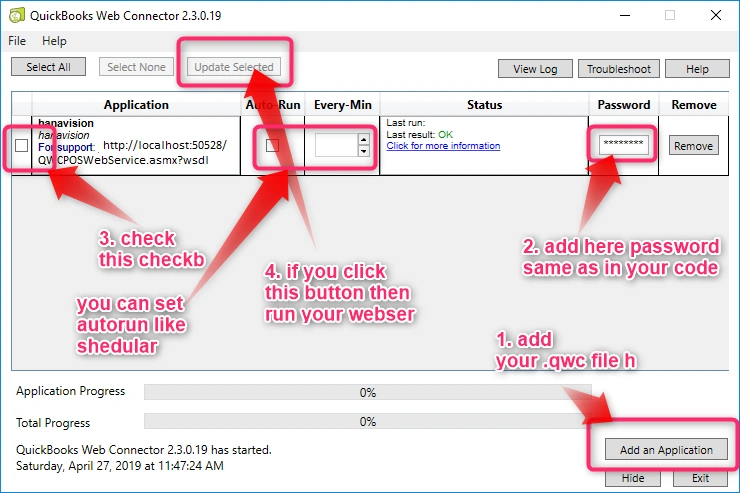
-
Add your file using the "Add an Application" button; then choose your QBC file.
-
Add password which is similar to the one in your code of web services.
-
Select this web service in web connector using the checkbox.
-
Click the "Update selected" button for running your code of web service.
If you want to run like scheduler, then you can set autorun and give the timing in every Min text box. So now, your QuickBooks desktop and your web service are connected using this web connector.
Authorizing the Application
On the first time that an application connects to a QuickBooks company file, QuickBooks should be opened and a user must be there to authorize the access. When we try to save a customer again and QuickBooks is running this time, a dialog will appear in QuickBooks, as shown in the figure below. We should take note that this will block the current thread so if we used the UI thread, then the UI will become unresponsive.

- <?xml version="1.0" encoding="utf-8"?>
- <?qbxml version="2.0"?>
- <QBXML>
- <QBXMLMsgsRq onError="stopOnError">
- <CustomerAddRq requestID="15">
- <CustomerAdd>
- <Name>20706 - Eastern XYZ University</Name>
- <CompanyName>Eastern XYZ University</CompanyName>
- <FirstName>Keith</FirstName>
- <LastName>Palmer</LastName>
- <BillAddress>
- <Addr1>Eastern XYZ University</Addr1>
- <Addr2>College of Engineering</Addr2>
- <Addr3>123 XYZ Road</Addr3>
- <City>Storrs-Mansfield</City>
- <State>CT</State>
- <PostalCode>06268</PostalCode>
- <Country>United States</Country>
- </BillAddress>
- <Phone>860-634-1602</Phone>
- <AltPhone>860-429-0021</AltPhone>
- <Fax>860-429-5183</Fax>
- <Email>[email protected]</Email>
- <Contact>Keith Palmer</Contact>
- </CustomerAdd>
- </CustomerAddRq>
- </QBXMLMsgsRq>
- </QBXML>
Example qbXML Response to "Add Customer".
- <?xml version="1.0" ?>
- <QBXML>
- <QBXMLMsgsRs>
- <CustomerAddRs requestID="15" statusCode="0" statusSeverity="Info" statusMessage="Status OK">
- <CustomerRet>
- <ListID>F540000-1197683154</ListID>
- <TimeCreated>2007-12-14T20:45:54-05:00</TimeCreated>
- <TimeModified>2007-12-14T20:45:54-05:00</TimeModified>
- <EditSequence>1197683154</EditSequence>
- <Name>20706 - Eastern XYZ University</Name>
- <FullName>20706 - Eastern XYZ University</FullName>
- <IsActive>true</IsActive>
- <Sublevel>0</Sublevel>
- <CompanyName>Eastern XYZ University</CompanyName>
- <FirstName>Keith</FirstName>
- <LastName>Palmer</LastName>
- <BillAddress>
- <Addr1>Eastern XYZ University</Addr1>
- <Addr2>College of Engineering</Addr2>
- <Addr3>123 XYZ Road</Addr3>
- <City>Storrs-Mansfield</City>
- <State>CT</State>
- <PostalCode>88130</PostalCode>
- <Country>USA</Country>
- </BillAddress>
- <Phone>860-634-1602</Phone>
- <AltPhone>860-429-0021</AltPhone>
- <Fax>860-429-5183</Fax>
- <Email>[email protected]</Email>
- <Contact>Keith Palmer</Contact>
- <Balance>0.00</Balance>
- <TotalBalance>0.00</TotalBalance>
- <JobStatus>None</JobStatus>
- </CustomerRet>
- </CustomerAddRs>
- </QBXMLMsgsRs>
- </QBXML>
Example qbXML to "Add an Invoice".
- <?xml version="1.0" encoding="utf-8"?>
- <?qbxml version="2.0"?>
- <QBXML>
- <QBXMLMsgsRq onError="stopOnError">
- <InvoiceAddRq requestID="2">
- <InvoiceAdd>
- <CustomerRef>
- <ListID>F560000-1197683156</ListID> <!-- or
- <Name>Bhavdip</Name> -->
- </CustomerRef>
- <TxnDate>2007-12-14</TxnDate>
- <RefNumber>9668</RefNumber>
- <BillAddress>
- <Addr1>56 Cowles Road</Addr1>
- <City>Willington</City>
- <State>CT</State>
- <PostalCode>06279</PostalCode>
- <Country>United States</Country>
- </BillAddress>
- <PONumber></PONumber>
- <Memo></Memo>
- <InvoiceLineAdd>
- <ItemRef>
- <FullName>Downloaded Invoice</FullName>
- </ItemRef>
- <Desc>Item 1 Description Goes Here</Desc>
- <Quantity>1</Quantity>
- <Rate>295</Rate>
- </InvoiceLineAdd>
- <InvoiceLineAdd>
- <ItemRef>
- <FullName>Downloaded Invoice</FullName>
- </ItemRef>
- <Desc>Item 2 Description Goes Here</Desc>
- <Quantity>3</Quantity>
- <Rate>25</Rate>
- </InvoiceLineAdd>
- </InvoiceAdd>
- </InvoiceAddRq>
- </QBXMLMsgsRq>
- </QBXML>
Make sure of the Ref like below,
- <CustomerRef>
- <ListID>F560000-1197683156</ListID> <!-- or
- <Name>Bhavdip</Name> -->
- </CustomerRef>
If your customer "Bhavdip" is already added in your QuickBooks desktop, then your invoice will be added. Otherwise, it will return an error.
ranjith kumarPosted Mar 16, 2021, 12:45 PM
Is it possible to add different application in web connector for same company file. I am in the need of add customer and then need to capture the customer's list id from the response then need to add invoice for that customer .. Can anyone please help on this.. Thanks in advance!!!
Nokhlal KumarPosted Jan 25, 2021, 9:11 PM
How to get password for QWC file in Quick Book Web Connector
gourav gouravPosted Jan 18, 2021, 7:47 PM
Hi Talaviya, I send large number of records(2000-2500) to Quickbook by using webservice. But some records failed to sync on Quickbook using QB connector. But if I send failed records again using QB connector, they sync successfully. Can you please help me on this, I want to Sync all the records in one go?
salman alwatariPosted Oct 31, 2020, 9:22 AM
Hello, Talaviya. how to add customer or any request?
Akram BoktorPosted Aug 5, 2020, 12:50 PM
When create file *.QWC and attach it to web connector i get this error Please Help QBWC1503 A modal Dialog box is Showing in the QuickBooks user interface
Hemant SoniPosted Jul 28, 2020, 12:00 AM
Hi, Talaviya, I need your help to integrate Quickbooks desktop with salesforce. Please let me know when you have time. It would be paid service for you.
RBK ChiribogahPosted May 8, 2020, 10:32 PM
Hello, Talaviya. We have problem with creating web service with QB Web Connector using sample provides with sdk 13.0 against QB Enterprise Accountant 16. We received this error: https://drive.google.com/open?id=1TACpP7JjfjH71J7PQuWW3DsqifC9KBrz
DevendraPosted Feb 12, 2020, 2:22 AM
Hi ,I am running web connector and sending customer data to quickbook, but after sendRequestXML below error is coming and web connector stops working. hresult="0x8004041C " Message :"An internal QuickBooks error occurred while trying to access the QuickBooks company data file." I have tried below solutions but it did not solve the error. https://help.developer.intuit.com/s/article/QBD-QBSDK-Logging also try verify and rebuild of data from Utility in quickbooks. i have window 64 bit operating system. and installed quickbook 2020 on my machine. And running web connector 2.3.0.36 Please suggest solution soon. below is the log file <?xml version="1.0"?><?qbxml version="4.0"?><QBXML><QBXMLMsgsRq onError="stopOnError" /><CustomerAddRq requestID="1"><CustomerAdd><Name>Naga</Name><FirstName>Nagarajan</FirstName><MiddleName>Vara</MiddleName><LastName>Varatharajan</LastName><BillAddress><Addr1>33/33 st</Addr1><City>Chennai</City><State>TN</State></BillAddress><Phone>4545455</Phone></CustomerAdd><MaxReturned>1</MaxReturned></CustomerAddRq></QBXML> 20200206.11:19:28 UTC : QBWebConnector.SOAPWebService.do_sendRequestXML() : Request xml received. 20200206.11:19:28 UTC : QBWebConnector.SOAPWebService.ProcessRequestXML() : Processing request #1 20200206.11:19:28 UTC : QBWebConnector.SOAPWebService.ProcessRequestXML() : REQUEST: received from application: size (bytes) = 416 20200206.11:19:28 UTC : QBWebConnector.SOAPWebService.ProcessRequestXML() : Sending request to QuickBooks. 20200206.11:19:28 UTC : QBWebConnector.SOAPWebService.ProcessRequestXML() : Sending error message back to application: HRESULT = 0x8004041C Message: An internal QuickBooks error occurred while trying to access the QuickBooks company data file. 20200206.11:19:28 UTC : QBWebConnector.SOAPWebService.ProcessRequestXML() : XML dump follows: - Request that failed: <?xml version="1.0"?><?qbxml version="4.0"?><QBXML><QBXMLMsgsRq onError="stopOnError" /><CustomerAddRq requestID="1"><CustomerAdd><Name>Naga</Name><FirstName>Nagarajan</FirstName><MiddleName>Vara</MiddleName><LastName>Varatharajan</LastName><BillAddress><Addr1>33/33 st</Addr1><City>Chennai</City><State>TN</State></BillAddress><Phone>4545455</Phone></CustomerAdd><MaxReturned>1</MaxReturned></CustomerAddRq></QBXML> 20200206.11:19:28 UTC : QBWebConnector.SOAPWebService.ProcessRequestXML() : Response received from QuickBooks (if available): 20200206.11:19:28 UTC : QBWebConnector.SOAPWebService.do_receiveResponseXML() : *** Calling receiveResponseXML() with following parameters: 20200206.11:19:28 UTC : QBWebConnector.SOAPWebService.do_receiveResponseXML() : wcTicket="c0c32122-3333-4d9b-acc6-0b206d7b527f" 20200206.11:19:28 UTC : QBWebConnector.SOAPWebService.do_receiveResponseXML() : response = 20200206.11:19:28 UTC : QBWebConnector.SOAPWebService.do_receiveResponseXML() : 20200206.11:19:28 UTC : QBWebConnector.SOAPWebService.do_receiveResponseXML() : hresult="0x8004041C" 20200206.11:19:28 UTC : QBWebConnector.SOAPWebService.do_receiveResponseXML() : message="An internal QuickBooks error occurred while trying to access the QuickBooks company data file." 20200206.11:21:28 UTC : QBWebConnector.SOAPWebService.do_receiveResponseXML() : QBWC1042: ReceiveResponseXML failed Error message: The request was aborted: The operation has timed out.
Pablo Gaspar SalinasPosted Jan 24, 2020, 9:22 PM
Could you share your code please
Charanjot SinghPosted Nov 18, 2019, 4:28 AM
Hi, I am getting this error: "QuickBooks found an error when parsing the provided XML text stream." I have followed your steps and after clicking "Update Selected" button on Web Connector, it starts making connection with QB Desktop and trying to send XML via function(sendRequestXML) and getting error message from this function(receiveResponseXML). Below is this the XML which it send: <?xml version="1.0" ?> <QBXML> <QBXMLMsgsRs> <HostQueryRs requestID="0" statusCode="0" statusSeverity="Info" statusMessage="Status OK"> <HostRet> <ProductName>QuickBooks Desktop Pro 2020</ProductName> <MajorVersion>30</MajorVersion> <MinorVersion>0</MinorVersion> <Country>US</Country> <SupportedQBXMLVersion>1.0</SupportedQBXMLVersion> <SupportedQBXMLVersion>1.1</SupportedQBXMLVersion> <SupportedQBXMLVersion>2.0</SupportedQBXMLVersion> <SupportedQBXMLVersion>2.1</SupportedQBXMLVersion> <SupportedQBXMLVersion>3.0</SupportedQBXMLVersion> <SupportedQBXMLVersion>4.0</SupportedQBXMLVersion> <SupportedQBXMLVersion>4.1</SupportedQBXMLVersion> <SupportedQBXMLVersion>5.0</SupportedQBXMLVersion> <SupportedQBXMLVersion>6.0</SupportedQBXMLVersion> <SupportedQBXMLVersion>7.0</SupportedQBXMLVersion> <SupportedQBXMLVersion>8.0</SupportedQBXMLVersion> <SupportedQBXMLVersion>9.0</SupportedQBXMLVersion> <SupportedQBXMLVersion>10.0</SupportedQBXMLVersion> <SupportedQBXMLVersion>11.0</SupportedQBXMLVersion> <SupportedQBXMLVersion>12.0</SupportedQBXMLVersion> <SupportedQBXMLVersion>13.0</SupportedQBXMLVersion> <IsAutomaticLogin>false</IsAutomaticLogin> <QBFileMode>SingleUser</QBFileMode> </HostRet> </HostQueryRs> <CompanyQueryRs requestID="1" statusCode="0" statusSeverity="Info" statusMessage="Status OK"> <CompanyRet> <IsSampleCompany>false</IsSampleCompany> <CompanyName>SmartFleet</CompanyName> <LegalCompanyName>SmartFleet</LegalCompanyName> <FirstMonthFiscalYear>January</FirstMonthFiscalYear> <FirstMonthIncomeTaxYear>January</FirstMonthIncomeTaxYear> <CompanyType>TransportationTruckingorDelivery</CompanyType> <TaxForm>Form1065</TaxForm> <SubscribedServices> <Service> <Name>QuickBooks Online Banking</Name> <Domain>banking.qb</Domain> <ServiceStatus>Never</ServiceStatus> </Service> <Service> <Name>QuickBooks Online Billing</Name> <Domain>billing.qb</Domain> <ServiceStatus>Never</ServiceStatus> </Service> <Service> <Name>QuickBooks Online Billing Level 1 Service</Name> <Domain>qbob1.qbn</Domain> <ServiceStatus>Never</ServiceStatus> </Service> <Service> <Name>QuickBooks Online Billing Level 2 Service</Name> <Domain>qbob2.qbn</Domain> <ServiceStatus>Never</ServiceStatus> </Service> <Service> <Name>QuickBooks Online Billing Payment Service</Name> <Domain>qbobpay.qbn</Domain> <ServiceStatus>Never</ServiceStatus> </Service> <Service> <Name>QuickBooks Bill Payment</Name> <Domain>billpay.qb</Domain> <ServiceStatus>Never</ServiceStatus> </Service> <Service> <Name>QuickBooks Online Billing Paper Mailing Service</Name> <Domain>qbobpaper.qbn</Domain> <ServiceStatus>Never</ServiceStatus> </Service> <Service> <Name>QuickBooks Payroll Service</Name> <Domain>payroll.qb</Domain> <ServiceStatus>Never</ServiceStatus> </Service> <Service> <Name>QuickBooks Basic Payroll Service</Name> <Domain>payrollbsc.qb</Domain> <ServiceStatus>Never</ServiceStatus> </Service> <Service> <Name>QuickBooks Basic Disk Payroll Service</Name> <Domain>payrollbscdisk.qb</Domain> <ServiceStatus>Never</ServiceStatus> </Service> <Service> <Name>QuickBooks Deluxe Payroll Service</Name> <Domain>payrolldlx.qb</Domain> <ServiceStatus>Never</ServiceStatus> </Service> <Service> <Name>QuickBooks Premier Payroll Service</Name> <Domain>payrollprm.qb</Domain> <ServiceStatus>Never</ServiceStatus> </Service> <Service> <Name>Basic Plus Federal</Name> <Domain>basic_plus_fed.qb</Domain> <ServiceStatus>Never</ServiceStatus> </Service> <Service> <Name>Basic Plus Federal and State</Name> <Domain>basic_plus_fed_state.qb</Domain> <ServiceStatus>Never</ServiceStatus> </Service> <Service> <Name>Basic Plus Direct Deposit</Name> <Domain>basic_plus_dd.qb</Domain> <ServiceStatus>Never</ServiceStatus> </Service> <Service> <Name>Merchant Account Service</Name> <Domain>mas.qbn</Domain> <ServiceStatus>Never</ServiceStatus> </Service> </SubscribedServices> <AccountantCopy> <AccountantCopyExists>false</AccountantCopyExists> </AccountantCopy> <DataExtRet> <OwnerID>{87EDAAF8-0000-1111-2222-4BA79C2F8998}</OwnerID> <DataExtName>AppLock</DataExtName> <DataExtType>STR255TYPE</DataExtType> <DataExtValue>LOCKED:DT0045:637096686985507118</DataExtValue> </DataExtRet> <DataExtRet> <OwnerID>{87EDAAF8-0000-1111-2222-4BA79C2F8998}</OwnerID> <DataExtName>FileID</DataExtName> <DataExtType>STR255TYPE</DataExtType> <DataExtValue>{CA1C3EB8-0000-1111-2222-8D5B438B83AC}</DataExtValue> </DataExtRet> </CompanyRet> </CompanyQueryRs> <PreferencesQueryRs requestID="2" statusCode="0" statusSeverity="Info" statusMessage="Status OK"> <PreferencesRet> <AccountingPreferences> <IsUsingAccountNumbers>false</IsUsingAccountNumbers> <IsRequiringAccounts>true</IsRequiringAccounts> <IsUsingClassTracking>false</IsUsingClassTracking> <IsUsingAuditTrail>true</IsUsingAuditTrail> <IsAssigningJournalEntryNumbers>true</IsAssigningJournalEntryNumbers> </AccountingPreferences> <FinanceChargePreferences> <AnnualInterestRate>0.00</AnnualInterestRate> <MinFinanceCharge>0.00</MinFinanceCharge> <GracePeriod>0</GracePeriod> <IsAssessingForOverdueCharges>false</IsAssessingForOverdueCharges> <CalculateChargesFrom>DueDate</CalculateChargesFrom> <IsMarkedToBePrinted>false</IsMarkedToBePrinted> </FinanceChargePreferences> <JobsAndEstimatesPreferences> <IsUsingEstimates>true</IsUsingEstimates> <IsUsingProgressInvoicing>false</IsUsingProgressInvoicing> <IsPrintingItemsWithZeroAmounts>false</IsPrintingItemsWithZeroAmounts> </JobsAndEstimatesPreferences> <MultiCurrencyPreferences> <IsMultiCurrencyOn>false</IsMultiCurrencyOn> </MultiCurrencyPreferences> <MultiLocationInventoryPreferences> <IsMultiLocationInventoryAvailable>false</IsMultiLocationInventoryAvailable> <IsMultiLocationInventoryEnabled>false</IsMultiLocationInventoryEnabled> </MultiLocationInventoryPreferences> <PurchasesAndVendorsPreferences> <IsUsingInventory>false</IsUsingInventory> <DaysBillsAreDue>10</DaysBillsAreDue> <IsAutomaticallyUsingDiscounts>false</IsAutomaticallyUsingDiscounts> </PurchasesAndVendorsPreferences> <ReportsPreferences> <AgingReportBasis>AgeFromDueDate</AgingReportBasis> <SummaryReportBasis>Accrual</SummaryReportBasis> </ReportsPreferences> <SalesAndCustomersPreferences> <IsTrackingReimbursedExpensesAsIncome>false</IsTrackingReimbursedExpensesAsIncome> <IsAutoApplyingPayments>true</IsAutoApplyingPayments> <PriceLevels> <IsUsingPriceLevels>true</IsUsingPriceLevels> <IsRoundingSalesPriceUp>true</IsRoundingSalesPriceUp> </PriceLevels> </SalesAndCustomersPreferences> <TimeTrackingPreferences> <FirstDayOfWeek>Monday</FirstDayOfWeek> </TimeTrackingPreferences> <CurrentAppAccessRights> <IsAutomaticLoginAllowed>true</IsAutomaticLoginAllowed> <AutomaticLoginUserName>Admin</AutomaticLoginUserName> <IsPersonalDataAccessAllowed>false</IsPersonalDataAccessAllowed> </CurrentAppAccessRights> <ItemsAndInventoryPreferences> <EnhancedInventoryReceivingEnabled>false</EnhancedInventoryReceivingEnabled> <IsTrackingSerialOrLotNumber>None</IsTrackingSerialOrLotNumber> <FIFOEnabled>false</FIFOEnabled> <IsRSBEnabled>false</IsRSBEnabled> <IsBarcodeEnabled>false</IsBarcodeEnabled> </ItemsAndInventoryPreferences> </PreferencesRet> </PreferencesQueryRs> </QBXMLMsgsRs> </QBXML>
HARSH SHAHPosted Sep 10, 2019, 6:02 AM
Is it possible to call the "Update selected" QWC file from backend ? as i dont want customer to do auto run or sync everytime . Kindly Guide
shalin jirawlaPosted Sep 2, 2019, 4:09 AM
Can I send data through api from Asp.net core to quickbooks desktop ? If yes how ? I tried your above method but getting error Could not start quickbooks. [Using Quickbook pro desktop 2018]
HARSH SHAHPosted Aug 6, 2019, 6:10 AM
How to send the request from the web service as mentioned above ? how can i connect with current company data ? can you please share ?'
Hoan NguyenPosted May 28, 2019, 4:13 PM
Hello. Very nice post. My have a question. I can use the following XML to retrieve invoices (from a specific day), but how would I retrieve the line items for the specified invoice.<QBXML><QBXMLMsgsRq onError=\"stopOnError\"><InvoiceQueryRq requestID=\"2\"> <TxnDateRangeFilter> <FromTxnDate>2019-05-20</FromTxnDate> <ToTxnDate>2019-05-20</ToTxnDate> </TxnDateRangeFilter> </InvoiceQueryRq> </QBXMLMsgsRq> </QBXML>
Kaushik DudhatPosted May 2, 2019, 6:33 AM
Nice Article
Faisal PathanPosted May 1, 2019, 11:12 PM
Nice content, keep it up.