

Here are the steps for Navigation in UWP,
- Create a new UWP project
- Go to add new item and add 3 'Blank Pages', page1, page 2 and page3 respectively as shown below,

- Now add two stackpanels and a frame in it and name the frame to refer it later.
- Add Home, Back and Forward buttons in the stackpanel and assign click events to them.

- Go to the constructor of MainPage.xaml.cs and type MyFrame.Navigate(typeof(Page1));, So the first page loads as the application runs.

- Copy the same code in home button click event.

- Go to Page1.xaml and create a button and a textblock.

- Go to Page2.xaml and create a button and a textblock.

- Go to page2.xaml.cs click event and write Frame.Navigate(typeof(Page3));

- Go to page1.xaml.cs click event and write Frame.Navigate(typeof(Page2));

- Go to page3.xaml and create a textblock.

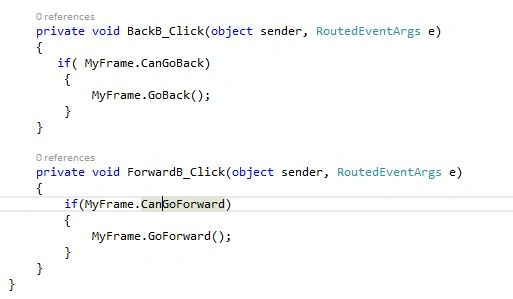
- Now go to MainPage.xaml.cs and write the following code to make the navigation work.

- Now run the program and see the navigation in work.
Source Code:
Belly KnotsPosted Jul 26, 2017, 11:44 AM
In VB.NET Typeof needs to be replaced with GetType()
Mukesh KumarPosted Dec 1, 2015, 11:59 PM
Nice share
Harshad PansuriyaPosted Dec 1, 2015, 11:31 PM
Nice one
Ajay GandhiPosted Dec 1, 2015, 1:32 PM
Nice
Santhakumar MunuswamyPosted Dec 1, 2015, 11:04 AM
Good one