

Step 1: Create Form
- Start the Excel application.
- On the Developer tab click Insert then click Command Button from ActiveX Controls group.
- Place the button on the spreadsheet.
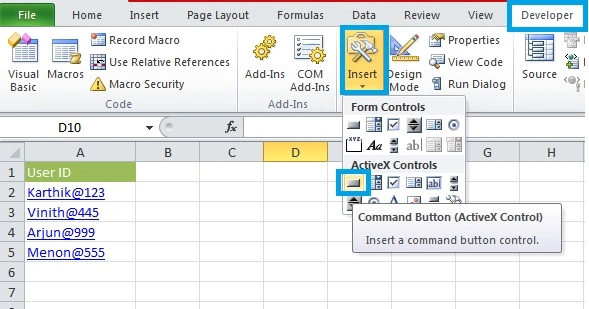
Figure 1: Login Image
- Press Alt+F11 to activate the Visual Basic Editor (VBE)
- On the Insert tab click User Form to insert the user form.
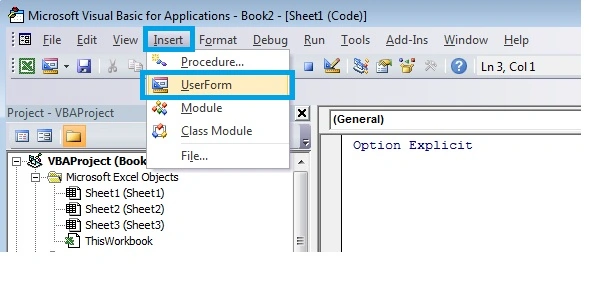
Figure 2: User Id
Step 2: Add Controls
Add the controls listed in the table below. Clicking on control from the Toolbox then drag a control onto a User Form.
| Control | Name |
| Image1 | Login Image |
| Image2 | User Id |
| Image3 | Correct Id |
| Image4 | Home |
| TextBox | User Id Text |
| ChackBox | User Check |
| Label | Submit Label |
- Add all the preceding specified controls on the user form
- Add the controls such that the form looks as in Figure 3
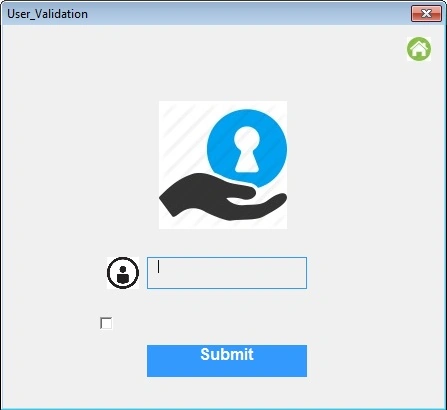
Figure 3: User Validation
- In the Project Explorer, right-click on UserForm1 and then click View Code.
- Add the following code lines.
- Private Sub SubmitLabel_Click()
- Me.Hide
- Call Setting
- UserForm2.Show
- End Sub
- Private Sub UserIDText_Change()
- Dim i As Integer
- If UserIDText.Value = "" Then
- UserIDText.BorderColor = RGB(255, 102, 0)
- End If
- i = 1
- Do Until IsEmpty(Cells(i, 1).Value)
- If UserIDText.Value = Cells (i, 1).Value Then
- With UserIDText
- .Border Color = RGB (186, 214, 150)
- .Back Color = RGB (216, 241, 211)
- .Fore Color = RGB (81, 99, 51)
- End With
- Image3.Visible = True
- End If
- ii = i + 1
- Loop
- End Sub
- Private Sub UserForm_Initialize()
- Call Setting
- End Sub
- Sub Setting ()
- UserIDText. Text = ""
- UserCheck.Value = False
- UserIDText.BackStyle = fmBackStyleTransparent
- UserIDText.BorderStyle = fmBorderStyleSingle
- UserIDText.BorderColor = &H8000000D
- SubmitLabel.TextAlign = fmTextAlignCenter
- SubmitLabel.BackColor = &H8000000D
- Image3.Visible = False
- End Sub
- Press Alt+F11 to exit from VBA
- Right-click CommandButton1 and click View code.
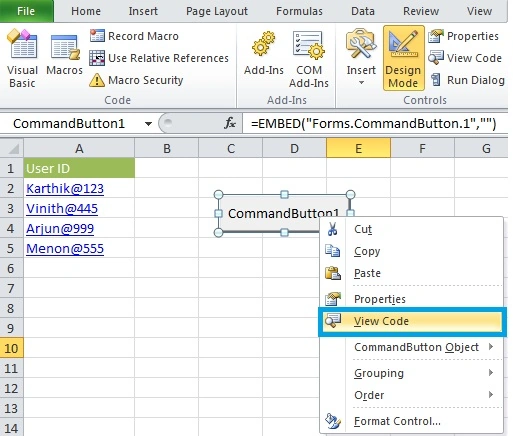
Figure 4: Design Mode
Right-click Sheet1 and click View code to write the code between Private Sub CommandButton1_Click () and End Sub.
Add the code shown below.
Private Sub CommandButton1_Click ()
UserForm1.Show
End Sub
- Press Alt+F11 to exit from the Visual Basic Editor (VBE)
- Press the Command button (Be sure Design made is deselected)
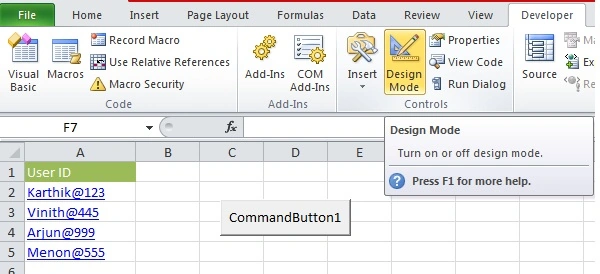
Figure 5: Command Button
Output
- Press the command button1
- Type the User ID given in the spreadsheet
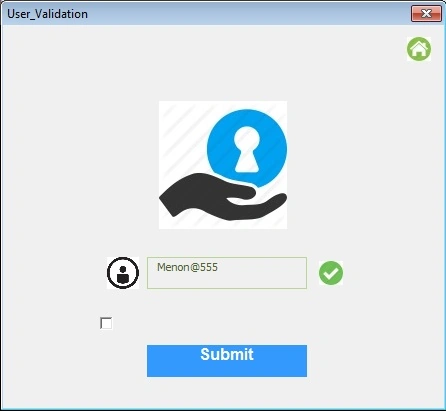
Figure 6: User Form
Check the Check box then press the submit button.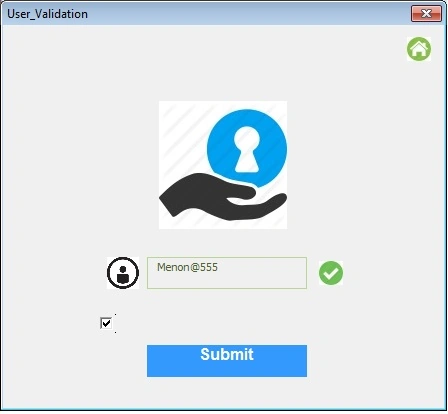
Figure 7: Submit Button
Figure 8: TradingX
Conclusion
I hope this article is useful for VBA beginners and those new to VBA. Thanks for reading and please provide your valuable suggestions.
HAVE A NICE DAY
Karthikeyan KPosted Aug 16, 2015, 3:28 AM
Thank you Santha kumar sir...
Karthikeyan KPosted Aug 16, 2015, 3:27 AM
Thank you Gopi sir...
Santhakumar MunuswamyPosted Aug 16, 2015, 2:17 AM
Nice Article. Thanks for sharing
Gopi ChandPosted Aug 15, 2015, 11:43 PM
Nice
Karthikeyan KPosted Aug 15, 2015, 3:00 PM
Thank you Rajeesh sir...
Karthikeyan KPosted Aug 15, 2015, 2:59 PM
Thank you Rakesh sir...
Karthikeyan KPosted Aug 15, 2015, 2:59 PM
Thank you Sibeesh sir...
Karthikeyan KPosted Aug 15, 2015, 2:59 PM
Thank you Nilesh sir...
Karthikeyan KPosted Aug 15, 2015, 2:58 PM
Thank you Sumit sir..
Sumit JoshiPosted Aug 15, 2015, 1:30 PM
thanks for share...
Nilesh JadavPosted Aug 15, 2015, 5:12 AM
Good one sir
Sibeesh VenuPosted Aug 15, 2015, 4:34 AM
Nice Share :)
RakeshPosted Aug 15, 2015, 3:34 AM
Good one
Rajeesh MenothPosted Aug 15, 2015, 3:31 AM
Nice Share