

- Copy a backup file and paste it into your system (that means paste into any drive (D:/, E:/ ...))
Step 2:
- Open SQL Server Management studio.

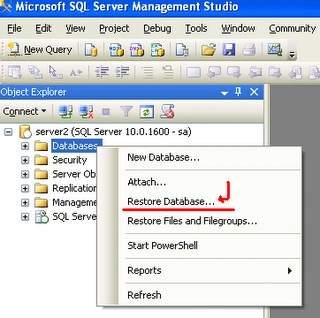
- Go to Object Explorer (it is located in the left side) in the SQL Server IDE.
- Select "Database" and Right-click.
- A window will open; in that window select the "Restore Databases.." Option.
- Another window will open.
- That window has...
- "Todatabase" option; you can give any Database name.
- And select "From Device" radio button and go to browse ... and select "backup file".

- Specify Backup window; in that window click the "Add" button.

- The drives window displays; select your backup file from your system drives.


- Click OK button.
- Another wIndow displays; in that window ...
- Check the "Restore" checkbox.

- Click "OK" button.
- The MSQLMS window is displayed.
- And click Ok.

- After completing all processes ...
- Again go to "Object Explorer" and press the "Refresh" button.
- Go to the database option and expand the database.

- "Project" is our database name

Gowtham RajamanickamPosted Jan 6, 2016, 1:23 AM
good article..
Krishna GaradPosted Mar 29, 2011, 5:27 AM
Is the same procedure for 2005 and 2008