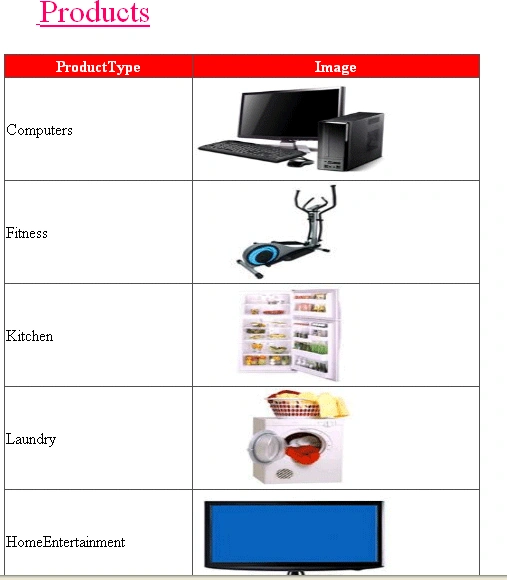
Now I want to retrieve these images from the database and display in a Grid View.
These are the products I want to retrieve from the database.
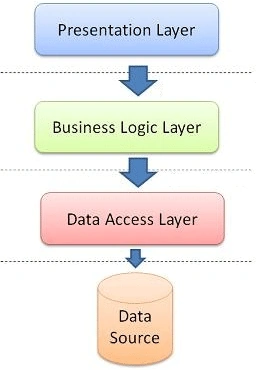
Presentation Layer
Take a page SearchComputers.aspx
Under SearchComputers.aspx page:
- <asp:GridView ID="GVImages" runat="server" AutoGenerateColumns="false" HeaderStyle-BackColor="red" HeaderStyle-ForeColor="white" Height="278px" Width="476px">
- <Columns>
- <asp:BoundField DataField="ProductId" HeaderText="ID" Visible="false" />
- <asp:BoundField DataField="ProductType" HeaderText="ProductType" />
- <asp:TemplateField HeaderText="Image">
- <ItemTemplate>
- <asp:ImageButton ID="ImageButton1" runat="server" ImageUrl='<%# "Handler.ashx?id="+ Eval("ProductId")%>' Width="200" Height="100" />
- </ItemTemplate>
- </asp:TemplateField>
- </Columns>
- <HeaderStyle BackColor="Red" ForeColor="White"></HeaderStyle>
- </asp:GridView>
Under SearchComputers.aspx page.cs :
- protected void Page_Load(object sender, EventArgs e) {
-
-
- SelectProducts b = new SelectProducts();
- DataSet ds = new DataSet();
- ds = b.FetchAllImagesInfo();
- GVImages.DataSource = ds;
- GVImages.DataBind();
- }
If you want to retrieve images from a database you should use a Generic Handler Class.
That class name is Handler.ashx
Under Handler.ashx Class
- <%@ WebHandler Language="C#" Class="Handler" %>
- using System;
- using System.Web;
- using System.Data.SqlClient;
- using System.Configuration;
- using System.Data;
- using System.IO;
- public class Handler: IHttpHandler {
- public void ProcessRequest(HttpContext context) {
- string id = context.Request.QueryString["id"];
- SqlConnection con = new SqlConnection();
- con.ConnectionString = System.Configuration.ConfigurationManager.ConnectionStrings["ConnectionString"].ConnectionString;
-
- SqlCommand cmd = new SqlCommand();
- cmd.CommandText = "Select Image from Products where ProductId ='" + id + "'";
- cmd.CommandType = System.Data.CommandType.Text;
- cmd.Connection = con;
- SqlParameter ProductId = new SqlParameter("@ProductId", System.Data.SqlDbType.Int);
- ProductId.Value = context.Request.QueryString["id"];
- cmd.Parameters.Add(ProductId);
- con.Open();
- SqlDataReader dReader = cmd.ExecuteReader();
- dReader.Read();
- context.Response.BinaryWrite((byte[]) dReader["Image"]);
- dReader.Close();
- con.Close();
- }
- public bool IsReusable {
- get {
- return false;
- }
- }
- }
Business Access Layer
Take a Class i.e. SelectProducts.cs
Under SelectProducts.cs class
- public DataSet FetchAllImagesInfo() {
- return ds = SqlHelper.ExecuteDataset(clsConnection.Connection, CommandType.StoredProcedure, "sp_GetProductsWithImage");
- }
-
Data Access Layer
- public class clsConnection {
- public clsConnection() {
-
-
-
- }
- public static string Connection = ConfigurationManager.ConnectionStrings["ConnectionString"].ConnectionString;
- }
Under Web.config:- <connectionStrings>
- <add name="ConnectionString" connectionString="user Id=sa;Password=123;DataBase=RentalShopping;Data Source=server2" providerName="System.Data.SqlClient" />
- </connectionStrings>
- //Here write your database name,userid,password,datasource.
Under the DataBase:
Create one database i.e RentalShopping.Under Database create one table.I have created one table i.e Products.
- CREATE TABLE [dbo].[Products]
- (
- [ProductId] [int] IDENTITY(101,1) NOT NULL,
- [ProductType] [varchar](50) NULL,
- [Image] [image] NULL
- }
This is the Stored Procedure
- USE[RentalShopping]
- GO
- SET ANSI_NULLS ON
- GO
- SET QUOTED_IDENTIFIER ON
- GO
- Create PROCEDURE[dbo]. [sp_GetProductsWithImage]
- as
- begin
- select * from Products
- end
If you want to store images into a database, see my article
Click Here


SubashPosted Sep 19, 2016, 2:38 AM
Can you give for windows application
SubashPosted Sep 19, 2016, 2:38 AM
Good one
Gowtham RajamanickamPosted Apr 26, 2016, 8:49 AM
very good...
Mahesh BabueditedPosted Dec 20, 2012, 3:35 AMEdited Dec 20, 2012, 3:35 AM
Thanks to all
Anand NPosted Dec 17, 2012, 5:27 AM
thank you very much
sultan kadanyoPosted Aug 27, 2011, 5:00 AM
thanks allot man
Krishna GaradPosted Feb 28, 2011, 1:37 AM
keep it up
SapnaPosted Feb 27, 2011, 11:11 PM
Easy to understand, keep sharing your ideas!