

Sending An Email Using JSP Code With Netbeans IDE
In this article I am going to describe how
to send an e-mail in JSP using the NetBeans IDE(7.0). This article is divided
into several Steps.
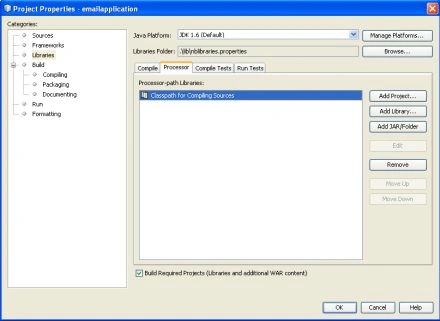
Step 1 : Downloading and Registering Libraries in NetBeans IDE 7.0.
First of all, you need to download the latest version of Java Mail , as well as
DJ Native Swing. After you download the libraries, you need to put them into the
NetBeans Library Manager. I recommend you store all libraries in, for example,
C:\Program Files\Java\libraries.
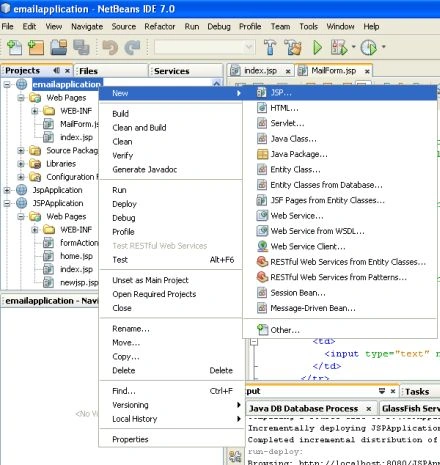
Step 2 : Creating a new JSP web project
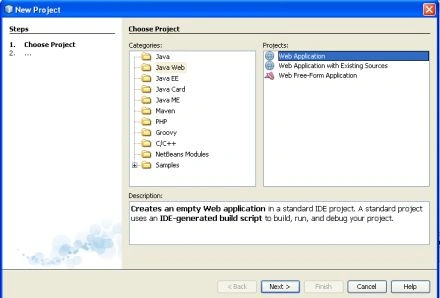
In this step we select a new web project and click on next.
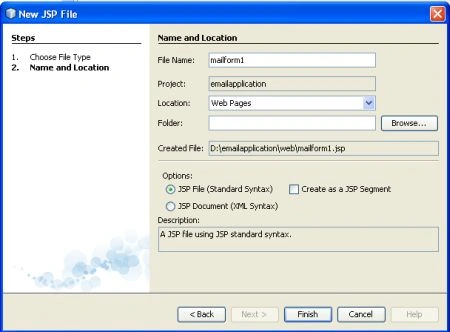
Step 3 : Name and Location
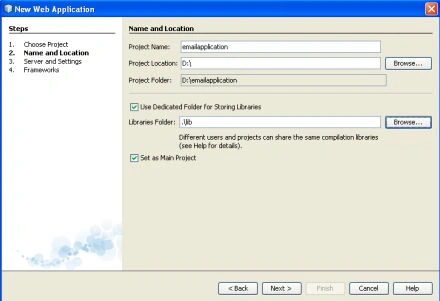
Giving a specific name and set a location for this web application
and click on next button.




Kwun JaehyunPosted Feb 6, 2013, 8:43 PM
Can't working in eclipse? it's not working in eclipse. My error is it. org.apache.jasper.JasperException: An exception occurred processing JSP page /mail_send.jsp at line 33 30: msg.setSubject(subject); 31: msg.setSentDate(new Date()); 32: msg.setText(messageText); 33: Transport.send(msg); 34: out.println("Mail was sent to " + to); 35: out.println(" from " + from); 36: out.println(" using host " + host + "."); Stacktrace: org.apache.jasper.servlet.JspServletWrapper.handleJspException(JspServletWrapper.java:521) org.apache.jasper.servlet.JspServletWrapper.service(JspServletWrapper.java:412) org.apache.jasper.servlet.JspServlet.serviceJspFile(JspServlet.java:313) org.apache.jasper.servlet.JspServlet.service(JspServlet.java:260) javax.servlet.http.HttpServlet.service(HttpServlet.java:717)
jay chouPosted Dec 30, 2011, 1:32 AM
I really like this website,and hope you will write more ,thanks a lot for your information. <a href=" http://www.koreanjapanclothing.com/Evening_Dresses_62.htm " target="_new">wholesale evening dresses</a> <a href=" http://www.koreanjapanclothing.com/Fashion_Shoes_29.htm" target="_new">cheap fashion boots</a>