

Introduction
Flutter is a popular open-source framework for building cross-platform mobile applications. Here's a guide on how to set up Flutter on your Windows system.
Prerequisites
- Windows system. (64-bit)
- Disk Space: 400 MB (excluding IDE/tools).
- Git for Windows (Optional, but recommended for version control)
Step 1. To install Git on your Windows system, follow these steps (Optional but recommended).
- Click on the Git link provided: https://git-scm.com/download/win
- Once you click on the link, you will be directed to the Git for Windows download page.
- On the download page, choose the "64-bit Git for Windows SetUP" option.
- Click on the download link to start the download
- Once the download is complete, locate the downloaded file and run the installer.
- Follow the on-screen instructions to complete the installation process.
By following these steps, you will successfully install Git on your Windows system.

Step 2. Install Flutter SDK
Visit the Flutter official website.
Link: https://docs.flutter.dev/get-started/install/windows
Download the Flutter SDK file and save it on your device (e.g., C:\src\flutter).
Save the downloaded file in a suitable location on your device, such as "C:\src\flutter".
Ex. D:\foldername\flutter.
Note. Avoid installing Flutter on paths containing special characters and spaces.
In my case, I saved the file in C drive that C:\src\flutter.

Update the path
Update the system environment variables path, open "Edit the system environment variable" option in your system settings.(Press Windows button)
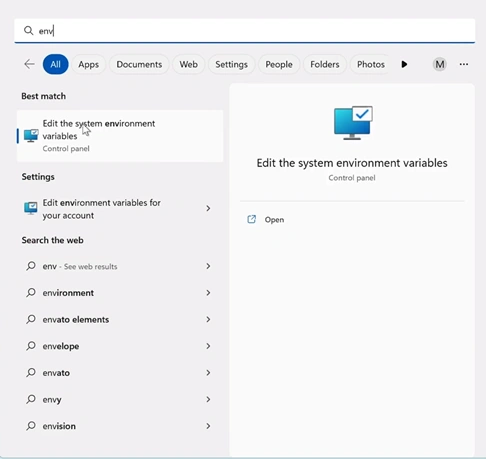
Click on the “environment variable” button as follow below screen shot.


Sania WilkinsonPosted May 15, 2026, 9:45 AM
Great walkthrough for beginners trying to set up Flutter with VS Code on Windows. The step-by-step explanation makes the installation process much less intimidating, especially for developers who are new to Flutter. I also liked that the article covered environment variables and Flutter Doctor, since those are usually the areas where most setup issues happen. A lot of development teams and companies like ValueCoders, GeekyAnts, and Appinventiv actively work with Flutter for cross-platform projects, so guides like this are genuinely useful for developers looking to get started with the ecosystem. Really helpful and easy-to-follow article overall.