

Introduction
In this article, we’ll learn how to put AJAX loader for all AJAX calls from all pages which extend from your layout page in MVC. Here, we will create a simple MVC project and call AJAX function from view. For beginners who are new to AJAX, AJAX is Asynchronous JavaScript and XML, it's a front-end web technology that calls web-server asynchronously. It will load your content without loading or leaving your currunt page.
Recommended Prerequisites
- Visual Studio
- ASP.NET MVC
Step 1
Open Visual Studio and select “File” >> "New". Then, click on Project.
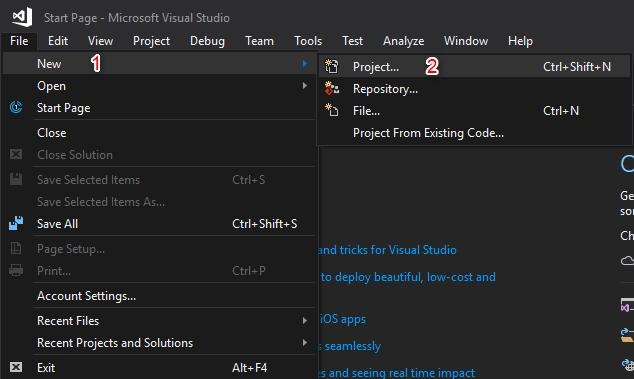
Open Visual Studio and select “File” >> "New". Then, click on Project.
Step 2
Select “Templates” >> Visual C# >> Web then ASP.NET Web Application (.NET Framework), and put appropriate project name.
- And click the “OK” button.
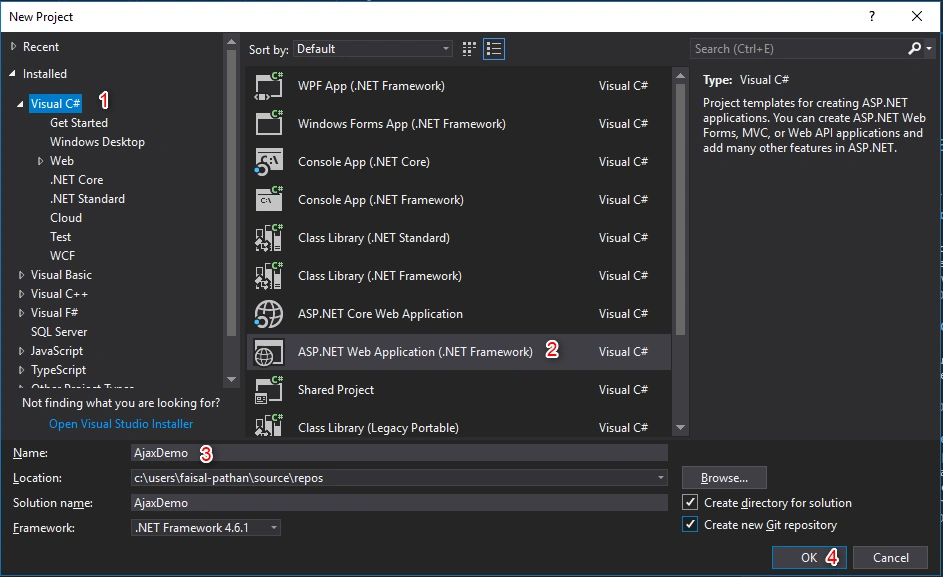
Step 3
And, from here select MVC project (you can select the project as per your requirement).
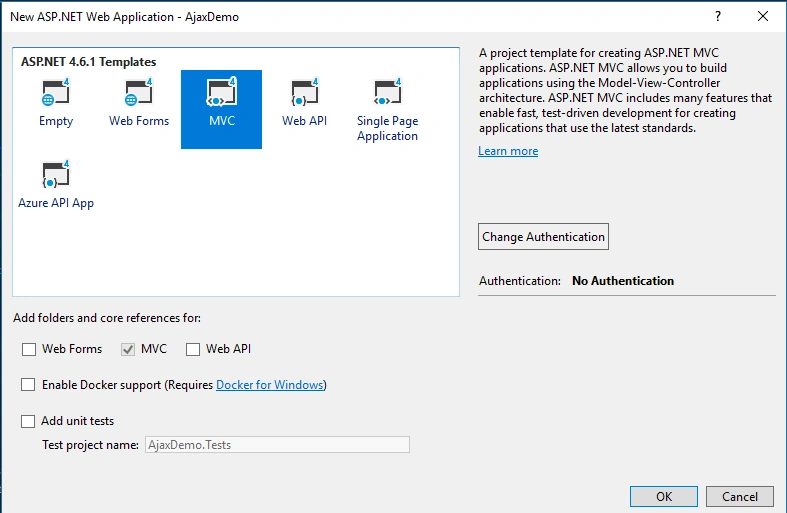
Step 4
Now, go to your layout page and put the below code as per the below instruction.
Copy the below CSS, Div, and Script and put in your layout (please see below image for reference).
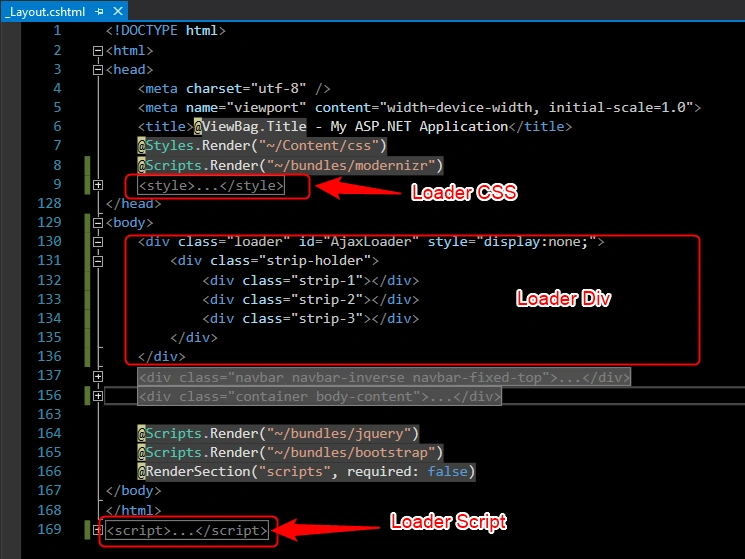
Loader CSS
- <style>
- /*!
- // 3. Loader
- // --------------------------------------------------*/
- .loader {
- top: 0;
- left: 0;
- position: fixed;
- opacity: 0.8;
- z-index: 10000000;
- background: Black;
- height: 100%;
- width: 100%;
- margin: auto;
- }
- .strip-holder {
- top: 50%;
- -webkit-transform: translateY(-50%);
- -ms-transform: translateY(-50%);
- transform: translateY(-50%);
- left: 50%;
- margin-left: -50px;
- position: relative;
- }
- .strip-1,
- .strip-2,
- .strip-3 {
- width: 20px;
- height: 20px;
- background: #0072bc;
- position: relative;
- -webkit-animation: stripMove 2s ease infinite alternate;
- animation: stripMove 2s ease infinite alternate;
- -moz-animation: stripMove 2s ease infinite alternate;
- }
- .strip-2 {
- -webkit-animation-duration: 2.1s;
- animation-duration: 2.1s;
- background-color: #23a8ff;
- }
- .strip-3 {
- -webkit-animation-duration: 2.2s;
- animation-duration: 2.2s;
- background-color: #89d1ff;
- }
- @@-webkit-keyframes stripMove {
- 0% {
- transform: translate3d(0px, 0px, 0px);
- -webkit-transform: translate3d(0px, 0px, 0px);
- -moz-transform: translate3d(0px, 0px, 0px);
- }
- 50% {
- transform: translate3d(0px, 0px, 0px);
- -webkit-transform: translate3d(0px, 0px, 0px);
- -moz-transform: translate3d(0px, 0px, 0px);
- transform: scale(4, 1);
- -webkit-transform: scale(4, 1);
- -moz-transform: scale(4, 1);
- }
- 100% {
- transform: translate3d(-50px, 0px, 0px);
- -webkit-transform: translate3d(-50px, 0px, 0px);
- -moz-transform: translate3d(-50px, 0px, 0px);
- }
- }
- @@-moz-keyframes stripMove {
- 0% {
- transform: translate3d(-50px, 0px, 0px);
- -webkit-transform: translate3d(-50px, 0px, 0px);
- -moz-transform: translate3d(-50px, 0px, 0px);
- }
- 50% {
- transform: translate3d(0px, 0px, 0px);
- -webkit-transform: translate3d(0px, 0px, 0px);
- -moz-transform: translate3d(0px, 0px, 0px);
- transform: scale(4, 1);
- -webkit-transform: scale(4, 1);
- -moz-transform: scale(4, 1);
- }
- 100% {
- transform: translate3d(50px, 0px, 0px);
- -webkit-transform: translate3d(50px, 0px, 0px);
- -moz-transform: translate3d(50px, 0px, 0px);
- }
- }
- @@keyframes stripMove {
- 0% {
- transform: translate3d(-50px, 0px, 0px);
- -webkit-transform: translate3d(-50px, 0px, 0px);
- -moz-transform: translate3d(-50px, 0px, 0px);
- }
- 50% {
- transform: translate3d(0px, 0px, 0px);
- -webkit-transform: translate3d(0px, 0px, 0px);
- -moz-transform: translate3d(0px, 0px, 0px);
- transform: scale(4, 1);
- -webkit-transform: scale(4, 1);
- -moz-transform: scale(4, 1);
- }
- 100% {
- transform: translate3d(50px, 0px, 0px);
- -webkit-transform: translate3d(50px, 0px, 0px);
- -moz-transform: translate3d(50px, 0px, 0px);
- }
- }
- </style>
- <div class="loader" id="AjaxLoader" style="display:none;">
- <div class="strip-holder">
- <div class="strip-1"></div>
- <div class="strip-2"></div>
- <div class="strip-3"></div>
- </div>
- </div>
Sanjay ShekhawatPosted Jun 8, 2020, 5:52 AM
Thanks for sharing
Mohamed El GhandourPosted Jul 3, 2019, 5:45 AM
So helpful, but the code is not complete yet.