
Introduction
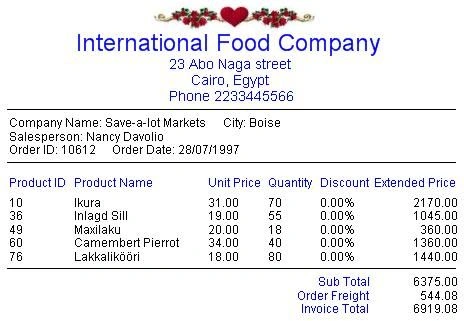
This is a trial to print Invoice with VB.Net, this project lets you know:
- How to create a report using PrintPreviewDialog control and PrintDocument control?
- How to draw Invoice head?
- How to draw the table of products and its price?
- How to compute and draw Invoice total?
You can read my article about
How to use C# to print Invoice.
My Project has three Forms:
- frmInvoice: to bind DataGrid with all Orders from Northwind database file.
- frmInput: to choose one Order which you want to print its Invoice.
- frmOrder: to display Invoice on DataGrid, then you can Print Preview or Print the Invoice as Report.
Also, we need three classes for printing:
System.Windows.Forms.PrintDialog, System.Windows.Forms.PrintPreviewDialog and
System.Drawing.Printing.PrintDocument.
Of course you can use any database file instead Northwind.mdb and change my code
to connect with your database file, also you can change my SQL string to bind
DataGrid with data.
About the Code
Bind the DataGrid in frmInvoice form with all Orders:
' following lines to connect with
access database file 'Northwind.mdb'
Dim
MyPass As String
= ""
Dim
MyDataFile As
String =
Application.StartupPath & "\DataFile\Northwind.mdb"
Dim
strCon
As String
=
"provider=microsoft.jet.oledb.4.0;data source=" _
& MyDataFile & ";" & "Jet OLEDB:Database Password=" & MyPass & ";"
' If you are using SQL Server, please replace previous lines
with following:
Dim
strCon As String
= "provider=sqloledb;Data Source=PC;Initial Catalog=" _
& "Northwind;Integrated Security=SSPI" & ";"
' and replace 'Data Source=PC' with the name of your
system
Try
' Get data from tables: Orders, Customers, Employees,
Products, Order Details:
Dim
InvSql As String
= "SELECT Customers.CompanyName, Customers.City, " _
& "Employees.FirstName
+
Space(1) +
Employees.LastName AS Salesperson, " _
& "Orders.OrderID,
Orders.OrderDate, " _
& "[Order
Details].ProductID, Products.ProductName, [Order Details].UnitPrice, " _
& "[Order
Details].Quantity, [Order Details].Discount, " _
& "CCur([Order
Details].UnitPrice*[Quantity]*(1-[Discount])/100)*100 AS ExtendedPrice, " _
& "Orders.Freight " _
& "FROM Products INNER
JOIN ((Employees INNER JOIN " _
& "(Customers INNER
JOIN Orders ON Customers.CustomerID = Orders.CustomerID) " _
& "ON
Employees.EmployeeID = Orders.EmployeeID) " _
& "INNER JOIN [Order
Details] ON Orders.OrderID = [Order Details].OrderID) " _
& "ON
Products.ProductID = [Order Details].ProductID;"
' create an OleDbDataAdapter
Dim
datAdp As
OleDbDataAdapter =
New
OleDbDataAdapter(InvSql, strCon)
' create a command builder
Dim
cBuilder As
OleDbCommandBuilder =
New
OleDbCommandBuilder(datAdp)
' create a DataTable to hold the query results
Dim
dTable As
DataTable = New
DataTable
' fill the DataTable
datAdp.Fill(dTable)
' set DataSource of DataGrid
datGrid.DataSource =
dTable
Catch
ex As
Exception
MessageBox.Show(ex.ToString())
End Try
Bind the DataGrid in
frmOrder form with one Order:
'InvoiceOrder is the number of Order which you
select:
Dim intOrder
As Integer = Int32.Parse(InvoiceOrder)
Dim MyDataFile As
String = Application.StartupPath & "\DataFile\Northwind.mdb"
Dim MyPass As String
= ""
Dim strCon As String
= "provider=microsoft.jet.oledb.4.0;data source=" _
& MyDataFile & ";" & "Jet OLEDB:Database Password=" & MyPass & ";"
Try
' Get Invoice Data:
InvSql = "SELECT [Order Details].ProductID, " _
& "Products.ProductName, [Order Details].UnitPrice, " _
& "[Order Details].Quantity, [Order Details].Discount, " _
& "CCur([Order Details].UnitPrice*[Quantity]*(1-[Discount])/100)*100 " _
& "AS ExtendedPrice " _
& "FROM Products INNER JOIN [Order Details] " _
& "ON Products.ProductID=[Order Details].ProductID " _
& "WHERE [Order Details].OrderID = " & intOrder
' create an OleDbDataAdapter
Dim datAdp
As OleDbDataAdapter =
New OleDbDataAdapter(InvSql, strCon)
' create a command builder
Dim cBuilder
As OleDbCommandBuilder =
New OleDbCommandBuilder(datAdp)
' create a DataTable to hold the query results
Dim dTable
As DataTable = New
DataTable
' fill the DataTable
datAdp.Fill(dTable)
' Create a TableStyle to format Datagrid
columns.
ordGrid.TableStyles.Clear()
Dim tableStyle As
DataGridTableStyle = New DataGridTableStyle
For Each dc As
DataColumn In dTable.Columns
Dim txtColumn As
DataGridTextBoxColumn = New
DataGridTextBoxColumn
txtColumn.MappingName = dc.ColumnName
txtColumn.HeaderText = dc.Caption
Select Case (dc.ColumnName.ToString())
Case "ProductID"
' Product ID
txtColumn.HeaderText = "Product ID"
txtColumn.Width = 60
Case "ProductName"
' Product Name
txtColumn.HeaderText = "Product Name"
txtColumn.Width = 110
Case "UnitPrice"
' Unit Price
txtColumn.HeaderText = "Unit Price"
txtColumn.Format = "0.00"
txtColumn.Alignment = HorizontalAlignment.Right
txtColumn.Width = 60
Case "Discount"
' Discount
txtColumn.HeaderText = "Discount"
txtColumn.Format = "p" 'percent
txtColumn.Alignment = HorizontalAlignment.Right
txtColumn.Width = 60
Case "Quantity"
' Quantity
txtColumn.HeaderText = "Quantity"
txtColumn.Alignment = HorizontalAlignment.Right
txtColumn.Width = 50
Case "ExtendedPrice"
' Extended Price
txtColumn.HeaderText = "Extended Price"
txtColumn.Format = "0.00"
txtColumn.Alignment = HorizontalAlignment.Right
txtColumn.Width = 90
End Select
tableStyle.GridColumnStyles.Add(txtColumn)
Next
tableStyle.MappingName = dTable.TableName
ordGrid.TableStyles.Add(tableStyle)
' set DataSource of DataGrid
ordGrid.DataSource = dTable.DefaultView
Catch ex As
Exception
MessageBox.Show(ex.ToString())
End Try
Declare and initialize three
instances for printing:\
Private
prnDialog As
System.Windows.Forms.PrintDialog
Private
prnPreview As
System.Windows.Forms.PrintPreviewDialog
Private
prnDocument As
System.Drawing.Printing.PrintDocument
Me.prnDialog
= New
System.Windows.Forms.PrintDialog
Me.prnPreview
= New
System.Windows.Forms.PrintPreviewDialog
Me.prnDocument
= New
System.Drawing.Printing.PrintDocument
' the Event of 'PrintPage'
AddHandler
prnDocument.PrintPage,
AddressOf
prnDocument_PrintPage
To draw something on the report (as line or text):
1. Get Left Margin, Right Margin, Top Margin, Bottom Margin, Report Width and Report Height:
' Result of the Event 'PrintPage'
Private Sub
prnDocument_PrintPage(ByVal
sender As
System.Object, ByVal e As
System.Drawing.Printing.PrintPageEventArgs)
leftMargin = Convert.ToInt32(e.MarginBounds.Left)
' leftMargin, rightMargin, ... Declared before
rightMargin = Convert.ToInt32(e.MarginBounds.Right)
topMargin = Convert.ToInt32(e.MarginBounds.Top)
bottomMargin = Convert.ToInt32(e.MarginBounds.Bottom)
InvoiceWidth = Convert.ToInt32(e.MarginBounds.Width)
InvoiceHeight = Convert.ToInt32(e.MarginBounds.Height)
' Draw Invoice Head
SetInvoiceHead(e.Graphics)
End Sub
2. Set Font and Color:
Dim
InvTitleFont As
Font = New
Font("Arial", 24, FontStyle.Regular)
Dim
HeadBrush As
SolidBrush = New
SolidBrush(Color.Blue)
3. Set Font Height and Font
Width and coordinate then use DrawString method:
Private Sub SetInvoiceHead(ByVal
g As
Graphics)
'Invoice title:
Dim
InvTitle As String
= "International Food Company"
'Title Font:
Dim
InvTitleFont As
Font = New
Font("Arial", 24, FontStyle.Regular)
'Title Color:
Dim
HeadBrush As
SolidBrush = New
SolidBrush(Color.Blue)
'Title Height:
Dim
InvTitleHeight As Integer =
Convert.ToInt32(InvTitleFont.GetHeight(g))
'Title Length:
Dim
lenInvTitle As
Integer
=
Convert.ToInt32(g.MeasureString(InvTitle, InvTitleFont).Width)
'Coordinate:
Dim
CurrentX As Integer
= leftMargin + (InvoiceWidth - lenInvTitle) / 2 'to set the title in
center
Dim
CurrentY As Integer
= topMargin + InvTitleHeight
'draw the title:
g.DrawString(InvTitle, InvTitleFont, HeadBrush, CurrentX,
CurrentY)
End Sub
The project has several pieces of code in three forms, please read
the code then run the program to see the result.
If you have any idea or if you find any problems please tell me.

Join the conversation! Your thoughts help the community grow.