

AngularJS Validation
AngularJS is an open source script language. AngularJS validation has fast processing compared to other validations. Hence, AngularJS works on the client-side form validation. One of the best features of AngularJS is the form validation.
Validate data
These are some functions, which can be used to track the error.
- $dirty – It is used by the user to make some changes.
- $invalid – It is used to identify the value entered is invalid.
- $error – It is used to exact the error.
- $Valid- These validations in the form currently evaluates to correct.
Here, I am using Visual Studio 2013 to write an AngularJS program. You can write some other text such as (sublime text, Notepad++,Text….). Thus, many text options are available to write the program.
Step 1: Open Visual Studio, click New=>Project.

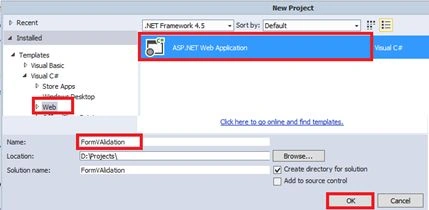
Step 2: Now, select ASP.NET Web Application. Create a project name. Here, our project name is “FormValidation “ and click OK button.
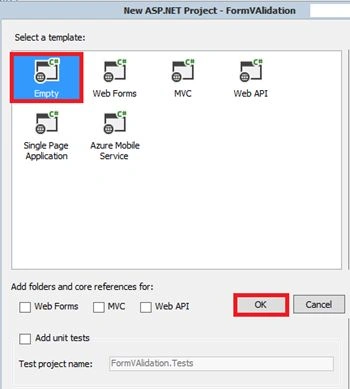
Step 3: Select MVC template and click OK button.
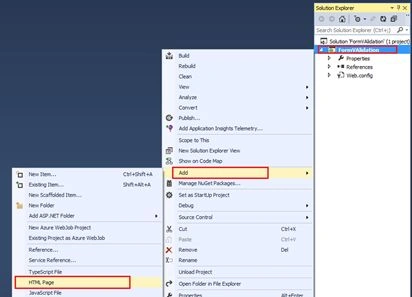
Step 4: Here, right click on the project name and add=> HTML page.
Step 5: Now, right click on the project name. Click on NuGet packages.
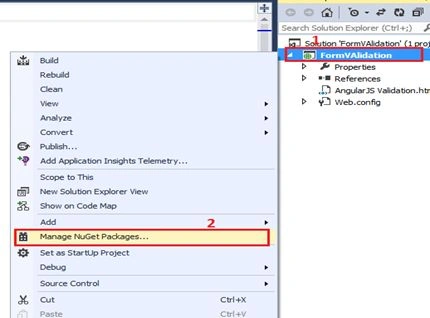
Step 6: You need to search AnjularJS in the TextBox. nstall AngularJS.
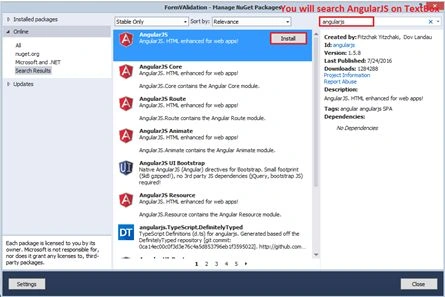
Step 7: In this section , I am using CSS and AngularJS Validation coding.
- <!DOCTYPE html>
- <html ng-app="myForm"
- xmlns="http://www.w3.org/1999/xhtml">
- <head>
- <title>AngularJS Validation demo</title>
- <style>
- body {
- font-family: "Calibri";
- background-color: #E2E2DC;
- }
- </style>
- <style>
- .name.ng-valid {
- background-color: lightgreen;
- }
- .name.ng-dirty.ng-invalid-required {
- background-color: red;
- }
- .name.ng-dirty.ng-invalid-minlength {
- background-color: orange;
- }
- .degree.ng-valid {
- background-color: lightgreen;
- }
- .degree.ng-dirty.ng-invalid-required {
- background-color: red;
- }
- degree.ng-dirty.ng-invalid-minlength {
- background-color: orange;
- }
- .email.ng-valid {
- background-color: lightgreen;
- }
- .email.ng-dirty.ng-invalid-required {
- background-color: red;
- }
- .email.ng-dirty.ng-invalid-email {
- background-color: orange;
- }
- .Mnumber.ng-valid {
- background-color: lightgreen;
- }
- .Mnumber.ng-dirty.ng-invalid-required {
- background-color: red;
- }
- .Mnumber.ng-dirty.ng-invalid-minlength {
- background-color: orange;
- }
- </style>
- </head>
- <body ng-controller="Mycontroller as Myctrl">
- <form ng-submit="Myctrl.submit()" name="MyInfo">
- <label>Name:</label>
- <input type="text"ng-model="Myctrl.user.name" name="Name" class="name" placeholder="Enter your Name" required ng-minlength="4">
- <span ng-show="MyInfo.$dirty && MyInfo.Name.$error.required">Name is Required</span>
- <span ng-show="MyInfo.$dirty && MyInfo.Name.$error.minlength">Minimum length Required is 4</span>
- <span ng-show="MyInfo.$dirty && MyInfo.Name.invalid">This field is Invalid</span>
- <br />
- <br />
- <label>Degree:</label>
- <input type="text" ng-model="Myctrl.user.degree" name="Degree" class="degree" placeholder="Enter your Degree Name" required ng-minlength="2">
- <span ng-show="MyInfo.$dirty && MyInfo.Degree.$error.required">Degree is Required</span>
- <span ng-show="MyInfo.$dirty && MyInfo.Degree.$error.minlength">Minimum length Required is 2</span>
- <span ng-show="MyInfo.$dirty && MyInfo.Degree.invalid">This field is Invalid</span>
- <br />
- <br />
- <label>EmailId:</label>
- <input type="email" ng-model="Myctrl.user.email" name="email" class="email" placeholder="Enter your Email" required />
- <span ng-show="MyInfo.$dirty && MyInfo.email.$error.required">Email is Required</span>
- <span ng-show="MyInfo.$dirty && MyInfo.email.invalid">This field is Invalid</span>
- <br />
- <br />
- <label>Mnumber:</label>
- <input type="number" ng-model="Myctrl.user.Mnumber" name="MNumber" class="Mnumber" placeholder="Enter your Mobile Number " required ng-minlength="10">
- <span ng-show="MyInfo.$dirty && MyInfo.MNumber.$error.required">Mobile Number is Required</span>
- <span ng-show="MyInfo.$dirty && MyInfo.MNumber.$error.minlength">Minimum length Required is 10</span>
- <span ng-show="MyInfo.$dirty && MyInfo.MNumber.invalid">This field is Invalid</span>
- <br />
- <br />
- <input type="submit" value="Submit" ng-disabled="MyInfo.$invalid">
- </form>
- <script src="Scripts/angular.js"></script>
- <script>
- angular.module('myForm', [])
- .controller('Mycontroller', [function () {
- var self = this;
- self.submit = function () {
- console.log('Form is submitted with following user', self.user);
- };
- }]);
- </script>
- </body>
- </html>
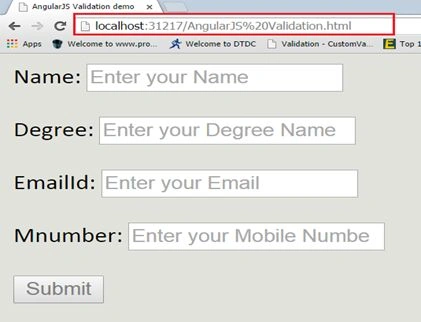
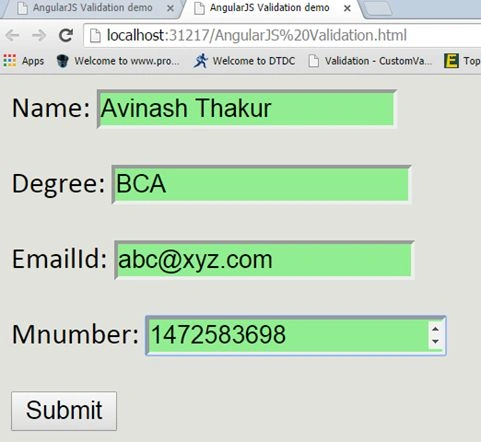
Here, AngularJS validation is working properly.
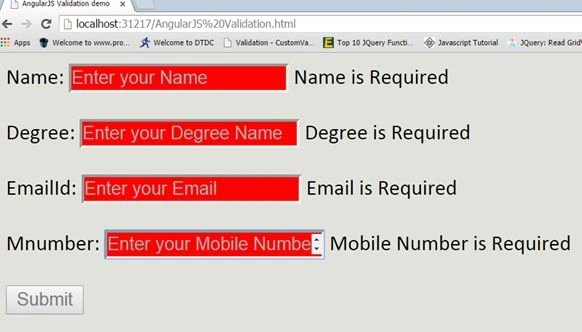
Here, you can see the range validation in AngularJS.
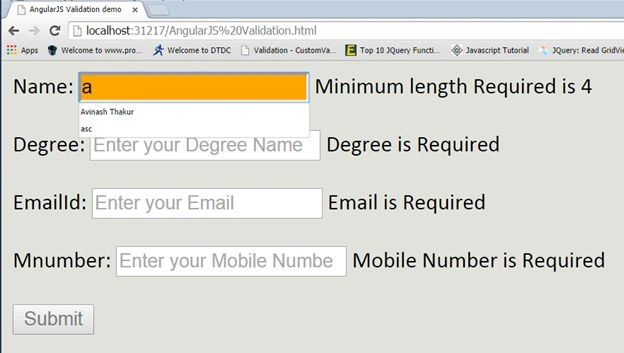
Finally, our output is successfully shown in the figure, given below:
Kartik KumarPosted Aug 18, 2016, 9:42 AM
Good one..
Avinash ThakurPosted Aug 15, 2016, 11:32 PM
Thanks to all
Kiran MaramPosted Aug 14, 2016, 7:53 AM
Useful
Nigel FernandesPosted Aug 14, 2016, 6:14 AM
Good
Ravi KandelPosted Aug 14, 2016, 2:53 AM
Nice