

Introduction
Token-based security is commonly used in today’s security architecture. There are several token-based security techniques. JWT is one of the more popular techniques. JWT token is used to identify authorized users.
What is the JWT WEB TOKEN?
- Open Standard: Means anywhere, anytime, and anyone can use JWT.
- Secure data transfer between any two bodies, any two users, any two servers.
- It is digitally signed: Information is verified and trusted.
- There is no alteration of data.
- Compact: because JWT can be sent via URL, post request & HTTP header.
- Fast transmission makes JWT more usable.
- Self Contained: because JWT itself holds user information.
- It avoids querying the database more than once after a user is logged in and has been verified.
JWT is useful for
- Authentication
- Secure data transfer
JWT Token Structure
A JWT token contains a Header, a Payload, and a Signature.

Header
Header contains the algorithms like RSA or HMACSHA256 and the information of the type of Token.
- {
- “alg” : ”” Algorithm like RSA or HMACSHA256
- “Type” : ”” Type of JWT Token
- }
Payload
Payload contains the information of rows, i.e., user credentials.
- {
- “loginname” : ”Gajendra”
- “password”:”123#”
- }
- It contains claims.
- Claims are user details or additional information
Signature
{ base64urlencoded (header) +”.”+ base64urlencoded (payload) +”.”+ secret }
- Combine base64 encoded Header , base64 encoded Payload with secret
- These provide more security.
How Does JWT Work?
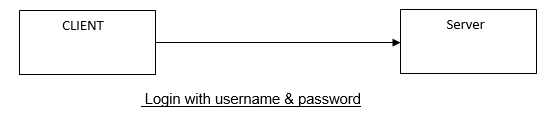
Step 1
Client logs in with his/her credentials.
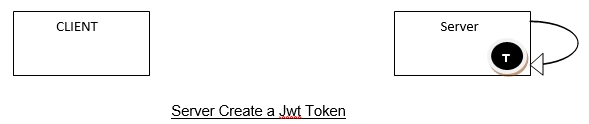
Step 2
Server generates a Jwt token at server side.
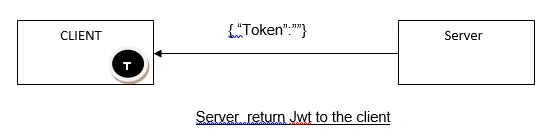
Step 3
After token generation, the server returns a token in response.
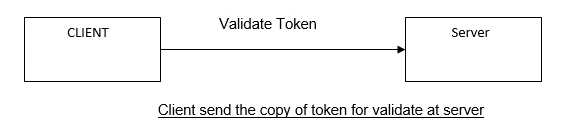
Step 4
Now, the client sends a copy of the token to validate the token.
Step 5
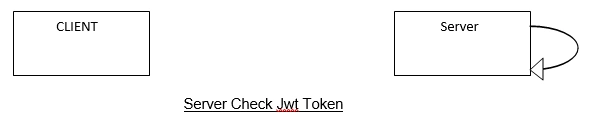
The server checks JWT token to see if it's valid or not.
Step 6
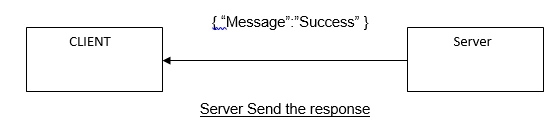
After the token is validated, the server sends a status message to the client.
Working With JWT
Step 1
User Login - User normally logs in with his/her credentials such as User Name and Password.
- [Route("UserLogin")]
- [HttpPost]
- public ResponseVM UserLogin(LoginVM objVM) {
- var objlst = wmsEN.Usp_Login(objVM.UserName, UtilityVM.Encryptdata(objVM.Passward), "").ToList < Usp_Login_Result > ().FirstOrDefault();
- if (objlst.Status == -1) return new ResponseVM {
- Status = "Invalid", Message = "Invalid User."
- };
- if (objlst.Status == 0) return new ResponseVM {
- Status = "Inactive", Message = "User Inactive."
- };
- else return new ResponseVM {
- Status = "Success", Message = TokenManager.GenerateToken(objVM.UserName)
- };
- }
Step 2
Server generates a JWT token.
Jwt secret string
- private static string Secret = "ERMN05OPLoDvbTTa/QkqLNMI7cPLguaRyHzyg7n5qNBVjQmtBhz4SzYh4NBVCXi3KJHlSXKP+oi2+bXr6CUYTR==";
Create Jwt Token
First you have to add Microsoft.IdentityModel.Tokens and System.IdentityModel.Tokens.Jwt references from NuGet Package Manager.
- public static string GenerateToken(string username) {
- byte[] key = Convert.FromBase64String(Secret);
- SymmetricSecurityKey securityKey = new SymmetricSecurityKey(key);
- SecurityTokenDescriptor descriptor = new SecurityTokenDescriptor {
- Subject = new ClaimsIdentity(new [] {
- new Claim(ClaimTypes.Name, username)
- }),
- Expires = DateTime.UtcNow.AddMinutes(30),
- SigningCredentials = new SigningCredentials(securityKey, SecurityAlgorithms.HmacSha256Signature)
- };
- JwtSecurityTokenHandler handler = new JwtSecurityTokenHandler();
- JwtSecurityToken token = handler.CreateJwtSecurityToken(descriptor);
- return handler.WriteToken(token);
- }
- public static ClaimsPrincipal GetPrincipal(string token) {
- try {
- JwtSecurityTokenHandler tokenHandler = new JwtSecurityTokenHandler();
- JwtSecurityToken jwtToken = (JwtSecurityToken) tokenHandler.ReadToken(token);
- if (jwtToken == null) return null;
- byte[] key = Convert.FromBase64String(Secret);
- TokenValidationParameters parameters = new TokenValidationParameters() {
- RequireExpirationTime = true,
- ValidateIssuer = false,
- ValidateAudience = false,
- IssuerSigningKey = new SymmetricSecurityKey(key)
- };
- SecurityToken securityToken;
- ClaimsPrincipal principal = tokenHandler.ValidateToken(token, parameters, out securityToken);
- return principal;
- } catch {
- return null;
- }
- }
Step 3
Check for token validation.
- [Route("Validate")]
- [HttpGet]
- public ResponseVM Validate(string token, string username) {
- int UserId = new UserRepository().GetUser(username);
- if (UserId == 0) return new ResponseVM {
- Status = "Invalid", Message = "Invalid User."
- };
- string tokenUsername = TokenManager.ValidateToken(token);
- if (username.Equals(tokenUsername)) {
- return new ResponseVM {
- Status = "Success",
- Message = "OK",
- };
- }
- return new ResponseVM {
- Status = "Invalid", Message = "Invalid Token."
- };
- }
- public static string ValidateToken(string token) {
- string username = null;
- ClaimsPrincipal principal = GetPrincipal(token);
- if (principal == null) return null;
- ClaimsIdentity identity = null;
- try {
- identity = (ClaimsIdentity) principal.Identity;
- } catch (NullReferenceException) {
- return null;
- }
- Claim usernameClaim = identity.FindFirst(ClaimTypes.Name);
- username = usernameClaim.Value;
- return username;
- }
Here is the complete TokenManager class.
- using Microsoft.IdentityModel.Tokens;
- using System;
- using System.Collections.Generic;
- using System.IdentityModel.Tokens.Jwt;
- using System.Linq;
- using System.Security.Claims;
- using System.Web;
- namespace WMS.Models.VM
- {
- public class TokenManager
- {
- private static string Secret = "ERMN05OPLoDvbTTa/QkqLNMI7cPLguaRyHzyg7n5qNBVjQmtBhz4SzYh4NBVCXi3KJHlSXKP+oi2+bXr6CUYTR==";
- public static string GenerateToken(string username)
- {
- byte[] key = Convert.FromBase64String(Secret);
- SymmetricSecurityKey securityKey = new SymmetricSecurityKey(key);
- SecurityTokenDescriptor descriptor = new SecurityTokenDescriptor
- {
- Subject = new ClaimsIdentity(new[] {
- new Claim(ClaimTypes.Name, username)}),
- Expires = DateTime.UtcNow.AddMinutes(30),
- SigningCredentials = new SigningCredentials(securityKey,
- SecurityAlgorithms.HmacSha256Signature)
- };
- JwtSecurityTokenHandler handler = new JwtSecurityTokenHandler();
- JwtSecurityToken token = handler.CreateJwtSecurityToken(descriptor);
- return handler.WriteToken(token);
- }
- public static ClaimsPrincipal GetPrincipal(string token)
- {
- try
- {
- JwtSecurityTokenHandler tokenHandler = new JwtSecurityTokenHandler();
- JwtSecurityToken jwtToken = (JwtSecurityToken)tokenHandler.ReadToken(token);
- if (jwtToken == null)
- return null;
- byte[] key = Convert.FromBase64String(Secret);
- TokenValidationParameters parameters = new TokenValidationParameters()
- {
- RequireExpirationTime = true,
- ValidateIssuer = false,
- ValidateAudience = false,
- IssuerSigningKey = new SymmetricSecurityKey(key)
- };
- SecurityToken securityToken;
- ClaimsPrincipal principal = tokenHandler.ValidateToken(token,
- parameters, out securityToken);
- return principal;
- }
- catch
- {
- return null;
- }
- }
- public static string ValidateToken(string token)
- {
- string username = null;
- ClaimsPrincipal principal = GetPrincipal(token);
- if (principal == null)
- return null;
- ClaimsIdentity identity = null;
- try
- {
- identity = (ClaimsIdentity)principal.Identity;
- }
- catch (NullReferenceException)
- {
- return null;
- }
- Claim usernameClaim = identity.FindFirst(ClaimTypes.Name);
- username = usernameClaim.Value;
- return username;
- }
- }
- }
Summary
In this article, I have explained the Jwt token authentication and how it works.
Satish BhuktarPosted Aug 19, 2022, 1:49 PM
How to register jwt with the system for taking effect for other requests?
Martin SchneiderPosted Sep 8, 2021, 3:38 PM
"Payload contains the information of rows, i.e., user credentials." Bad usage example. Since the payload is not encrypted in most use-cases, anyone could read the data (in your example 'username' and 'password'). Furthermore the Steps 4 to 6 are not part of the JWT creation process as implicitly described. From step 4 on the client just uses the received JWT in every further request that it sends to the server. The server can verify the JWT and can process the requests immediately without the need to re-authenticate the user on database-level. So JWT improves the speed of authentication while holding clientsession info that may relevant for many requests, like userID, userName, etc. User credentials on the other hand (like login name and password) are never required in JWT, they are only required for the first authentication request on database-level.
RICHARDPosted Jul 15, 2021, 7:37 AM
Please clarify. once JWT Token generated and verified by Client , How and where we can validate username and password whether username is exist or not?
Rajaram SahasranamanPosted May 1, 2021, 11:08 AM
I have a token generated in API which is expired in 5 minutes. So now next request to API which I need to validate again, and found that the token is expired. So how can I regenerate a fresh token automatically and provide the same key to client again?
Priti KumariPosted Mar 2, 2021, 12:33 PM
Nice Article. Very Well explained
Andreas SethmacherPosted Sep 14, 2020, 1:48 PM
Sorry for that below, please delete.
Andreas SethmacherPosted Sep 14, 2020, 1:25 PM
Yet an other does not work trash.
Arslan AfzalPosted Jul 9, 2020, 2:27 PM
Hey Gajendra, Nice article with step by step implementation. I want to ask one very important question that what if someone gets the token string from headers and misused it what can we do in this scenario how can we save our API. I'm not talking about the blacklisting of the token as we don't aware of it that the request with the token is hacked or stolen or valid ?
Bhavin PandyaPosted Jul 1, 2020, 1:25 AM
Hey Gajendra, It's a nice article with full information. However, I want to correct something over here in this information is that JWT is used for authorization but not for authentication. As once client send credential in the first call to the server. Once the server does authentication, it generates JWT token along with information in Header, Payload, and Signature in it. After this, a token will be pass on to the client in response.
VenkataRamakoti BandaruPosted Mar 9, 2020, 7:12 AM
Once I got the JWT token, we can copy the token send requests to the server from the same machine/hacked machine, how to restrict that?
sai kiranPosted Jan 9, 2020, 12:02 AM
Form where we get the secret? Who gives it?
Max DiBiagioPosted Oct 25, 2019, 2:15 PM
We want to automatically validate JWT if a method has [Authenticate] directive. Pest practice for that?
Praveen UpadhyayPosted Aug 20, 2019, 8:06 AM
JWT contains password? how come, could you confirm again, I have never used and seen password in JWT payload.
Amit MohantyPosted Aug 6, 2019, 7:24 AM
Nice article
Rizwan ShaikhPosted Jun 28, 2019, 5:51 AM
Var objlst = wmsEN.Usp_Login(objVM.UserName, UtilityVM.Encryptdata(objVM.Passward), "").ToList<Usp_Login_Result>().FirstOrDefault(); What about utilityVM it give a arror
Rizwan ShaikhPosted Jun 28, 2019, 5:49 AM
Var objlst = wmsEN.Usp_Login(objVM.UserName, UtilityVM.Encryptdata(objVM.Passward), "").ToList<Usp_Login_Result>().FirstOrDefault();
Madan ShekarPosted Mar 5, 2019, 3:39 AM
This method "validateToken()" validate our token which is comes from client machine in server side every time
Hamid KhanPosted Mar 1, 2019, 1:05 AM
Good explanation...…………...
Siddhartha SharmaPosted Feb 27, 2019, 11:36 PM
Hey Gajendra, Nice article. I have one doubt. Do I need to call validateToken() method every time for validating the token? or How will i validate the every call with token?