

Microphone support is new in XNA 4.0.It helps you to use Microphone in your games which adds interactivity in my opinion.But there isnt any example made using XNA so we will be using one of the Silverlight examples I have found on PeteOnSoftware(special thanks to Pete by the way)
Now we will be using it Step-By-Step by explaining how to do it:
First of all lets create a new project:
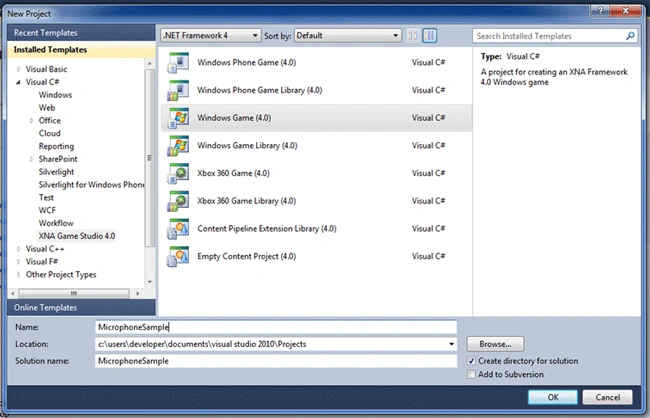
Now add these namespaces on your project:
using System.IO;
using
System.IO.IsolatedStorage;
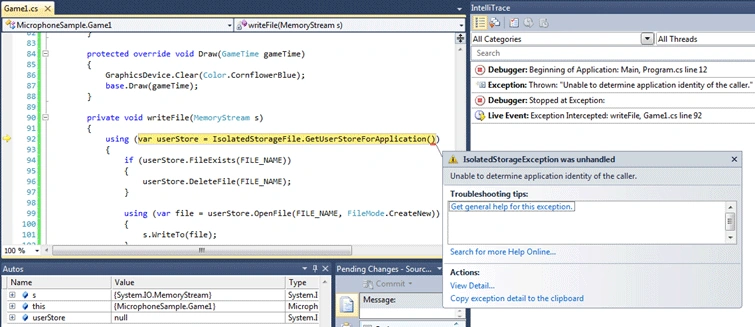
Yes we are using IsolatedStorage.Know that its not only used in Silverlight!
Then add a byte array to read from the Microphone:
byte[] bffr;
Add a MemoryStream:
MemoryStream stream;
Add a filename constant and a Microphone class:
private const string
FILE_NAME = "xna.ibo";
private Microphone mc = Microphone.Default;
using mc variable we will access our Default plugged-in or integrated-on-device Microphone and using FileName we will save it on IsolatedStorage to access later.
Update your Game1 Constructor as seen below:
public Game1()
{
graphics = new GraphicsDeviceManager(this);
Content.RootDirectory = "Content";
mc.BufferDuration = TimeSpan.FromSeconds(1);
bffr = new byte[mc.GetSampleSizeInBytes(mc.BufferDuration)];
mc.BufferReady +=
handleBufferReady;
}
We are storing an array that defines our Microphone BufferDuration
Add an event we declared previously:
private void handleBufferReady(object
sender, EventArgs e)
{
mc.GetData(bffr);
stream.Write(bffr, 0,
bffr.Length);
}
Here when the buffer is ready to record from microphone we are storing the bytes in our byte array named 'bffr'.Then write it on our MemoryStream.
Update your Initialize function as seen below:
protected override void
Initialize()
{
base.Initialize();
stream = new MemoryStream();
mc.Start();
}
Here when first the game run,we are creating a new instance of Memory Stream then starting our Microphone class.
Update Function will be like that:
protected override void Update(GameTime gameTime)
{
KeyboardState stat = Keyboard.GetState();
if(stat.IsKeyDown(Keys.Escape))
Ibrahim ErsoyPosted Nov 9, 2012, 9:20 AM
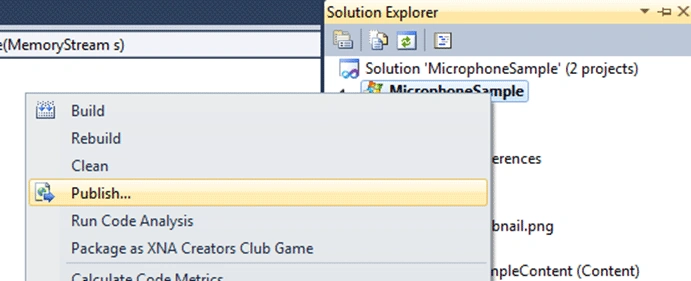
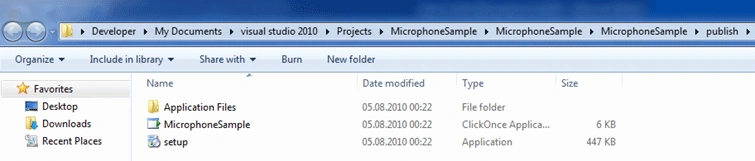
Did you publish it also?
valdas JankaitisPosted Nov 8, 2012, 4:40 PM
Hi, i tries you code, it compiles, but when i press escape or space it just crashes. any ideas?
Sam HobbsPosted Dec 25, 2011, 5:29 PM
I am getting "The project type is not supported by this installation." when I try to open the sample project. I also do not have a template installed for XNA Game Studio. Do I need to install that separateley? If so then it would help to say that in the article. I see there is an express version of XNA Game Studio; does the non-express version cost money? If so, then will this sample work with the express version?
Ibrahim ErsoyeditedPosted Aug 5, 2010, 9:08 AMEdited Nov 26, 2010, 8:05 AM
Thank you Mike.I agree with you
Mike GoldPosted Aug 5, 2010, 8:16 AM
Thanks Ibrahim. Using any multimedia in Microsoft has always been overly complicated. XNA really simplifies things. Nice sample!