

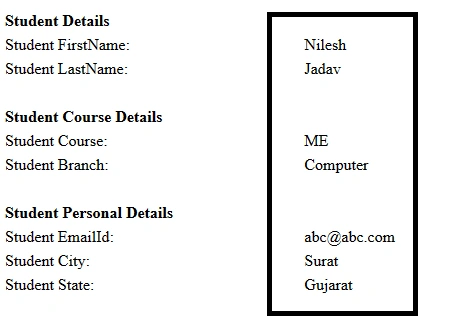
In this tutorial, I will show you how to use MultiView in an ASP.NET. Using C#, and we will take straightforward example of the same student information, which we used in our Wizard control and it will be the same design which we will integrate here.
INITIAL CHAMBER
Step 1
Open Your Visual Studio 2010 and create an empty Website, give a suitable name [view_demo].
Step 2
In Solution Explorer, you get your empty Website, add a Web form.
For Web Form
view_demo (Your Empty Website) -> Right click -> Add New Item -> Web Form. Name it as ->view_demo.aspx.
DESIGN CHAMBER
Step 3
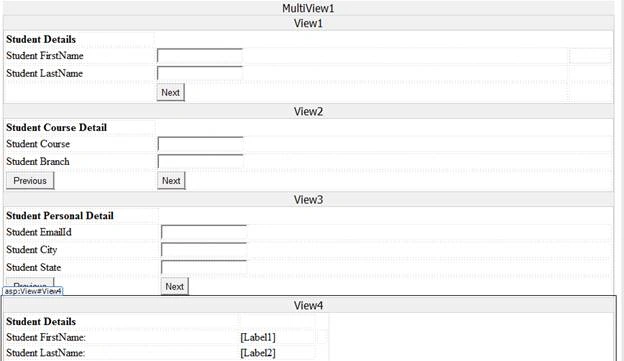
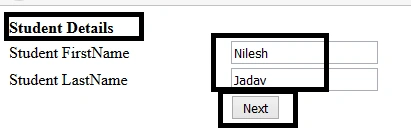
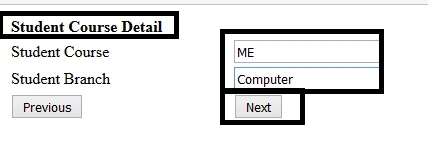
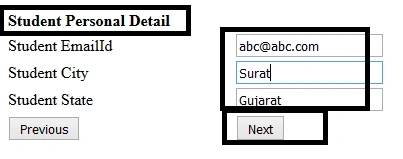
Open your view_demo.aspx, drag and drop Multiview control from the toolbox. Inside your Multiview, add three Views as – Student Details, Student Course Details, Student Personal Details and Student Summary. Design your .aspx file, as shown below.
- <%@ Page Language="C#" AutoEventWireup="true" CodeFile="Multiview.aspx.cs" Inherits="Multiview" %>
- <!DOCTYPE html>
- <html xmlns="http://www.w3.org/1999/xhtml">
- <head runat="server">
- <title></title>
- <style type="text/css">
- .auto-style1 {
- width: 478px;
- }
- .auto-style2 {
- width: 224px;
- }
- .auto-style3 {
- width: 219px;
- }
- .auto-style4 {
- width: 218px;
- }
- </style>
- </head>
- <body>
- <form id="form1" runat="server">
- <div>
- <asp:MultiView ID="MultiView1" runat="server">
- <asp:View ID="View1" runat="server">
- <table style="width: 100%;">
- <tr>
- <td class="auto-style4"><strong>Student Details</strong></td>
- </tr>
- <tr>
- <td class="auto-style4">Student FirstName</td>
- <td>
- <asp:TextBox ID="TextBox1" runat="server"></asp:TextBox></td>
- <td></td>
- </tr>
- <tr>
- <td class="auto-style4">Student LastName</td>
- <td>
- <asp:TextBox ID="TextBox2" runat="server"></asp:TextBox></td>
- <td> </td>
- </tr>
- <tr>
- <td class="auto-style4"> </td>
- <td>
- <asp:Button ID="Button2" runat="server" OnClick="Button2_Click" Text="Next" />
- </td>
- <td> </td>
- </tr>
- </table>
- </asp:View>
- <asp:View ID="View2" runat="server">
- <table style="width: 100%;">
- <tr>
- <td class="auto-style3"><strong>Student Course Detail</strong></td>
- </tr>
- <tr>
- <td class="auto-style3">Student Course</td>
- <td>
- <asp:TextBox ID="TextBox3" runat="server"></asp:TextBox></td>
- </tr>
- <tr>
- <td class="auto-style3">Student Branch</td>
- <td>
- <asp:TextBox ID="TextBox4" runat="server"></asp:TextBox></td>
- </tr>
- <tr>
- <td class="auto-style3">
- <asp:Button ID="Button3" runat="server" Text="Previous" OnClick="Button3_Click" />
- </td>
- <td>
- <asp:Button ID="Button4" runat="server" Text="Next" OnClick="Button4_Click" />
- </td>
- </tr>
- </table>
- </asp:View>
- <asp:View ID="View3" runat="server">
- <table style="width: 100%;">
- <tr>
- <td class="auto-style2"><strong>Student Personal Detail</strong></td>
- </tr>
- <tr>
- <td class="auto-style2">Student EmailId</td>
- <td>
- <asp:TextBox ID="TextBox5" runat="server"></asp:TextBox></td>
- </tr>
- <tr>
- <td class="auto-style2">Student City</td>
- <td>
- <asp:TextBox ID="TextBox6" runat="server"></asp:TextBox></td>
- </tr>
- <tr>
- <td class="auto-style2">Student State</td>
- <td>
- <asp:TextBox ID="TextBox7" runat="server"></asp:TextBox></td>
- </tr>
- <tr>
- <td class="auto-style2">
- <asp:Button ID="Button5" runat="server" Text="Previous" OnClick="Button5_Click" />
- </td>
- <td>
- <asp:Button ID="Button6" runat="server" Text="Next" OnClick="Button6_Click" style="height: 26px" />
- </td>
- </tr>
- </table>
- </asp:View>
- <asp:View ID="View4" runat="server">
- <table class="auto-style1">
- <tr>
- <td><strong>Student Details</strong></td>
- <td> </td>
- </tr>
- <tr>
- <td>Student FirstName:</td>
- <td>
- <asp:Label ID="Label1" runat="server" Text=""></asp:Label>
- </td>
- <td> </td>
- </tr>
- <tr>
- <td>Student LastName:</td>
- <td>
- <asp:Label ID="Label2" runat="server" Text=""></asp:Label>
- </td>
- </tr>
- <tr>
- <td></td>
- <td> </td>
- </tr>
- <tr>
- <td><strong>Student Course Details</strong></td>
- <td> </td>
- </tr>
- <tr>
- <td>Student Course:</td>
- <td>
- <asp:Label ID="Label3" runat="server" Text=""></asp:Label>
- </td>
- </tr>
- <tr>
- <td>Student Branch:</td>
- <td>
- <asp:Label ID="Label4" runat="server" Text=""></asp:Label>
- </td>
- </tr>
- <tr>
- <td> </td>
- <td> </td>
- </tr>
- <tr>
- <td><strong>Student Personal Details</strong></td>
- <td> </td>
- </tr>
- <tr>
- <td>Student EmailId:</td>
- <td>
- <asp:Label ID="Label5" runat="server" Text=""></asp:Label>
- </td>
- </tr>
- <tr>
- <td>Student City:</td>
- <td>
- <asp:Label ID="Label6" runat="server" Text=""></asp:Label>
- </td>
- </tr>
- <tr>
- <td>Student State:</td>
- <td>
- <asp:Label ID="Label7" runat="server" Text=""></asp:Label>
- </td>
- </tr>
- </table>
- </asp:View>
- </asp:MultiView>
- </div>
- </form>
- </body>
- </html>
Join the conversation! Your thoughts help the community grow.