

In our previous sample we have seen how to use Microphone device. Now we will be talking about Webcam.
For Webcam we have several alternatives.Com Registration and DirectShow.
I have chosen the DirectShow way! Let me remind one thing: DirectShowLib says No Warranty what happens to your webcam or computer,so I shall tell you so :)
Its much more easier and no-com register at all.
Ok lets start!
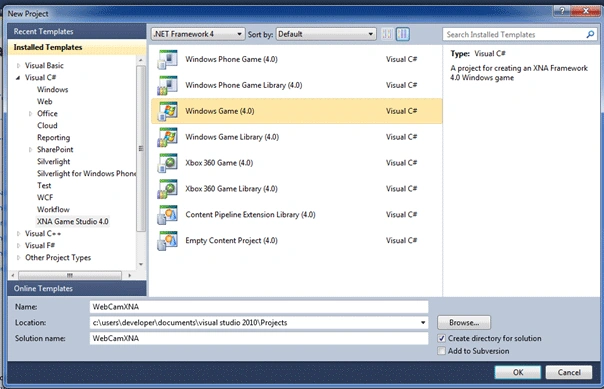
Create a new XNA 4.0 Windows Game Project(i named it WebCamXNA)
Add these namespaces and references to your project.
System
System.Drawing
DirectShowLib
using System.Windows.Forms;
using DirectShowLib;
using System.Drawing;
Then add Capture.cs file to your project there are lots of comments so no need to explain further :) but if you need me to explain,please write a comment under this article so i would be more helpful;
Which has this structure:
using System;
using
System.Drawing;
using
System.Drawing.Imaging;
using
System.Collections;
using
System.Runtime.InteropServices;
using
System.Threading;
using
System.Diagnostics;
using
System.Windows.Forms;
using
DirectShowLib;
namespace WebCamXNA
{
internal
class Capture
: ISampleGrabberCB, IDisposable
{
#region Member variables
/// <summary> graph builder interface. </summary>
private IFilterGraph2
m_FilterGraph = null;
// Used to snap picture on Still pin
private IAMVideoControl
m_VidControl = null;
private IPin m_pinStill = null;
/// <summary> so we can wait for the async job to finish </summary>
private ManualResetEvent
m_PictureReady = null;
private bool m_WantOne = false;
/// <summary> Dimensions of the image, calculated once in constructor
for perf. </summary>
private int m_videoWidth;
private int m_videoHeight;
private int m_stride;
/// <summary> buffer for bitmap data.
Always release by caller</summary>
private IntPtr m_ipBuffer = IntPtr.Zero;
#if DEBUG
// Allow you to "Connect to remote graph" from GraphEdit
DsROTEntry m_rot = null;
#endif
#endregion
#region APIs
[DllImport("Kernel32.dll",
EntryPoint="RtlMoveMemory")]
private static extern void
CopyMemory(IntPtr Destination, IntPtr Source, [MarshalAs(UnmanagedType.U4)] int
Length);
#endregion
// Zero based device index and device params and output window
public Capture(int iDeviceNum, int iWidth, int
iHeight, short iBPP, Control
hControl)
{
DsDevice [] capDevices;
// Get the collection of video devices
capDevices = DsDevice.GetDevicesOfCat(FilterCategory.VideoInputDevice);
if (iDeviceNum + 1 > capDevices.Length)
{
throw new Exception("No
video capture devices found at that index!");
}
try
{
// Set up the capture graph
SetupGraph(
capDevices[iDeviceNum], iWidth, iHeight, iBPP, hControl);
// tell the
callback to ignore new images
m_PictureReady
= new ManualResetEvent(false);
}
catch
{
Dispose();
throw;
}
}
/// <summary> release everything. </summary>
public void Dispose()
{
#if DEBUG
if (m_rot != null)
{
m_rot.Dispose();
}
#endif
CloseInterfaces();
if (m_PictureReady != null)
{
m_PictureReady.Close();
}
}
// Destructor
~Capture()
{
Dispose();
}
/// <summary>
/// Get the image from the Still
pin. The returned image can turned into
a bitmap with
/// Bitmap b = new Bitmap(cam.Width,
cam.Height, cam.Stride, PixelFormat.Format24bppRgb, m_ip);
/// If the image is upside down, you can
fix it with
///
b.RotateFlip(RotateFlipType.RotateNoneFlipY);
/// </summary>
/// <returns>Returned pointer to be freed by caller with
Marshal.FreeCoTaskMem</returns>
public IntPtr Click()
{
int hr;
// get ready to wait for new image
m_PictureReady.Reset();
m_ipBuffer = Marshal.AllocCoTaskMem(Math.Abs(m_stride)
* m_videoHeight);
try
{
m_WantOne = true;
// If we are using a still pin, ask for a picture
if (m_VidControl != null)
{
// Tell the camera to send an image
hr =
m_VidControl.SetMode(m_pinStill, VideoControlFlags.Trigger);
DsError.ThrowExceptionForHR( hr );
}
// Start waiting
if ( ! m_PictureReady.WaitOne(9000, false) )
{
throw new Exception("Timeout
waiting to get picture");
}
}
catch
{
Marshal.FreeCoTaskMem(m_ipBuffer);
m_ipBuffer = IntPtr.Zero;
throw;
}
// Got one
return m_ipBuffer;
}
public int Width
{
get
{
return m_videoWidth;
}
}
public int Height
{
get
{
return m_videoHeight;
}
}
public int Stride
{
get
{
return m_stride;
}
}
/// <summary> build the capture graph for grabber. </summary>
private void SetupGraph(DsDevice dev, int
iWidth, int iHeight, short
iBPP, Control hControl)
{
int hr;
ISampleGrabber sampGrabber = null;
IBaseFilter capFilter = null;
IPin pCaptureOut = null;
IPin pSampleIn = null;
IPin pRenderIn = null;
// Get the graphbuilder object
m_FilterGraph = new FilterGraph() as IFilterGraph2;
try
{
#if DEBUG
m_rot = new DsROTEntry(m_FilterGraph);
#endif
// add the video input device
hr =
m_FilterGraph.AddSourceFilterForMoniker(dev.Mon, null,
dev.Name, out capFilter);
DsError.ThrowExceptionForHR( hr );
// Find the still pin
m_pinStill = DsFindPin.ByCategory(capFilter, PinCategory.Still, 0);
// Didn't find one.
Is there a preview pin?
if (m_pinStill == null)
{
m_pinStill
= DsFindPin.ByCategory(capFilter, PinCategory.Preview, 0);
}
// Still
haven't found one. Need to put a
splitter in so we have
// one stream to capture the bitmap from, and one to
display. Ok, we
// don't *have* to do it that way, but we are going to
anyway.
if (m_pinStill == null)
{
IPin pRaw = null;
IPin pSmart = null;
// There is no still pin
m_VidControl = null;
// Add a splitter
IBaseFilter iSmartTee = (IBaseFilter)new SmartTee();
try
{
hr =
m_FilterGraph.AddFilter(iSmartTee, "SmartTee");
DsError.ThrowExceptionForHR( hr );
// Find the find the capture pin from the video device and
the
// input pin for the splitter, and connnect them
pRaw = DsFindPin.ByCategory(capFilter, PinCategory.Capture, 0);
pSmart = DsFindPin.ByDirection(iSmartTee, PinDirection.Input, 0);
hr =
m_FilterGraph.Connect(pRaw, pSmart);
DsError.ThrowExceptionForHR( hr );
// Now set the capture and still pins (from the splitter)
m_pinStill = DsFindPin.ByName(iSmartTee,
"Preview");
pCaptureOut = DsFindPin.ByName(iSmartTee,
"Capture");
// If any of the default config items are set, perform the
config
// on the actual video device (rather than the splitter)
if (iHeight + iWidth + iBPP > 0)
{
SetConfigParms(pRaw, iWidth, iHeight, iBPP);
}
}
finally
{
if (pRaw != null)
{
Marshal.ReleaseComObject(pRaw);
}
if (pRaw != pSmart)
{
Marshal.ReleaseComObject(pSmart);
}
if (pRaw != iSmartTee)
{
Marshal.ReleaseComObject(iSmartTee);
}
}
}
else
{
// Get a control pointer (used in Click())
m_VidControl
= capFilter as IAMVideoControl;
pCaptureOut
= DsFindPin.ByCategory(capFilter, PinCategory.Capture, 0);
// If any of the default config items are set
if (iHeight + iWidth + iBPP > 0)
{
SetConfigParms(m_pinStill, iWidth, iHeight, iBPP);
}
}
// Get the SampleGrabber interface
sampGrabber = new SampleGrabber()
as ISampleGrabber;
// Configure the sample grabber
IBaseFilter baseGrabFlt = sampGrabber as IBaseFilter;
ConfigureSampleGrabber(sampGrabber);
pSampleIn = DsFindPin.ByDirection(baseGrabFlt, PinDirection.Input, 0);
// Get the default video renderer
IBaseFilter pRenderer = new
VideoRendererDefault() as IBaseFilter;
hr =
m_FilterGraph.AddFilter(pRenderer, "Renderer");
DsError.ThrowExceptionForHR( hr );
pRenderIn = DsFindPin.ByDirection(pRenderer, PinDirection.Input, 0);
// Add the sample grabber to the graph
hr =
m_FilterGraph.AddFilter( baseGrabFlt, "Ds.NET
Grabber" );
DsError.ThrowExceptionForHR( hr );
if (m_VidControl == null)
{
// Connect the Still pin to the sample grabber
Janis StolzenwaldPosted Jul 12, 2019, 10:31 AM
Hi, thank you so much for your example, it works really well. I faced a resolution problem though. When I set the constants for VIDEOWIDTH/HEIGHT to HD i.e. 1280/720 then the video becomes super lagy. is there a way to improve that?
Greg IvanovPosted Dec 2, 2012, 7:55 PM
Thank you for your example, but in windows XP functions described above taking sreen it does not work (provided by exception "Timeout waiting to get picture"), if it can be replaced by another way? Best regards
Brian SinghPosted May 30, 2012, 10:08 AM
Great article. I am running your code on Windows XP with DirectX 9.0c. I am getting the following error: No combination of intermediate filters could be found to make the connection. [VFW_E_CANNOT_CONNECT (0x80040217)] The error is thrown at...Capture -> SetupGraph() if (_mVidControl == null) { /* THROWS EXCEPTION [VFW_E_CANNOT_CONNECT (0x80040217)] */ hr = _mFilterGraph.Connect(_mPinStill, pSampleIn); DsError.ThrowExceptionForHR( hr ); // works no exception hr = _mFilterGraph.Connect(pCaptureOut, pRenderIn); DsError.ThrowExceptionForHR( hr ); } else { // works no exception hr = _mFilterGraph.Connect(pCaptureOut, pRenderIn); DsError.ThrowExceptionForHR( hr ); /* THROWS EXCEPTION [VFW_E_CANNOT_CONNECT (0x80040217)] */ hr = _mFilterGraph.Connect(_mPinStill, pSampleIn); DsError.ThrowExceptionForHR( hr ); } Seems the issue is with connecting the Still Pin. Connecting the Capture Pin works. How can I resolve this issue? Thanks in advance. PS The same code on Windows 7 with DirectX 11 works fine.
Vineet Kumar SainiPosted Nov 29, 2011, 12:15 PM
Hi Ibrahim ,I want to know How to use WebCam in C#.NET,Please tell me....
MehrdadeditedPosted Jun 1, 2011, 9:22 AMEdited Jun 1, 2011, 9:25 AM
Hi, and tnx for your working!! code. I want to capture webcam content and pass it to Image Processing block in my game, and not showing on Control. I just need a Bitmap. what should i do?
RobertPosted Mar 3, 2011, 1:15 PM
Thank you for a great example of using the webcam in XNA. I was curious how difficult it would be to adpat this code so that it accepts a webcam feed through a TCP connection?
aditya gangwarPosted Oct 20, 2010, 1:37 AM
i am working in c#.net with web application, how to integrate webcam in web pages and how to store image in sql database
Cem OlcayPosted Aug 18, 2010, 9:23 PM
Helal olsun valla calisti, aklima -sizinde dediginiz gibi- bir cok proje gelmeye basladi bile, cok tesekkur ederim :)