

Introduction
This article explains how to use With Binding in Knockoutjs to bind multiple controls in an ASP.NET Application.
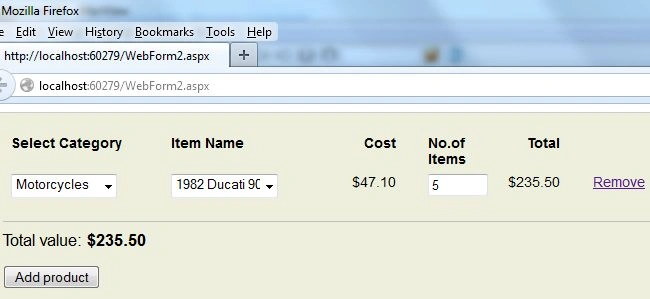
In this article you will see that every control is related to some other control that may be considered as it's parent control and will be shown only when the parent control contains any useful data, otherwise other controls will not be shown and the user can't move forward.
Let's see the procedure required for creating such an application.
Step 1
For making such an application you need to add 3 js files to your application:
- Knockout-2.3.0.js
- jquerymin.js
- sampleProductCategories.js
You can download them from the internet (if you can find them) or can download the Zip file present at the top of this article and then can fetch the files from it.
<script src="knockout-2.3.0.js"></script>
<script src="jquerymin.js"></script>
<script src="sampleProductCategories.js"></script>
SampleProductCategories.js contains a database of products that will be used in our application.
Step 2
Now we will work on the View Model of our application. Write this code in the View Model of your application.
<script>
function Currency(value) {
return "$" + value.toFixed(2);
}
var ProductRow = function () {
var self = this;
self.category = ko.observable();
self.product = ko.observable();
self.quantity = ko.observable(1);
self.total = ko.computed(function () {
return self.product() ? self.product().price * parseInt("0" + self.quantity(), 10) : 0;
});
self.category.subscribe(function () {
self.product(undefined);
});
};
var AllProduct = function () {
var self = this;
self.Row = ko.observableArray([new ProductRow()]);
self.FinalTotal = ko.computed(function () {
var complete = 0;
$.each(self.Row(), function () { complete += this.total() })
return complete;
});
self.addRow = function () { self.Row.push(new ProductRow()) };
self.removeRow = function (line) { self.Row.remove(line) };
};
ko.applyBindings(new AllProduct());
</script>
Here first I created a function that will return the value of Products that will return the value of products with a $ sign.
After that I created a function named "ProductRow", in this function I took three observables named "category", "product" and "quantity". By default the quantity is set to 1, but since these are made Observables, these can be changed at run time. I also created a Computed Function named "total", this computed function will return the Total Amount of each Row. One more function is created at the last that will change the type of products when the user changes the category.
Then I made a function named "AllProduct", in this function I made an Observable Array named "Row", this Row will be similar to the initial ProductRow. After that I created a computed Function named "FinalTotal," this computed function will return the grand total of all the selections made in each Row. After that I created two functions named "addRow" and "removeRow", these functions will be used to add a new Row or to delete an existing row of Product.
At the end the binding is applied to this "AllProduct".
Until now our work on View Model is completed so now we will move to the view of our application.
Step 3
Write this code in the view part of your application:
<tbody data-bind='foreach: Row'>
Join the conversation! Your thoughts help the community grow.