

Introduction
HTML 5 introduced a new specification for Bi-Directional communication or Full Duplex connection between the server and the client. It is one of the most awaited technologies after AJAX that solves the various problems of connection management and communication between the server and the client.
Web Sockets are basically exposed by JavaScript in HTML 5; it can also work independent of the technologies on the client and the server, nearly all browsers support the HTML 5 Web Sockets feature as of now (all the latest versions) and the only restriction on the server-side is that the server should support a Web Sockets connection.
HTML 5 Web Sockets helps in achieving real-time communication using the stateless model of the Web, although earlier we would do this using some convention such as polling, long polling, and so on or using some other libraries like SignalR (that is now known as ASP.Net SignalR and is also recommended by Microsoft).
To do real-time communication (required in Gaming applications, chat engines and so on) between a client and a server (Using a stateless model), we would actually poll the server for the updated response every few seconds (Polling and Long Polling, I will explain both in a moment). The problem with this technique was that for every request that is sent to the server from the client, there is a Request and Response object created for that. In addition to this, authentication/authorization and many other things are relevant for each and every request. Also, the creating request and response object in itself is a very heavy process, and the entire page is sent back as a response to the client that includes headers and much other unnecessary stuff that is just overhead. With HTML 5 Web Sockets all that overhead is minimized.
Polling is a technique in which a client continuously sends an HTTP request to the server at a specified time interval and the response is sent from the server to update the information. So there is always some lag in the display of the updated information and additionally, the server treats every single request as a new request and thus it includes overhead. One of the major disadvantages is that even if the update is not available on the server, the client will continue polling to the server for the updated information. In this technique, there is no way you can configure the client to make a request to the server when an update is available because of the stateless model on which the web works.
Long Polling is a technique in which the client continues sending an HTTP request to the server and then the server waits for a specified interval to check for available updates to be sent to the client if there are then it creates the response and sends the updated response to the client, otherwise it sends the response to the client to send the request. It provides us some benefits if the updates are not that frequent but if the updates are very frequent, say every few milliseconds or every second then it is of no use over Polling.
To overcome this overhead, HTML 5 Web Sockets came to the rescue. Here I will explain how to work with HTML 5 Web Sockets with a sample application. Apart from all the conventional techniques of achieving Real-Time communication that works on HTTP Protocol, Web Socket Connections and Communication works on the Web Socket protocol.
This tells us the actual state of the Socket if the connection is opened, closed or not. The State is defined using integer values (0: Connection is not established until now, 1: Connection Established, 3: Connection is closed).
Web Socket Events
Conventional Techniques for Achieving Real-Time Communication
Polling
Long Polling
Web Socket Attributes
Socket.readyState
- Open: Fired when the connection is opened
- Message: Fired when message is received from the server
- Error: Fired when there is some error that has occurred in the socket connection
- Close: Fired when the connection is closed
Web Socket Methods
- Send: Used for sending data
- Close: Used for closing the connection
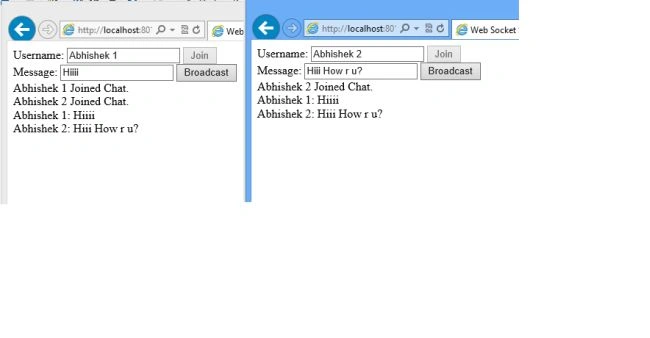
Here in this sample, I will create an HTML Page on HTML 5 standards and on the server-side I will create an HTTP Handler to which the client will make a Web Socket request and this handler will support the Web Sockets request or connections (for this, one thing is mandatory; the server should support or accept the Web Sockets request). The sample I am creating is a type of Chat Engine (I will let you know how to get it tested without making much effort, please remember that this is a sample application to show you how to use WebSockets and is not the best chat implementation in real applications, you can always create a better design than this for your applications).
It will be good I think to create an HTTP Handler first. All my .Net/C# code for HTTP Handler will be based upon .Net Framework 4.5 hosted on IIS 8. This is because IIS 8 provides the low-level support for Web Socket Connections and .Net 4.5 provides us some managed libraries (System.Web.WebSockets) for Web Socket objects.
Note: You can find detailed comments inline.
Open Microsoft Visual Studio 2012 then select "Add New Project (Class Library)". Here I have created a Class Library type of project named "HandlerProject". I have created a class in this project named "WebSocketHandler" that inherits from "HttpTaskAsyncHandler", in .Net 4.0 when we would create an HTTP Handler we would inherit it from an interface "IHttpHandler", but now .Net 4.5 provides a way to create an Async handler by just inheriting this base class where we need need to implement "BeginProcessRequest" and "EndProcessRequest" instead we just need to focus on "ProcessRequestAsync". I have also used a new feature of .Net 4.5, async/await. (If you don't know about this feature then please refer to this link: http://www.codeproject.com/Articles/599756/Five-Great-NET-Framework-4-5-Features since this is out of the scope of this article). In this Class Library, we need to import a reference for the DLL "System.Web".
Class Library Code
Creating an HTTP Handler
- using System;
- using System.Net.WebSockets;
- using System.Text;
- using System.Threading;
- using System.Threading.Tasks;
- using System.Web;
- using System.Web.WebSockets;
- namespace HandlerProject
- {
- //Handler Class which is main entry point.
- public class WebSocketHandler : HttpTaskAsyncHandler
- {
- public override bool IsReusable
- {
- get
- {
- return false;
- }
- }
- //Socket Object, Although I have created a Static Dictionary of Socket objects just to show the sample working. What I do is create this Socket object for each user and
- //keeps it into the dictionary. You can obviously change the implementation in real-time.
- private WebSocket Socket { get; set; }
- //Overriden menthod Process Request async/await featur has been used.
- public override async Task ProcessRequestAsync(HttpContext httpContext)
- {
- //task is executed
- await Task.Run(() =>
- {
- //Checks if it is a Web Socket Request
- if (httpContext.IsWebSocketRequest)
- {
- httpContext.AcceptWebSocketRequest(async delegate(AspNetWebSocketContext aspNetWebSocketContext)
- {
- Socket = aspNetWebSocketContext.WebSocket;
- //Checks if the connection is not already closed
- while (Socket != null || Socket.State != WebSocketState.Closed)
- {
- //Recieves the message from client
- ArraySegment<byte> buffer = new ArraySegment<byte>(new byte[1024]);
- WebSocketReceiveResult webSocketReceiveResult = await Socket.ReceiveAsync(buffer, CancellationToken.None);
- //Here I have handled the case of text-based communication, you can also put down your hode to handle byte arrays, etc.
- switch (webSocketReceiveResult.MessageType)
- {
- case WebSocketMessageType.Text:
- OnMessageReceived(Encoding.UTF8.GetString(buffer.Array, 0, webSocketReceiveResult.Count));
- break;
- }
- }
- });
- }
- });
- }
- //Sends message to the client
- private async Task SendMessageAsync(string message, WebSocket socket)
- {
- await SendMessageAsync(Encoding.UTF8.GetBytes(message), socket);
- }
- //Sends the message to the client
- private async Task SendMessageAsync(byte[] message, WebSocket socket)
- {
- await socket.SendAsync(
- new ArraySegment<byte>(message),
- WebSocketMessageType.Text,
- true,
- CancellationToken.None);
- }
- //This message is fired and parent can forget about this, what this method does it gets the message and push it to the various clients which are connected
- protected void OnMessageReceived(string message)
- {
- Task task;
- if (message.IndexOf("JOINEDSAMPLECHAT") == 0)
- {
- WebSocketDictionary.Sockets[message.Replace("JOINEDSAMPLECHAT:", string.Empty)] = Socket;
- foreach (string key in WebSocketDictionary.Sockets.Keys)
- {
- task = SendMessageAsync(string.Concat(message.Replace("JOINEDSAMPLECHAT:", string.Empty), " Joined Chat."), WebSocketDictionary.Sockets[key]);
- }
- }
- else
- {
- if (message.IndexOf("BROADCAST") == 0)
- {
- foreach (string key in WebSocketDictionary.Sockets.Keys)
- {
- task = SendMessageAsync(message.Replace("BROADCAST:", string.Empty), WebSocketDictionary.Sockets[key]);
- }
- }
- }
- }
- }
- }
soumyaPosted Nov 25, 2021, 11:32 AM
I am getting connection closed msg
David BandelPosted Nov 17, 2017, 6:13 AM
How would you launch this server? Lol. There's no main method.
Jose PachecoPosted Dec 30, 2016, 7:22 AM
Does such a mechanism work even if it greatly increases the flow of messaging?
Rakesh YadavPosted Feb 24, 2016, 6:12 AM
Is it necessary to host the site for test purpose
Rakesh YadavPosted Feb 24, 2016, 6:09 AM
Sir YOUR CODE shows a popup for connection is closed. what to do please?????????????
sali maliPosted Oct 15, 2015, 6:38 AM
YOUR CODE shows a popup for connection is closed. what to do please?????????????
ratnesh kumarPosted Dec 16, 2014, 1:00 AM
sir if i am converting port number then it is not working..please give me solution
ratnesh kumarPosted Dec 12, 2014, 4:15 AM
sorry it was my mistake...now its working...thank you..:)
ratnesh kumarPosted Dec 12, 2014, 3:02 AM
sir i went through your code but wen i run this application its is showing a popup for connection is closed...showing some javascript function error in consol..
Nikulkumar PatelPosted Sep 18, 2014, 12:53 AM
when server is secure
Nikulkumar PatelPosted Sep 18, 2014, 12:52 AM
this code do no work
Prasenjit DeyPosted Oct 7, 2013, 5:44 AM
good article
Sahil MaheshwaryPosted Oct 7, 2013, 5:32 AM
SignalR is better than WebSockets?