

Today I worked on a project where I am required to display an image on the web page. As you know there is not a HTML Helper for images yet. Look at the following screen, we can't see an image here:
Before proceeeding in this article, let me share the sample data source here (I can't share the original data so I created a set of dummy data with a controller here):
Data Source & Controller
View
As in the above image, the first one (@Html.DisplayFor…) is generated by scaffolding for me (marked as a comment in the above view) and the second one is an alternative that will work.
So, we don't have a HTML helper to deal with images using Razor syntax! Wait wait. We can develop an extension method for this that will allow us to work with images. Let's get started.
Step 1: Add a class file using the following code:
using System;
using System.Collections.Generic;
using System.Linq;
using System.Web;
using System.Web.Mvc;
namespace MvcApplication8.Models
{
public static class ImageHelper
{
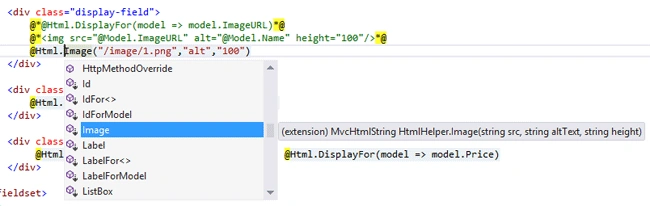

Marko PavicPosted Oct 20, 2017, 9:42 AM
Nice article thanks!
Suraj RenkePosted Sep 16, 2017, 3:19 PM
I'm unable to merge width attribute
Abdul Amin KhanPosted Jul 13, 2017, 6:33 AM
Very Helpful... I was searching same. Thanks
Upendra Pratap ShahiPosted Jul 10, 2017, 9:10 AM
Nice one...........................
salman khanPosted Aug 4, 2015, 6:15 AM
@Html.image("@model.imagesrc,"aa",100) is not working
Anil SaxenaPosted Oct 25, 2012, 12:04 AM
Thanks for sharing your experience. It's really helpful for developing extension method in MVC.
Vishal ChauhanPosted Oct 24, 2012, 11:57 PM
This is great and useful to create extension methods..
Anshika MittalPosted Oct 24, 2012, 11:52 PM
nice article abhimanyu sir...
Megha GoyalPosted Oct 24, 2012, 11:44 PM
Really this is the nice concept in MVC.
Nishant RoyPosted Oct 24, 2012, 11:00 PM
Thanks for sharing this article.