


Introduction
In this article, we will learn how to parse an HTML page using jsoup in Xamarin.Android, just like we used jsoup in Native Java Android development.
jsoup
jsoup is a Java library for working with real-world HTML. It provides a very convenient API for extracting and manipulating the data, using the best of DOM, CSS, and jQuery-like methods.
jsoup for Xamarin.Android
In this article, we will see the Xamarin.Android binding or port Java jsoup and its implementations with the application. You can find the binding DLL of jsoup from GitHub or its package from NuGet.
Coding Part
I have split this article into 3 steps.
Step 1
Creating a new Xamarin.Android project.
Step 2
Setting up the plug-in for Xamarin.Android application.
Step 3
Implementing jsoup in Xamarin.Android application.
Step 1 - Creating new Xamarin.Android Projects
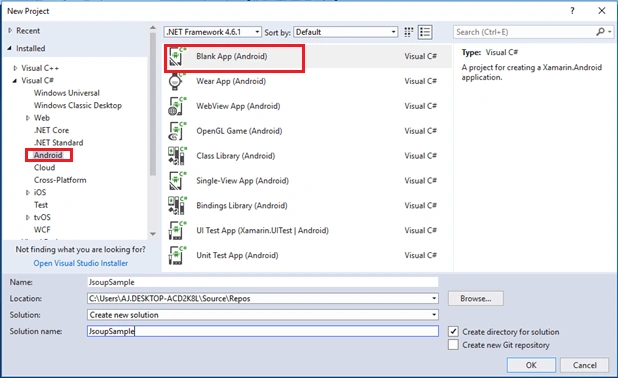
Create a new project by selecting New >> Project, and select Android App followed by a click on OK.
Step 2 - Setting up the plug-in for Xamarin.Android application
In this step, we will include the jsoup plug-in for Xamarin.Android Project. Open NuGet Package Manager against the project and do search for jsoup. Select the jsoup package from the list and click "Install" to add the library or paste the following in Package Manager Console to install the NuGet plugin.
Install-Package Jsoup -Version 1.0.0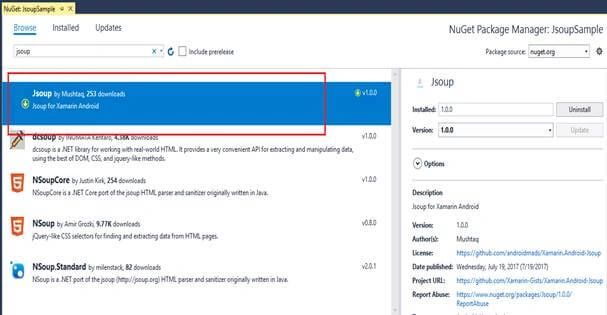
Step 3 - Implementing jsoup in Xamarin.Android application
In this part, we will see how to implement Jsoup to parse an HTML page or link.
- Open your MainActivity.cs and paste the following code.
- Document doc = Jsoup.Connect("https://androidmads.blogspot.in/").Get();
- Element link = doc.Select("img").First();
- link.AbsUrl("src");
- Here, the document used to make the web page is given as a singles file or document.
- Consist of Elements and TextNodes.
- Document extended from Elements or Nodes and TextNodes are extended from Nodes.
- In the above example, the page from https://androidmads.blogspot.in link is retrieved and assigned to Document.
- Then the Image tagged Elements (<img />) are retrieved from the document and I have getting the first “img” tag using “Select("img").First()”. By default, “doc.Select("img")” will returns the list of element or Elements.
- Then, I have separated or retrieved the source of the image tag element using “link.AbsUrl("src")”.
- The Jsoup Connections needed to be run with separate thread. So, I had done the call with “AsyncTask”. You can find the full code below.
Naresh SinghalPosted Jan 21, 2018, 11:20 PM
Nicely explained Mustaq