

This is the “HttpHandler and HttpModule in real scenarios” article series. As the name suggests, in this series we will understand a few real scenarios where we can use HttpHandler and HttpModule. In our previous article we have learned to implement a simple HttpHandler in our ASP.NET application. If you are new to HttpHandler then you can visit our previous article by clicking the following link.
HttpHandler and HttpModule in Real Scenario: Getting Started with HttpHandler
In this article, we will understand a few more scenarios where we can implement HttpHandler. Let’s try to understand the following example.
Stop specific HTTP method in ASP.NET application
In this scenario, we can use HttpHandler. For example a situation might occur wherein we want to stop a certain HTTP verb in our application. In this scenario, we can use HttpHandler as a solution. In this example, we will stop a GET request in our application. When the user throws a GET request in the application our custom HttpHandler login will prevent the request by throwing one simple response message. Have a look at the following example.
This is the custom HttpHandler where we have written logic to prevent a GET request that will come from the user.
- using System;
- using System.Collections.Generic;
- using System.Linq;
- using System.Web;
- namespace WebApp
- {
- public class methodHandler : IHttpHandler
- {
- public void ProcessRequest(HttpContext context)
- {
- if(context.Request.RequestType.ToString() == "GET" || context.Request.HttpMethod.ToString() == "GET")
- {
- context.Response.ContentType = "text/plain";
- context.Response.Write("Please do not use GET request");
- }
- }
- public bool IsReusable
- {
- get
- {
- return false;
- }
- }
- }
- }
We are checking the request type in the HttpContext object. If the request type is GET then we are displaying a custom response message from there.
We now need to register the HttpHandler in the web.config file in the application. This is the code to register the HttpHandler in the application.
We are giving path=”*.html”, in other words when any GET request is received from the user, our custom HttpHandler code will execute and it will prevent the GET request.
- <system.webServer>
- <handlers>
- <add name="myImageHandler" verb="*" path="*.html" type="WebApp.methodHandler"/>
- </handlers>
- </system.webServer>
Here is the output of the example above. We are getting a custom message when we are making a GET request in the application.

Not only GET, you can prevent any request type in the same way.
Determine whether or not the user is authenticated
This is another possible scenario wherein we can use HttpHandler. For example, in our example we will not allow any request from any unauthorized user.
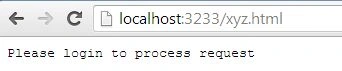
We can check whether or not the user is authenticated by checking the “IsAuthenticated” property of the Request object. Have a look at the following example.

Lava KumarPosted Sep 1, 2015, 10:52 AM
i learn httphandler concept from ur article and thank u sir...............