

This is our first presentation of the “HttpHandler and HttpModule in real scenario” article series. Before starting with the technical discussion let’s clarify the purpose of this series.
As the name implies, we will understand a few scenarios where we can implement the concept of HttpHandler in our ASP.NET application. So, the series is not targeting those who are very new to this concept. After following this series you may get the following benefits:
- Basic implementation of HttpHandler and HttpModule
- Good understanding of HttpHandler and HttpModule of ASP.NET request processing pipeline
- Understanding of real problem where we can use both
Since this series will emphasize practical examples, we will not discuss the theoretical parts of HttpHandler and HttpModule. I recommend the use of MSDN for that. In the first few articles we will cover HttpHandler and then we will get to HttpModule with practical examples.
We know that HttpHandler is responsible for handling each and every HTTP request (from 10K feet above) and ASP.NET uses various HTTP handlers to serve the various file types. For example, the handler for a web page takes a HTTP request targeted to some .aspx or .html page and processes the request.
That’s fine; ASP.NET uses HttpHandler to process a HTTP request, but why do we need to create our own HttpHandler?
If we don’t satisfy the job requirements with the default HttpHandler of ASP.NET then we need to create our own. And in this example we will create our own HttpHandler that will be injected into a HTTP request processing pipeline.
Here are a few reasons to create our own HttpHandler:
- Implement security features
- Dynamic image generation
- Create RSS feed and binary data
And many more.
Ok, so let’s start to implement our first HttpHandler in ASP.NET applications. Let’s think that, for maintenance purposes, our site must be down for a few hours and we want to show some default message to our visitors and we want to solve this problem using HttpHandler.
This could be one scenario where we can implement HttpHandler , because before processing to any request we wants to show some custom message to user and we will drop any request for .aspx file.
So, this is the scenario and let’s start the implementation.
Create one empty Web Form application and add one Handler (.ashx) file to that, as in the following.
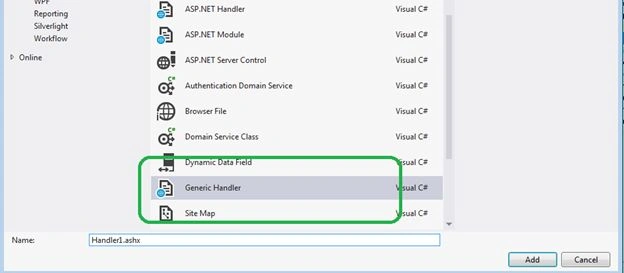
In this example I am keeping a filename as Handler.ashx that could be more relevant depending on the purpose of Handler.
Here is the code of the Handler1.ashx file. The ProcessRequest() function will execute in each and every HTTP request and the most interesting encounter that the HTTP request will not move to the next pipeline because we are creating a HTTP response within the ProcessRequest() function that will bypass all the steps of HTTP request steps in the ASP.NET application.
- using System;
- using System.Collections.Generic;
- using System.Linq;
- using System.Web;
- namespace WebApp
- {
- public class ShutdownHandler : IHttpHandler
- {
- public void ProcessRequest(HttpContext context)
- {
- context.Response.ContentType = "text/plain";
- context.Response.Write("Currently we are down for mantainance");
- }
- public bool IsReusable
- {
- get
- {
- return false;
- }
- }
- }
- }


imran savnurPosted Dec 18, 2019, 7:25 AM
Nice explanation
pramod kumarPosted Aug 25, 2019, 9:09 AM
Very nice brother..
neeraj kanojiyaPosted Jun 20, 2016, 3:00 AM
very good article.. :)
swarna upadhyayPosted May 18, 2016, 6:49 AM
very nice explaination i have read many web site but your explanation power is very nice....
subhan gasimovPosted Oct 28, 2015, 11:56 AM
Great Article Thanks !
Gaurav JoshiPosted May 29, 2015, 2:26 AM
Great Article Saurav thanks a lot
AKHILESH deetiPosted Feb 16, 2015, 11:05 AM
you are master in explaining .. thank you so much for the article ... _/\_
Saineshwar BageriPosted Oct 9, 2014, 8:02 AM
nice one sir
amit guptaPosted Jun 29, 2014, 7:58 AM
great...