This is the HttpHandler and HttpModule in real scenarios article series. In this series we are learning various concepts and uses of HttpHandler and HttpModule. In our previous articles we covered various important concepts, you can read them here.
In this article we will understand a few more concepts and uses of HttpModule. Those concepts and the situation is mapped with a practical problem and solution. So, let’s start with our first example.
Handle exception in HttpModule
Exception handling is a very common task in any application. We can handle an exception using the HttpModule.HttpContext has Error event and it executes when some exception occurs in the application. In this example we will handle an exception with the Error event of the HttpContext class. This is the implementation.
- using System;
- using System.Collections.Generic;
- using System.Drawing;
- using System.Drawing.Imaging;
- using System.IO;
- using System.Linq;
- using System.Web;
- using System.Xml.Linq;
- using Newtonsoft.Json;
- namespace WebApp
- {
- public class MyHttpModule1 : IHttpModule
- {
- public void Dispose()
- {
- throw new NotImplementedException();
- }
- public void Init(HttpApplication context)
- {
- context.Error += new EventHandler(on_error);
- }
- public void on_error(object sender, EventArgs e)
- {
-
- HttpContext ctx = HttpContext.Current;
- HttpResponse response = ctx.Response;
- HttpRequest request = ctx.Request;
- Exception exception = ctx.Server.GetLastError();
- string errorInfo = "<p/>URL: " + ctx.Request.Url.ToString();
- errorInfo += "<p/>Stacktrace:---<br/>" +
- exception.InnerException.StackTrace.ToString();
- errorInfo += "<p/>Error Message:<br/>" +
- exception.InnerException.Message;
- response.Write("<p/>ErrorInfo:<p/>");
- response.Write(errorInfo);
- ctx.Server.ClearError();
- }
- }
- }
Ok, we have implemented our HttpModule that will trap an exception in the application. Now, take one .aspx page and write the following code in Page_Load(). It does nothing other than throwing one exception programmatically .
- protected void Page_Load(object sender, EventArgs e)
- {
- throw new Exception("My Exception");
- }
Here is the code to register the Handler in the request and response pipeline.
- <system.webServer>
- <modules>
- <add name="mymodule1" type="WebApp.MyHttpModule1"/>
- </modules>
- </system.webServer>
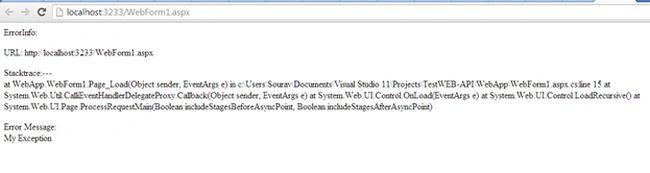
Now, if we run the application we will see the following screen. We are displaying all the information (including stack trace) about the exception. We will definitely not disclose that information to the user, it’s for our internal logging operations.
 URL re-writing/redirection operation
This is another beautiful scenario where we can use HttpModule. URL re-write/redirection is the process where we want to map the old URL and new URL. Form example let’s think that in the old application there was one directory called “Home” and in the new application the directory has changed to “NewHome”. Now, we need to redirect all requests to the “Home” directory to the “NewHome” directory. This is a sample implementation of the problem.
- using System;
- using System.Collections.Generic;
- using System.Drawing;
- using System.Drawing.Imaging;
- using System.IO;
- using System.Linq;
- using System.Web;
- using System.Xml.Linq;
- using Newtonsoft.Json;
- namespace WebApp
- {
- public class MyHttpModule1 : IHttpModule
- {
- public void Dispose()
- {
- throw new NotImplementedException();
- }
- public void Init(HttpApplication context)
- {
- context.BeginRequest += new EventHandler(begin_request);
- }
- public void begin_request(object sender, EventArgs e)
- {
- HttpContext Context = ((HttpApplication)sender).Context;
- string url = Context.Request.Url.AbsolutePath;
- if (url.Contains("Home"))
- {
- url = url.Replace("Home", "NewHome");
- }
- Context.Server.Transfer(url);
- }
- }
- }
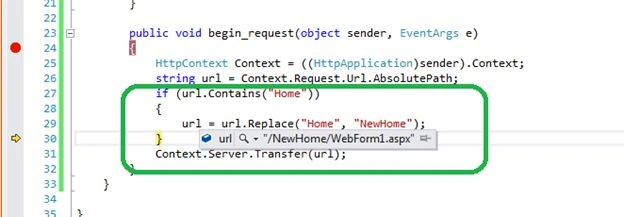
The trick is very simple, we are getting the current URL within HttpModule and then checking whether or not the URL contains the “Home” keyword. If the keyword is present then we are just replacing with the new keyword and then we are just channeling the request to the next step.
In the following example we see that the URL has changed to “NewHome/WebFomr1.aspx”
This is one cool use of HttpModule.
Prevent any request type in the application
This is also one situation where HttpModule may come as a solution. There might be a situation where we want to prevent a request type in the application. In this example we will not allow a GET request in the application. If the request is a GET type then we will drop the request in the request pipeline and we will generate a default error message.
- using System;
- using System.Collections.Generic;
- using System.Drawing;
- using System.Drawing.Imaging;
- using System.IO;
- using System.Linq;
- using System.Web;
- using System.Xml.Linq;
- using Newtonsoft.Json;
- namespace WebApp
- {
- public class MyHttpModule1 : IHttpModule
- {
- public void Dispose()
- {
- throw new NotImplementedException();
- }
- public void Init(HttpApplication context)
- {
- context.BeginRequest += new EventHandler(begin_request);
- }
- public void begin_request(object sender, EventArgs e)
- {
- HttpContext Context = ((HttpApplication)sender).Context;
- if (Context.Request.RequestType == "GET")
- {
- Context.Response.Write("Get Request is not allowed in this application");
- }
- }
- }
- }
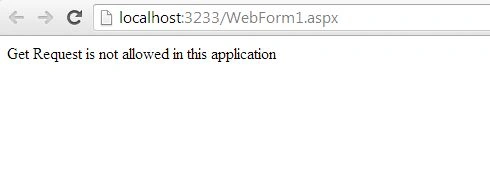
Here is the output of example above.
 Conclusion
In this article, we learned a few pragmatic situations for implementing HttpModule as a solution. I hope those examples will help us to understand HttpModule better.
Next Article : Few Important Uses of HttpModule: Part 2


Join the conversation! Your thoughts help the community grow.