

In this article we will learn to make
a image editing tool with the help of Vb.net. In this image editing tool we
include resizing image, cropping image,brightness and contrast in
images,rotation and other various common image editing functionality.
First we learn
that how to implement these functionality in image one by one. so first we need
to learn that how to show an image in windows form? for this we can take a
picturebox control, picturebox control able to load an image file format like
bmp,gpeg,gif,tiff file also.
So let start with
our first step.
Start a new windows application and add
one splitcontainer, picturebox, menustrip, toolstrip on windows form.
Arrange controls on the form like this.
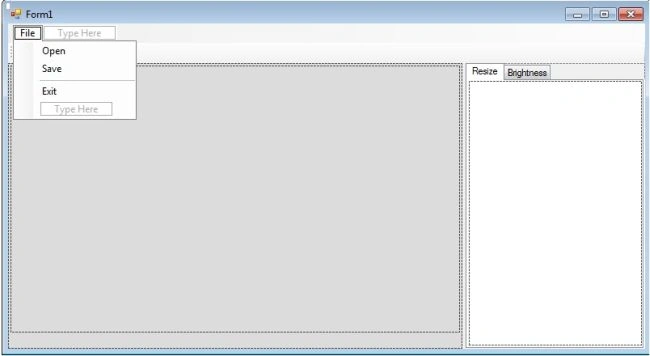
Now we need to open image on the form so we
use open filedialog class for selecting image file.
Code
File
Private Img As Image
Declare Img as object of Image class. Image class is the member of System.Drawing namespace, it is abstrat base class that provides functionality for raster images(bitmaps) and vector images(Metafile) descended classes.
use openfiledialog on OpenToolStripMenuItem_Click event
Private Sub OpenToolStripMenuItem_Click(ByVal sender As System.Object, ByVal e As System.EventArgs) Handles OpenToolStripMenuItem.Click
Dim Dlg As New OpenFileDialog
Dlg.Filter = ""
Dlg.Title = "Select image"
If Dlg.ShowDialog = Windows.Forms.DialogResult.OK Then
Img = Image.FromFile(Dlg.FileName)
'Image.FromFile(String)
method creates an image from the specifed file, here dlg.Filename contains the
name of the file from which to create the image
LoadImage()
End If
End Sub
Private Sub LoadImage()
Join the conversation! Your thoughts help the community grow.