

Introduction
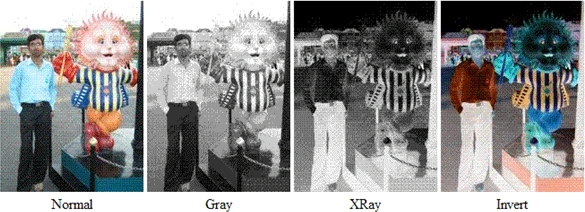
Filters give a great variety of visual effects in web pages dynamically. Image Filters are of three types:
- Gray-The Gray Filter applies a grayscale image effect in which all color is stripped from the image and all that remains in brightness data.
- Xray-The Xray Filter applies an Xray effect which is just an inversion of the Gray effect.
- Invert-The Invert Filter applies a Negative Image effect ie: dark areas become light and light areas become dark.
File name must be given with STYLE attribute as follows:
- STYLE="filter:gray"
- For example, look at following code snippets:
- <Html>
- <Body>
- <br>
- <br>
- <table>
- <tr>
- <td>
- <img src="F:\photo.gif" >
- </td>
- <td>
- <img src="F:\photo.gif" STYLE="filter:gray">
- </td>
- <td>
- <img src="F:\photo.gif" STYLE="filter:xray">
- </td>
- <td>
- <img src="F:\photo.gif" STYLE="filter:invert">
- </td>
- </tr>
- <tr align="center"><td>Normal</td>
- <td>Gray</td>
- <td>XRay</td>
- <td>Invert</td>
- </tr>
- </table>
- </Body>
- </Html>
Output
Join the conversation! Your thoughts help the community grow.