

This article explains use of the Accordion control with image button and image slideshow using Image Extender control. You can find a few other articles in www.c-sharpcorner.com about the accordion control and image slide show. This article is about the accordion and image slideshow controls with rich content.
First of all, I would like to thank the http://www.asp.net/ajax/ajaxcontroltoolkit/samples/ website. I have studied AJAX controls from that website. It is a great website for beginners of AJAX.
Snap shot for Image slide show and AccordionPane Control:
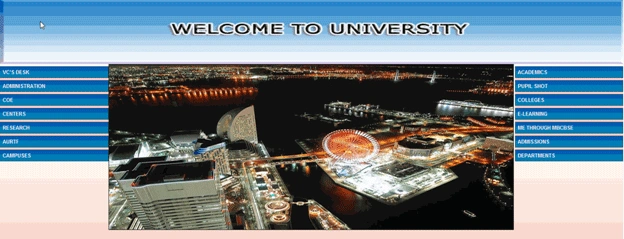

Accordion Control:
The Accordion is a web control that allows you to provide multiple panes and display them one at a time. It is like having several CollapsiblePanels where only one can be expanded at a time. The Accordion is implemented as a web control that contains AccordionPane web controls. Each AccordionPane control has a template for its Header and its Content. We keep track of the selected pane so it stays visible across postbacks.
Properties of the accordion control:
- Fadetransitions: This property defines if there will be fade transition effect or not.
- TransitionDuration: This is the number of milliseconds for the transition.
- FramesPerSecond: This defines the number of frames to be used in the transition per second.
- SuppressHeaderPostbacks: This is to set whether or not the header of the HeaderContentControl automatically posts back to the server. By default the SuppressHeaderPostbacks property is set to False.
- RequireOpenedPane:This is to hide all the panes.
Aspx Code for Accordion Control:
Note: Accordion Control needs Script Manager.
<asp:ToolkitScriptManager ID="ToolkitScriptManager1" runat="server">
</asp:ToolkitScriptManager>
<table class="demoarea" align="left" style="width: 250px">
<asp:Accordion ID="Accordion1" runat="server" HeaderCssClass="accordionHeader" HeaderSelectedCssClass="accordionHeaderSelected"
ContentCssClass="accordionContent" AutoSize="None" FadeTransitions="true" TransitionDuration="250"
FramesPerSecond="40" RequireOpenedPane="false" SuppressHeaderPostbacks="true"
BackColor="#FFCCCC" Font-Bold="True" Font-Names="Times New Roman" Font-Size="Large" BorderColor="#CCFFFF">
<Panes>
<asp:AccordionPane ID="AccordionPane1" runat="server" HeaderCssClass="accordionHeader"
HeaderSelectedCssClass="accordionHeaderSelected" ContentCssClass="accordionContent">
<Header>
VC'S DESK</Header>
<Content>
<asp:ImageButton ID="ImageButton1" runat="server" ImageUrl="imgbtn.jpg" Width="240px" Height="25px"/>
</Content>
</asp:AccordionPane>
</Panes>
</asp:Accordion>
The above code sample is for a single AccordionPane. If do you want more than one AccordionPane, again use <asp:AccordionPane> instead.
Image Slide Show Control:
SlideShow is an extender that targets image controls. You can provide it with buttons to hit previous, next and play. You can configure the slideshow to play automatically on render, allow it loop through the images in a round robin fashion and also set the interval for slide transitions. You can use a page method to supply images to the slide show or use a webservice. In the sample above we have provided you with a slideshow that plays automatically on render and loops around to the first picture if you hit next on the last picture and vice versa if you hit previous on the first picture. The slideshow transitions pictures after 3 seconds.
Slide Show Control Properties:
Gobi GPosted Mar 4, 2011, 12:27 AM
Thank you for your suggestion..
KayleighPosted Mar 3, 2011, 11:30 PM
Nice tutorial, looking for your next post!