

Introduction
With the ever-growing use of social media platforms like FaceBook, Twitter, LinkedIn to promote business, analyzing what the users feel and what feedback they share regarding the business is of paramount importance. One such scenario is where the users post their feedback in images on the concerned company's social media pages. It is of great importance that the companies analyze what the users post on their social media pages as it will give them an overall idea of the sentiment of the users towards the services offered by the company, which in turn will help them plan their marketing strategies accordingly.
Microsoft Cognitive Services
As per Microsoft,
Microsoft Cognitive Services (formerly Project Oxford) are a set of APIs, SDKs and services available to the developers to make their applications more intelligent, engaging and discover able. Microsoft Cognitive Services expands on Microsoft's evolving portfolio of machine learning APIs and enables developers to easily add intelligent features such as emotion and video detection; facial, speech and vision recognition; and speech and language understanding - into their applications. Our vision is for more personal computing experiences and enhanced productivity aided by systems that increasingly can see hear, speak, understand and even begin to reason.
Scope
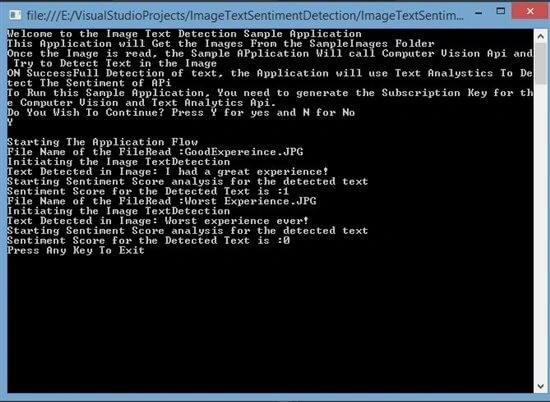
This article explains the concept of the Sentiment analysis of the text detected from an Image using a Sample Console Application. The article assumes that the user is familiar with the basic concepts of C# and knows how to consume the REST APIs in the C# code. In this sample application, images from a SampleImage folder are read and then the image is sent to the Computer Vision API to detect the text from the image. Once the Computer Vision API returns the JSON payload, the detected text is sent to the Text Analytics API to detect the sentiment score.
Pre Implementation
Computer Vision API Account
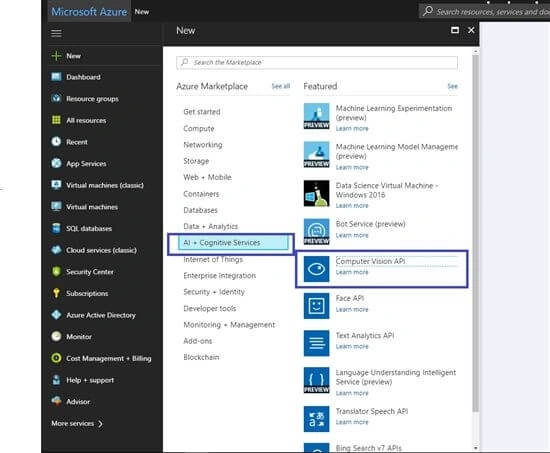
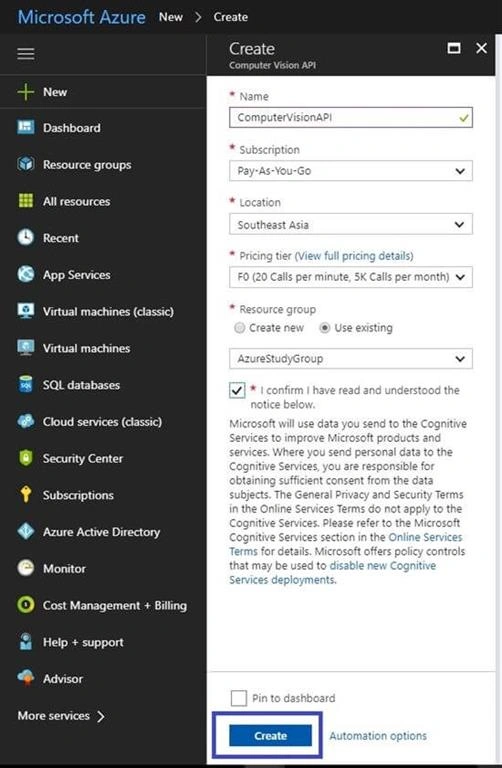
In order to use the Computer Vision API in the sample application, first, an API account for the Computer Vision API needs to be created. Once this is done, the API will be available to integrate the Computer Vision API in the sample application. Th efollowing screenshot shows the process to do so.
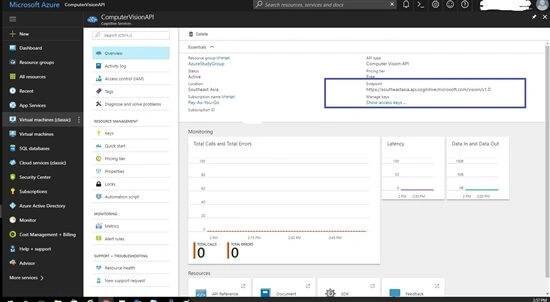
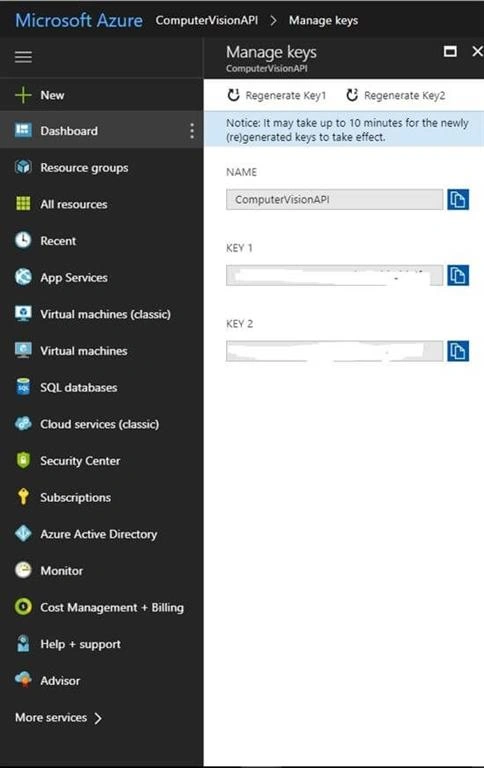
Once the API account is created, select the account from the dashboard and the following window is shown. Access keys and end points are required from this window which will be used to create a connection to the Computer Vision API.
Text Analytics API Account
In order to use the Text Analytics API in the sample application, first, an API account for the Text Analytics API needs to be created. Once this is done, the API will be available to integrate the Text Analytics in the Sample Application. The following screenshot shows the process to do so.
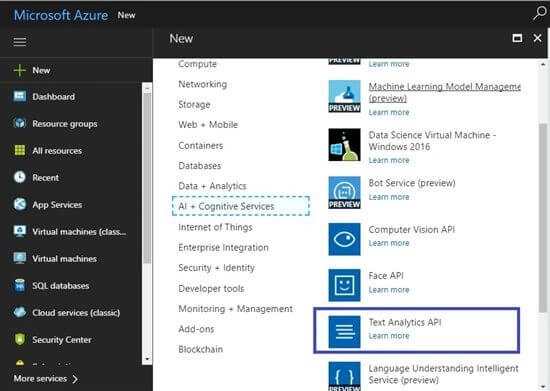
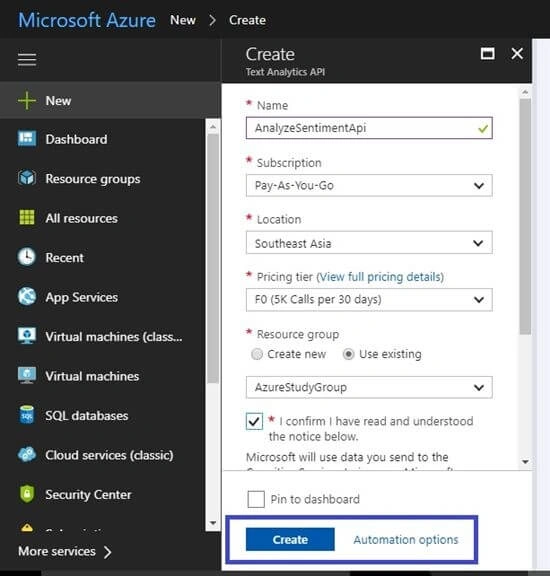
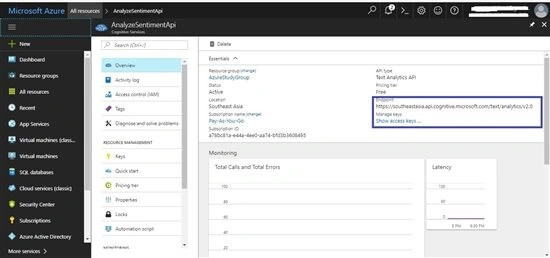
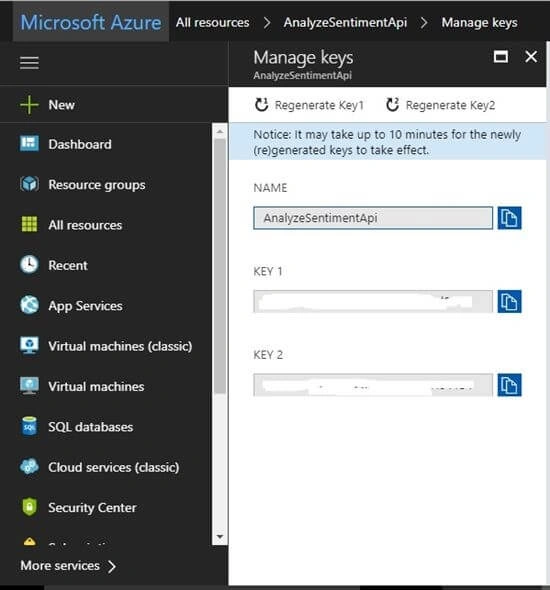
Once the API account is created, select the account from the dashboard and the following window is visible, the access keys and end point are required from this window which will be used to create a connection to the Text Analytics API.
Design - Constants
The constants class is used to store the constant values that are used in the application. Following is the constants class used in the application.
- using System;
- using System.Collections.Generic;
- using System.Linq;
- using System.Text;
- using System.Threading.Tasks;
- namespace ImageTextSentimentDetection
- {
- public class Constants
- {
- /// <summary>
- /// Key Name that is used to pass the subscrption Key Value in the Request Headers
- /// </summary>
- public static string SubscriptionKeyName = "Ocp-Apim-Subscription-Key";
- /// <summary>
- /// Uri for the Computer Vision APi to which the Request Will be routed
- /// </summary>
- public static string VisionApiUri = "https://southeastasia.api.cognitive.microsoft.com/vision/v1.0";
- /// <summary>
- /// Uri for the Text Analytics Api to which the Request will be routed.
- /// </summary>
- public static string TextAnalyticsApiUri = "https://southeastasia.api.cognitive.microsoft.com/text/analytics/v2.0";
- /// <summary>
- /// Path to the SampleImages Folder
- /// </summary>
- public static string SampleImagesFolderPath = @"..\..\SampleImages";
- /// <summary>
- /// Vision APi Subscription Key Value. This needs to be populated before Starting the Sample
- /// </summary>
- public static string VisionApiSubcriptionKey = "Enter key here";
- /// <summary>
- /// Text Analytics Subscription Key value. This Needs to be Populated before Starting the Sample
- /// </summary>
- // public static string TextAnalyticsApiSubscriptionKey = "Enter key here";
- }
- }
Computer Vision API Response Class
This class is used to convert the json payload received from the Computer Vision API into a C# class which can be used later on for extracting text. The class is generated using the sample json payload received from the Computer Vision API. The class structure will change if the response received is changed.
- // To parse this JSON data, add NuGet 'Newtonsoft.Json' then do:
- //
- // using ImageTextSentimentDetection;
- //
- // var data = ComputerVisionSuccessFullResponseClass.FromJson(jsonString);
- namespace ImageTextSentimentDetection
- {
- using System;
- using System.Net;
- using System.Collections.Generic;
- using Newtonsoft.Json;
- public partial class ComputerVisionSuccessFullResponseClass
- {
- [JsonProperty("language")]
- public string Language { get; set; }
- [JsonProperty("textAngle")]
- public double TextAngle { get; set; }
- [JsonProperty("orientation")]
- public string Orientation { get; set; }
- [JsonProperty("regions")]
- public Region[] Regions { get; set; }
- }
- public partial class Region
- {
- [JsonProperty("boundingBox")]
- public string BoundingBox { get; set; }
- [JsonProperty("lines")]
- public Line[] Lines { get; set; }
- }
- public partial class Line
- {
- [JsonProperty("boundingBox")]
- public string BoundingBox { get; set; }
- [JsonProperty("words")]
- public Word[] Words { get; set; }
- }
- public partial class Word
- {
- [JsonProperty("boundingBox")]
- public string BoundingBox { get; set; }
- [JsonProperty("text")]
- public string Text { get; set; }
- }
- public partial class ComputerVisionSuccessFullResponseClass
- {
- public static ComputerVisionSuccessFullResponseClass FromJson(string json)
- {
- return JsonConvert.DeserializeObject<ComputerVisionSuccessFullResponseClass>(json, Converter.Settings);
- }
- }
- public static class Serialize
- {
- public static string ToJson(this ComputerVisionSuccessFullResponseClass self)
- {
- return JsonConvert.SerializeObject(self, Converter.Settings);
- }
- }
- public class Converter
- {
- public static readonly JsonSerializerSettings Settings = new JsonSerializerSettings
- {
- MetadataPropertyHandling = MetadataPropertyHandling.Ignore,
- DateParseHandling = DateParseHandling.None,
- };
- }
- }
Text Analytics Response Class
This class is used to convert the JSON payload received from the Text Analytics API into a C# class which can be used later on for extracting text. The class is generated using the sample JSON payload received from the Text Analytics Api. The class structure will change if the response received is changed.
- // To parse this JSON data, add NuGet 'Newtonsoft.Json' then do:
- //
- // using ImageTextSentimentDetection;
- //
- // var data = TextAnalyticsResponseClass.FromJson(jsonString);
- namespace ImageTextSentimentDetection
- {
- using System;
- using System.Net;
- using System.Collections.Generic;
- using Newtonsoft.Json;
- public partial class TextAnalyticsResponseClass
- {
- [JsonProperty("documents")]
- public Document[] Documents { get; set; }
- [JsonProperty("errors")]
- public Error[] Errors { get; set; }
- }
- public partial class Document
- {
- [JsonProperty("score")]
- public long Score { get; set; }
- [JsonProperty("id")]
- public string Id { get; set; }
- }
- public partial class Error
- {
- [JsonProperty("id")]
- public string Id { get; set; }
- [JsonProperty("message")]
- public string Message { get; set; }
- }
- public partial class TextAnalyticsResponseClass
- {
- public static TextAnalyticsResponseClass FromJson(string json)
- {
- return JsonConvert.DeserializeObject<TextAnalyticsResponseClass>(json, Converter.Settings);
- }
- }
- }


Uttam ChaturvediPosted Apr 24, 2018, 2:48 AM
It#s very useful article. Thanks for Sharing