

Image transformation is exactly the same as any other transformation process. In this section we will see how to rotate, scale, translate, reflect, and shear images. We will create a Matrix object, set the transformation process by calling its methods, set the Matrix object as the Transform property or the transformation methods of the Graphics object, and call DrawImage.
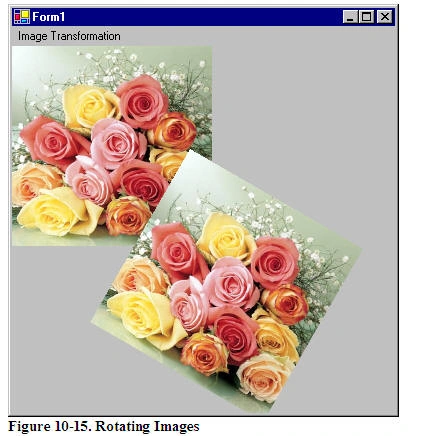
Rotating images is similar to rotating other graphics. Listing 10.16 rotates an image. We create a Graphics object using the CreateGraphics method. Then we create a Bitmap object from a file and call the DrawImage method, which draws the image on the form. After that we create a Matrix object, call its Rotate method, rotate the image by 30 degrees, and apply the resulting matrix to the surface using the Transform property. Finally, we draw the image again using DrawImage.
Listing 10.16: Rotating images
private
void RotationMenu_Click(object sender, System.EventArgs e){
Graphics g = this.CreateGraphics();
g.Clear(this.BackColor);
Bitmap curBitmap = new Bitmap(@"roses.jpg");
g.DrawImage(curBitmap, 0, 0, 200, 200);
// Create a Matrix object, call its Rotate method,
// and set it as Graphics.Transform
Matrix X = new Matrix();
X.Rotate(30);
g.Transform = X;
// Draw image
g.DrawImage(curBitmap,
new Rectangle(205, 0, 200, 200),
0, 0, curBitmap.Width,
curBitmap.Height,
GraphicsUnit.Pixel) ;
// Dispose of objects
curBitmap.Dispose();
g.Dispose();
}
Figure 10.17 shows the output from Listing 10.16. The first image is the original; the second image is rotated.
Now let's apply other transformations. Replacing the Rotate method in Listing 10.16 with the following line scales the image:
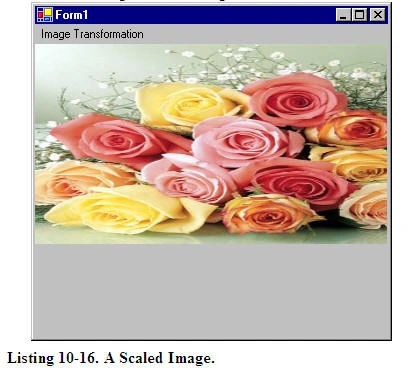
X.Scale(2, 1, MatrixOrder.Append);
The scaled image is shown in Figure 10.18.
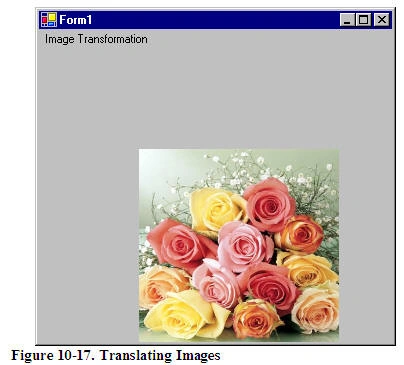
Replacing the Rotate method in Listing 10.16 with the following line translates the image with 100 offset in the x- and y-directions:
X.Translate(100, 100);
The new output is shown in Figure 10.19.
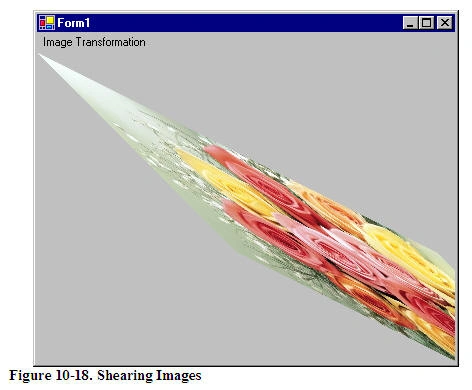
Replacing the Rotate method in Listing 10.16 with the following line shears the image:
X.Shear(2, 1);
The new output is shown in Figure 10.20.
You have probably noticed that image transformation is really no different from the transformation of other graphics objects. I recommend that you download the source code samples from the book's Web site to see the detailed code listings.
This articles is taken from Chapter 10 "Transformations" of Graphics Programming with GDI+.
Koudelka AiniPosted Aug 19, 2012, 12:23 PM
thank you very much, been very helpful to
End WarPosted Jul 10, 2012, 4:49 AM
Hi. I need to draw, for example, 2 images, but with different rotations (one to +10 and one to -10 angle), in same surface, and to the same Y location. When I do this, the Y location for the second image, is different. What is your advice? Thanks!
Pankaj MishraPosted May 31, 2012, 8:40 AM
Thanks Mahesh for the nice work.. However could you tell how can I do the rotation part using my mouse movements and not just by any fixed amount. Thanks
ENRIQUE DE LA CRUZPosted Jul 15, 2011, 9:31 PM
Hi, I need help making an analog clock in c # 2005. I create 3 hands, that of the hour, minute and second. these are within a circle. In fact, I drew on the form. how hard is to rotate 360 degrees clockwise, in the case of seconds, then turn the minute hand and finally the time. I hope I can help, thank you very much.
lennyPosted Jan 14, 2011, 12:15 PM
thanx it's useful
sarahG MohammedPosted Oct 4, 2010, 5:55 PM
I have an assignment of doing these image transformations without using the built in functions like : "x.shear(1,2);" I want the algorithms of these transformations so I can do it myself .... thank in advance
alvaro javierPosted Oct 2, 2010, 10:39 AM
in English hello my name is alvaro javier, I'm from Colombia, and I'm doing some work in C #, but so far I'm Starting at use in environment C #, and I need to make a game that is to make a memory game, my question is for how to make my images that are a picturebox, has barias face, for example: is in a state that all displayed the same image, and click, turn and show if the image is hidden behind it, and when you click over and lick it, but if the images are turned are not the same to return to normal, but if they become equal to be erased, or appear opaque,,, aga Pungo them play my part I have in C # 2010, I hope I can help prompt response to my email, youtube.182 @ hotmail.com thanks PS: if I answer in Spanish puedesn aagradeseria them http://www.gigasize.com/get.php?d=qt6drw1jm2c
Abraham EyasuPosted Jun 21, 2010, 10:21 AM
Hi, I have a panel on my windows forms that displays an image from a file. I am using GDI+'s Image.FromFile(..) method to read the image. The thing is, when I zoom the image some part of the image goes out of the my panel area. And when I zoom out the image part of the image that has been clipped becomes visible. What I wanted to do is, to use a mouse to drag the image as if it was floating on top of the panel. I will drag the image and bring part of the image that have been hidden to be visible. How can I do that? I don't want to use scroll bars and I have turned them off deliberately. Thanks in advance.
Abraham EyasuPosted Jun 21, 2010, 10:16 AM
Hi, I have a panel on my windows forms that displays an image from a file. I am using GDI+'s Image.FromFile(..) method to read the image. The thing is, when I zoom the image some part of the image goes out of the my panel area. And when I zoom out the image part of the image that has been clipped becomes visible. What I wanted to do is, to use a mouse to drag the image as if it was floating on top of the panel. I will drag the image and bring part of the image that have been hidden to be visible. How can I do that? I don't want to use scroll bars and I have turned them off deliberately. Thanks in advance.
RobertPosted Nov 3, 2009, 9:18 AM
Improve ur code to repaint the image, because now image disappears on minimize or when losing focus.
fathima shifanaPosted Feb 2, 2009, 1:50 AM
Hi, i am doing my final year project in image processing. Can u help me, how to cluster the input image. Thanking you.
Eric KAY HONGPosted Mar 22, 2006, 10:25 AM
Hi, I am developping a control in which I must transform an image. I want my image to take the trapezoid form (not parallelogram). Do you have a solution to suggest me? Thanks. Regards