

Introduction
Today, in this article, we will discuss how to develop a web application or console-based application to insert a message into the Azure Queue Storage. Now, as we all know Queue Storage is a part of the Azure Storage. So, first, we will discuss some basic concepts about Azure queue storage and then we will discuss how to store data into the Azure queue storage.
As a developer, we all know about queues. Most of us have already used or written a similar type of data structure at least once in our development-related work phase. In general, it is a collection that always has two primary methods: enqueue (a method to insert new records to the queue at the end) and dequeue (to get the topmost record from the queue). Yes, your assumption is correct. Microsoft Azure Queues are normal queues as we understand them. However, it is more than a class or a concept compared to others. Microsoft Azure Queues are a ready-to-use service that loosely connects components or applications through the Azure platform infrastructure.
Azure queue storage
Azure Queue Storage is a type of message queuing service provided by the Azure Platform which provides the queue storage infrastructure for a REST-based interface within and between the different applications and services. With the help of Azure Queue storage service, we can store a large number of messages that can be accessed from anywhere via authenticated calls using HTTP or HTTPS. So, in simple words, Azure queues are queues located in the Cloud platform and we can use it for exchanging messages between different components either in the cloud or on-premise. Every message typically represents a task created by someone (“produced”) which has to be processed by someone else (“consumer”). Every message always has a small body and some attributes like time-to-live, which we can use to configure our service. As Microsoft Azure always ensures that any dequeued message will be invisible to the other consumer or listener, we could imagine many producers and consumers as well as a one-to-one relationship scenario. So, the main benefit of the Azure Queue Service is the loose coupling.
As discussed in the above section, Azure Queues are a RESTful service through which we can use to enqueue and dequeue messages as operate (create, delete) our queues. For performing this type of work programmatically, Microsoft Azure provides many language-specific wrappers APIs (like .NET, Node.js, Java, PHP, Ruby, Python, etc) through which we can develop applications to send or receive REST call directly to access the Azure Queue storage.
Advantages and disadvantages of Azure queue storage
The main key advantages of the Azure Queue Storages are
- Azure Queue Storage service is much cheaper compared to the others. Azure Queues are charged based on our pay-per-use policy depending on the desired redundancy level, the required storage space, and several transactions (i.e. read, write, delete).
- Queue Storage data is much more secure since to access the data we need to use either HTTP or HTTPS protocol through applications
- We just need to pay only for the storage and operations. There is no long-running cost such as an Event Hub or a service bus.
Despite the above advantages, Azure Queue storage also has some disadvantages, like
- There is no provision or option to mention any order sequence of the message, so messages can be received the Queue service randomly from different producers.
- There is no subscription system in the Azure Queue service. So, to know whether new messages have arrived or not, we need to perform a pull to delete the new messages.
- The maximum size of every message is 64 KB.
- By default, the maximum TTL (Time-To-Live) for each message is 7 days.
An Azure Storage Queue will work just as we expect. We normally use a library that contains an Abstract API, through which we will do REST calls to a storage layer where messages are stored. The main difference between the Blob Storage and the Queue Storage is that the Queue Storage system has a retention time or TTL of 7 days and a size limit of 64 KB.

Azure Queue - Where or When to Use? A Typical Scenario
As per the discussion, it is clear that the main reason behind the use of Azure Queue is to separate components and loosely connect them. Let's imagine two different components of our application trying to exchange data, maybe one of them on-premise component (say A) and another in the cloud environment (say B). Now, when we use common exchange mechanisms such as calling a web service from A to B (or vice-versa), we always face some disadvantages related to this.
- We need to rely on or trust that both components will be available at the same time or simultaneously. If one of them is down, then there is no communication.
- We need to implement try or retry logic to get things Up and running again after an outage
- It is very hard to scale up if more workload is present.
In Azure Queue Service, we have a third player that connects the two components and acts as both a buffer and a mediator. It means if the consumer partner is down, then still insert messages in the queue process while it's waiting for the other component to back online. Also, the Azure Queue service is very easy to scale up. What we need to do for scaleup: just add more consumers (i.e. Worker Roles) and our queues will be processed in parallel. In Azure Queue Storage, Scaling up and down is always be a dynamic process – since we can add or remove workers automatically depending on the actual size of the Queue, hence it will be fast on heavy load and save costs when the queue is empty.
Perquisites required
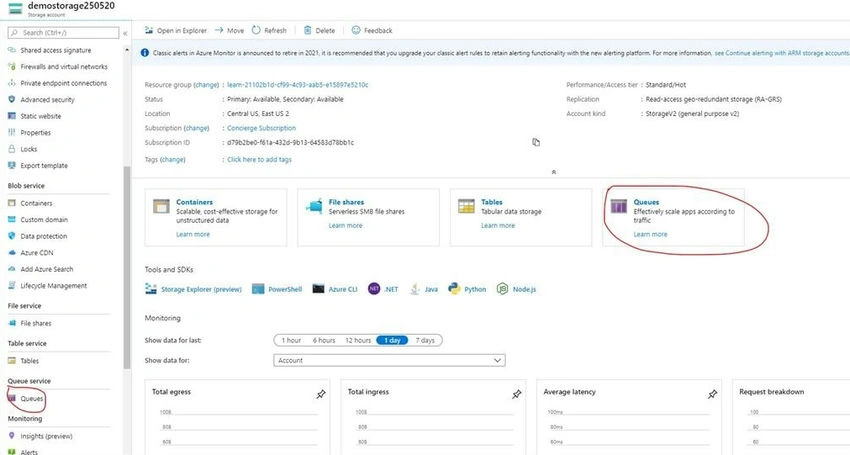
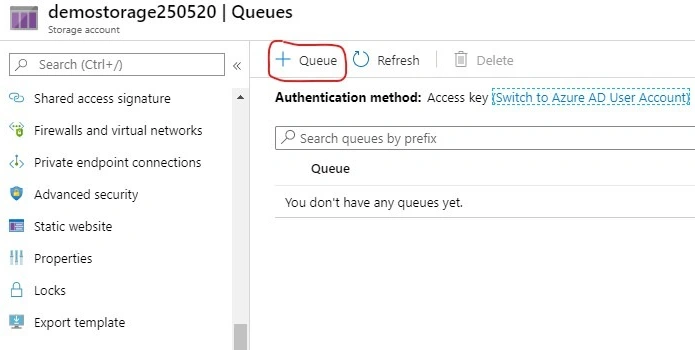
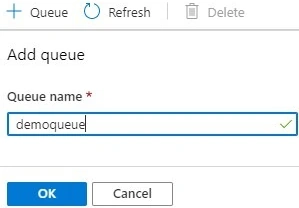

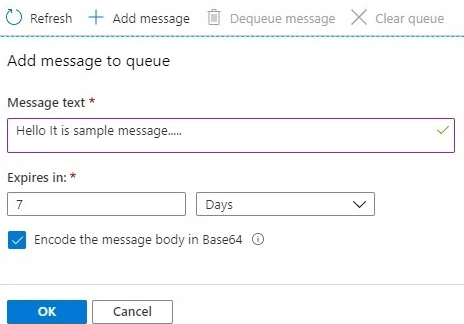


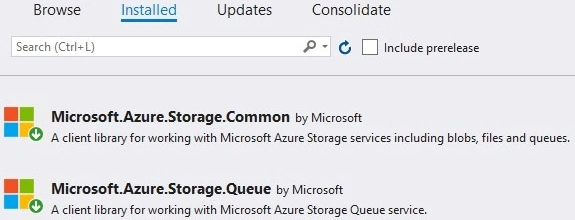



Viknaraj ManogararajahPosted Oct 20, 2021, 1:46 PM
Very useful article
StuartPosted Aug 26, 2021, 12:39 AM
This article doesn't cover ASP.Net - it uses a standard Console app, not ASP.Net.
nishita ghodkePosted Feb 21, 2021, 6:20 AM
Can you provide zip file instead of rar?